

Publish videos to Vimeo
Connect your Vimeo account and send finished Clevera videos as private videos, with an AI-written title, description and tags. Choose unlisted, embed-only or public when you send. Rolling out now.
Send a finished Clevera video to your Vimeo account, with the title, description and tags written by the AI. It arrives as a private video that only you can see, unless you choose unlisted, embed-only or public before sending.
For how publishing works across every platform, see Publish videos to your platforms.

What lands where
| Where it goes | A new video in your Vimeo library. |
| Visibility | Private (only me) by default. Also Unlisted, Hidden (embed only) or Public, depending on your Vimeo plan. |
| What Clevera fills | Title, Description and Tags by the AI. You choose visibility and content rating. |
| What it costs | No per-send fee. The upload counts toward your Vimeo plan's upload quota. |
| After you send | Vimeo processes the video. A private upload reads "Only you can see it. Publish it on Vimeo when you're ready." |
Before you start
- Plan. Publishing is part of the Pro plan and above.
- Role. Only workspace owners and admins can connect or disconnect an account. Anyone who can edit a video can send it to an account that's already connected.
- Vimeo plan. Any Vimeo account can receive uploads. Free and Basic accounts can only choose Private or Public; paid plans also get Unlisted and Hidden (embed only). Vimeo's upload quota applies: for example, a free account can upload 500 MB a week and 10 videos a day.
Connect Vimeo
Open Integrations
Open Integrations from the sidebar. Vimeo is under Video platforms.

Sign in with Vimeo
Click Connect and sign in to Vimeo. Vimeo lists what Clevera is asking for:
- Upload videos, to create the video.
- Edit your videos, to add the tags after the upload.
- Access public and private data, to read your account and plan and to follow the upload of the video Clevera created, even while it's private.
Clevera doesn't ask to delete videos, download your files or interact with other people's videos.
Allow
Click Allow. You land back on Integrations with the account on the Vimeo card.
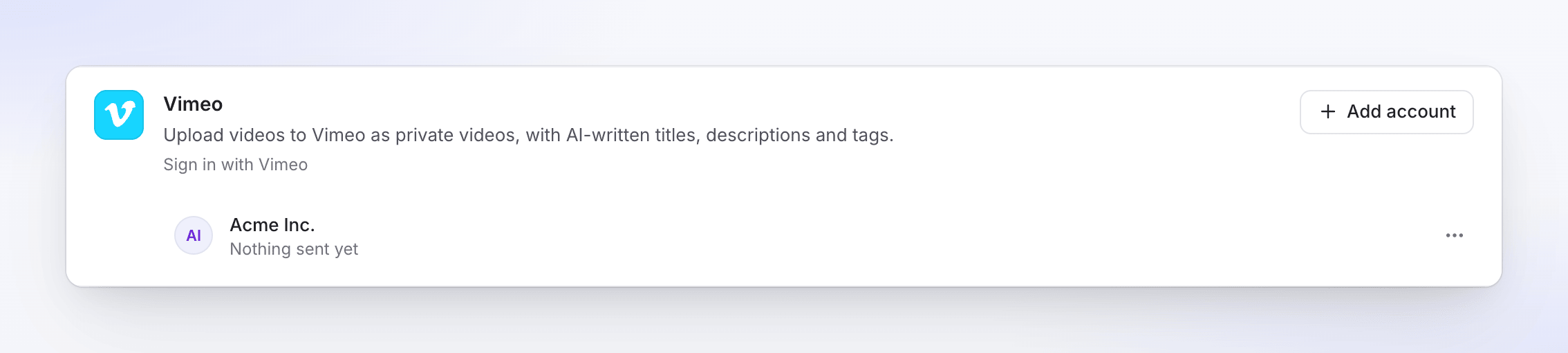
Each sign-in connects one Vimeo account. To add another, click Add account and sign in to the other account. Vimeo connections don't expire; they last until you disconnect or remove Clevera on Vimeo.
Send a video to Vimeo
Open the Publish tab
Open the video, click Share, then Publish. Click Publish… (or Publish again).
Tick the Vimeo account
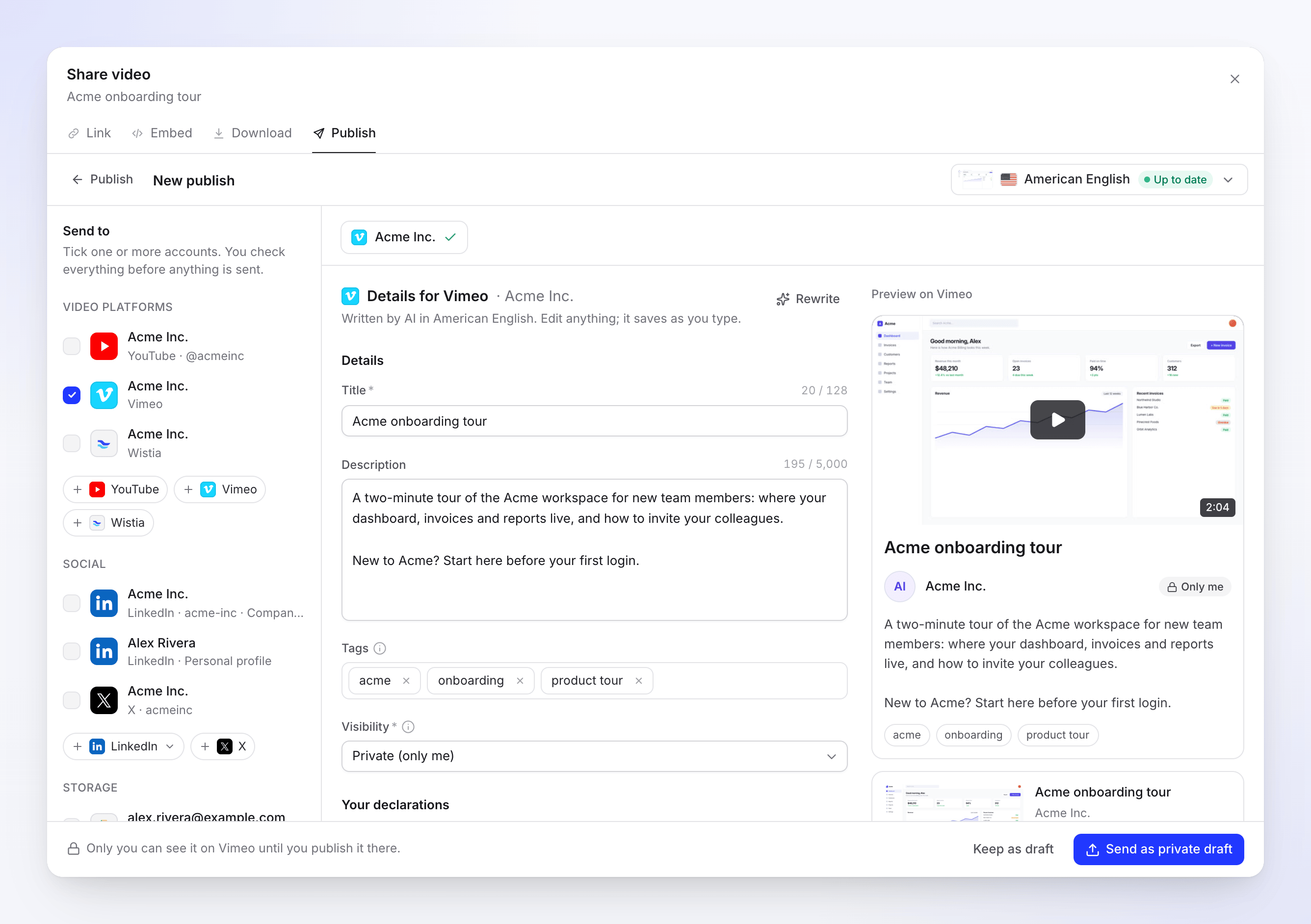
Under Send to → Video platforms, tick the Vimeo account.
Check the details
The AI writes the title, description and tags in the language of the selected render. Edit anything; changes save as you type. The preview shows the video page as Vimeo will show it.
Choose visibility and send
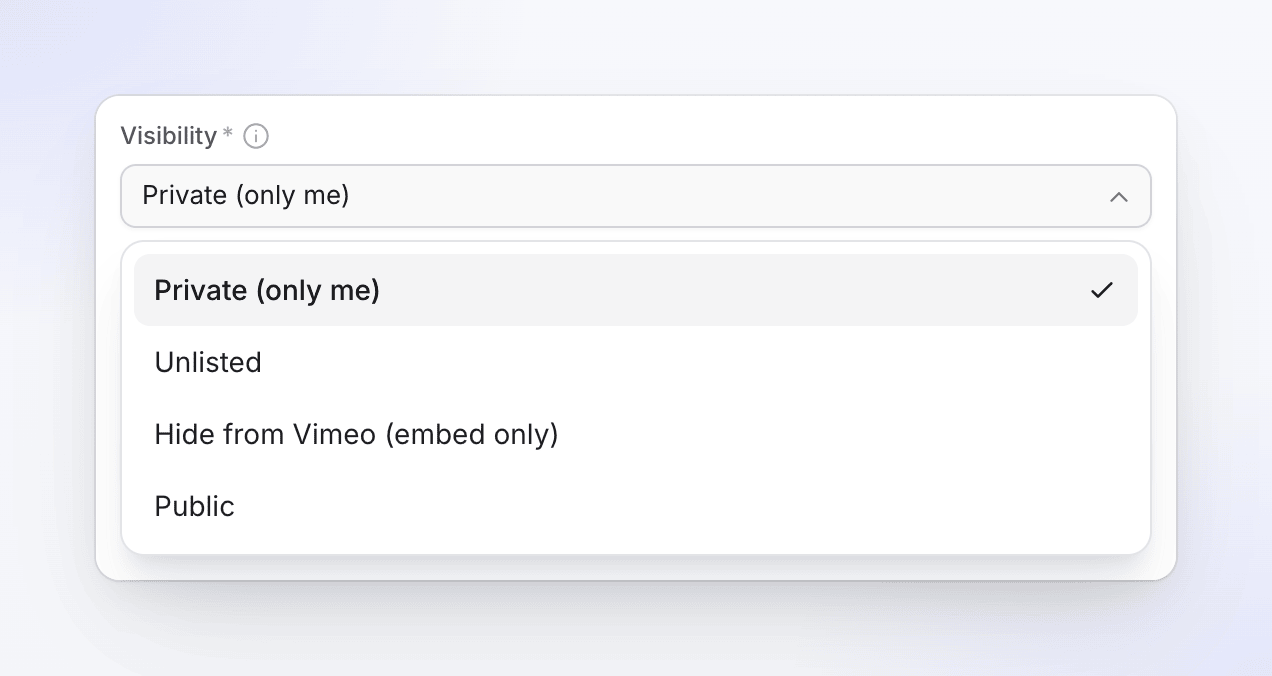
Pick a Visibility, then click the send button. It changes with your choice: Send as private draft, Send as unlisted, Send as embed only or Publish now. To finish later, click Keep as draft.
Privacy and visibility
| Choice | Who can watch | Vimeo plans |
|---|---|---|
| Private (only me) | Only you, on Vimeo. Publish it there when you're ready. | All |
| Unlisted | Anyone with the link. It doesn't appear on your profile or in search. | Paid |
| Hidden (embed only) | Nobody on vimeo.com. It plays only where you embed it. | Paid |
| Public | Everyone. It's published straight away. | All |
Password-protected and "people I follow" privacy aren't offered from Clevera; set them on Vimeo after the upload.
Fields and limits
| Field | Filled by | Limit or choices | Notes |
|---|---|---|---|
| Title | AI | 128 characters, required | Kept on one line. |
| Description | AI | 5,000 characters | |
| Tags | AI | Up to 20 tags | A leading # and duplicates are removed. |
| Visibility | You | See above | Default Private (only me). |
| Content rating | You | Not rated, All audiences, or a Mature rating: profanity or sexual language, drugs or alcohol, violence, nudity | Mature ratings hide the video from people who opted out. Default Not rated. |
The render's language is sent as the video's language. There's no thumbnail or chapters for Vimeo; Vimeo picks a thumbnail you can change there.
Your Visibility and Content rating are remembered for the account. Rewrite asks the AI for new text, up to 10 times a day per draft.
Video requirements
| Limit | |
|---|---|
| Length | 1 second to 24 hours |
| File size | Up to 300 GB, and within your Vimeo upload quota |
| Format | MP4 |
Before uploading, Clevera checks that your Vimeo account has room for the file, so a full account doesn't end up with an empty placeholder video.
Statuses you'll see
| Status | What it means |
|---|---|
| Waiting for render | Sends as soon as the render finishes. |
| Queued / Uploading N% | The video is on its way to Vimeo. |
| Processing on Vimeo | "Vimeo is processing the video. This can take a few minutes." |
| Delivered (green) | Private, unlisted or hidden on Vimeo. The line under it says who can watch. |
| Published | Public on Vimeo: "Live on Vimeo." |
| Failed | Vimeo refused the upload. The message says why. |
| Removed | The video was deleted on Vimeo. |
Open on Vimeo opens the video's settings page on Vimeo, or its public page once it's public.
On Vimeo afterwards
The upload is a normal video in your Vimeo library. Add it to a folder or showcase, change the thumbnail, privacy or embed settings there. Clevera doesn't change it after it arrives.
Troubleshooting
Retry only shows when trying again can help. When it's missing, the message says what to do instead.
| Message | What to do |
|---|---|
| "This account reached Vimeo's daily upload limit. Try again tomorrow." | Wait a day, then click Retry. |
| "This account reached Vimeo's weekly upload limit. Try again next week." | Wait for the weekly reset, or upgrade on Vimeo, then Retry. |
| "This account reached its Vimeo upload quota for now. It resets on the plan's schedule; retry then." | Retry when your quota resets. |
| "This account has no Vimeo upload quota left, and it doesn't reset on its own. Free up space or upgrade the plan on Vimeo, then send the video again." | Delete videos on Vimeo or upgrade, then send the video again. There's no Retry here, because waiting won't help. |
| "Reconnect your Vimeo account to send this." | The connection ended, for example after you removed Clevera on Vimeo. Click Reconnect Vimeo, then Retry. |
| "Vimeo didn't accept some of the details. Check them and send again." | Vimeo refused a field such as the title. Click Edit details, adjust and send again. |
| "Vimeo rejected the video: …" | Vimeo couldn't process the file. Click Retry if the row offers it; otherwise render the video again, then send. |
| "The upload was interrupted. Retry to carry on from where it stopped." | Click Retry. |
| "Something went wrong while sending this to Vimeo. Please try again. Reference: …" | Click Retry. If it keeps failing, contact support with the reference. |
If an upload restarts after a long interruption, Vimeo can be left with an empty "Untitled" video from the first attempt. Delete it on Vimeo; Clevera can't delete videos for you.
Disconnect Vimeo
- Open Integrations, find the account on the Vimeo card and click ⋯ → Disconnect.
- Confirm. Clevera revokes its access at Vimeo, sends still in progress stop, and videos already on Vimeo stay there.
To check from Vimeo's side, open Settings → Apps on vimeo.com (vimeo.com/settings/apps) and remove Clevera if it's still listed.
FAQ
Why can't I choose Unlisted? Vimeo only offers unlisted and embed-only videos on paid plans. Free and Basic accounts get Private or Public.
Can I add the video to a folder or showcase? Not from Clevera yet. Do it on Vimeo after the upload.
Does it use my Vimeo storage? Yes. Each upload counts toward your Vimeo plan's quota like any other upload.
Can I set a password? Not from Clevera. Send it as private, then set a password on Vimeo.
Does Vimeo publishing use credits? There's no per-send fee.