

Control agent spending and approve requests
How agents start paid work: quotes, spend caps per job, day and month, Approve automatically below, and approving or denying agent requests. Who decides, expiry and every refusal message.
Agents can start work that costs credits, like a product demo video or a social clip, but only within the limits you set on their token, and a person approves anything above the token's automatic line. This article explains spend caps, automatic approval and how to approve or deny an agent's request.
What costs credits
| Free for agents | Costs credits (the same as in the app) |
|---|---|
| Reading, searching and listing | Videos from a recording (how-to, product demo, cleanup, styled) |
| Quotes and dry runs | Social clips |
| Checking and waiting for jobs | Articles from a recording |
| Video exports (MP4 up to 4K) | Video translations |
| Uploading materials and images | Doc site article, changelog and site page translations, and AI-generated site pages |
To start paid work, a token needs credits:spend and the permission for that work (for example videos:create). The Producer and Workspace agent presets include both.
How a paid start is checked
Every paid start is quoted first. The quote gives a credit range (for example 45–60 credits), is valid for 15 minutes and can be used once. When the agent starts it, Clevera checks, in this order:
- The plan. Paid agent work is on Pro, Business and Custom. Otherwise: "Your plan does not include paid agent work. Upgrade to let agents start it."
- Credits. The workspace needs enough credits for the quote, as when you start the work in the app.
- The token's caps. The top of the quote must fit Per job, and fit what's left of Per day and Per month (credits spent this day or month, plus the quotes of the token's jobs still running). Over a cap: "This would pass the token's spend cap. A workspace admin can raise it."
- Approval. If the top of the quote is below the token's Approve automatically below value, the work starts. Otherwise it waits for a person on Agent requests.
The work is charged what it actually uses, like in the app. Days and months are calendar days and months.
Set the caps
You set the caps on the Limits step when you create the token. Spending appears only when the token has credits:spend.
| Field | What it does | Empty or 0 |
|---|---|---|
| Per job | The most one start may be quoted at. | Empty: no cap. |
| Per day | The most the token may spend in a calendar day. | Empty: no cap. |
| Per month | The most the token may spend in a calendar month. | Empty: no cap. |
| Approve automatically below | Starts quoted below this many credits run without a person. | 0: "a person approves every paid start". |
| Plan | Approve automatically below at most |
|---|---|
| Pro, Business | 500 credits |
| Custom | 1,000 credits |
Caps are whole credits. A token's caps can't be changed later: to raise or lower them, create a new token and revoke the old one. A regenerated secret keeps the same caps.
Approve or deny a request
Open Agent requests
When an agent waits, the workspace owner, admins and the token's owner get a notification, "agent needs your approval", with "It wants to spend up to n credits." Click Review, or open AI agents & API → Agent requests. The tab shows how many are waiting.
Check the request
Each request under Waiting for you shows the agent, the kind (Spend credits), the credit range, what it wants to make, when it Asked, when it Expires and the token it used.
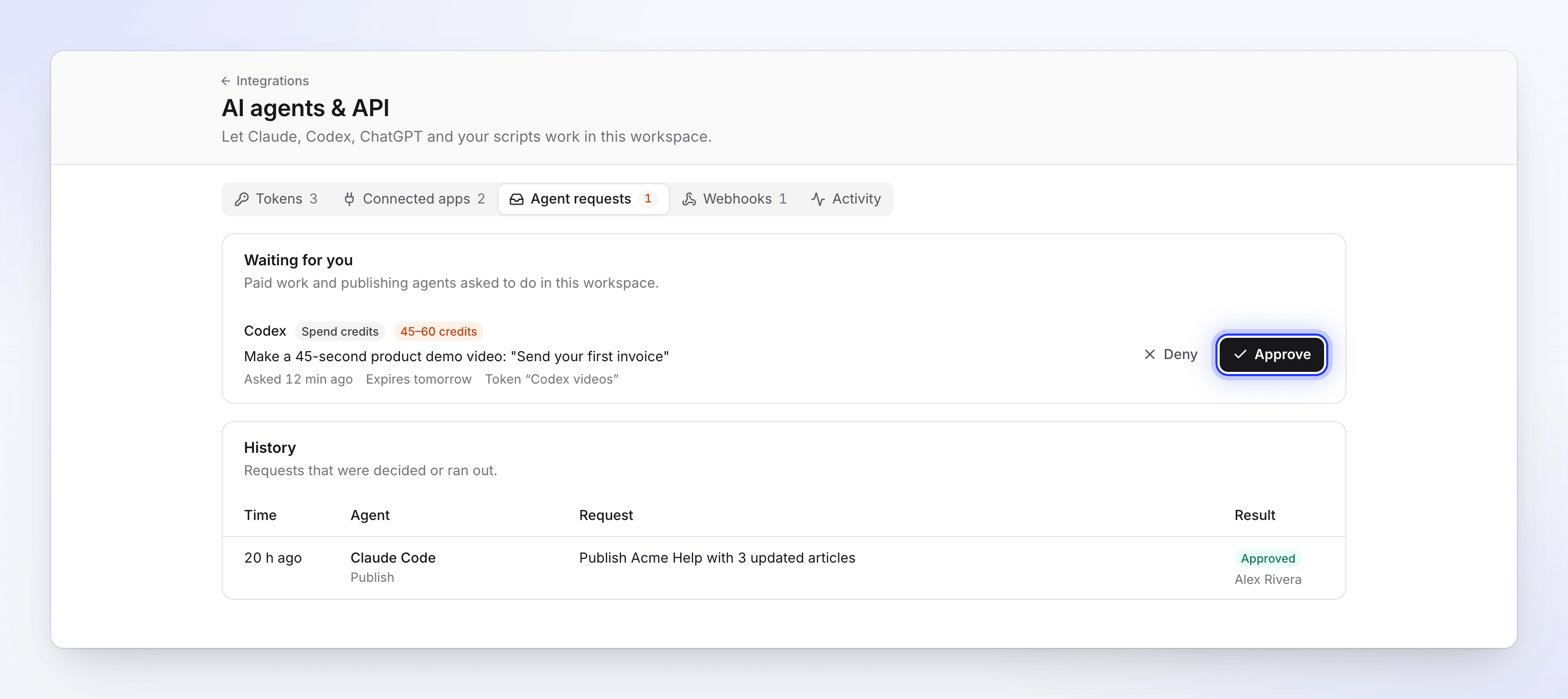
Each request shows what the agent wants to do and the credit range. Decide
Click Approve and confirm in "Approve this request?": the job starts. Click Deny: the job is canceled and nothing is charged. If the workspace is no longer on Pro or up, Approve says "The API and agent access are not on your plan."; Deny still works.
- Only the workspace owner and admins decide spending. Others see "An owner or admin decides". An agent can never approve its own request, and agent tokens can't call the approval endpoints.
- Requests expire after 24 hours. An expired request's job is canceled, and the agent has to ask again.
- Decided and expired requests move to History ("Requests that were decided or ran out.") with the result (Approved, Denied, Expired, Canceled) and who decided.
- The agent sees its job as
needs_inputwhile it waits, and the result when you decide. With webhooks, your systems getapproval.requestedandapproval.decided.
Members who aren't owners or admins see only their own agents' requests: "Before your agents spend credits or publish, they ask here and wait for an owner or admin."
Other spending limits
| Limit | What happens |
|---|---|
| 20 paid starts an hour per token, 100 a day per workspace | Further starts are refused with rate_limited until the window passes. |
| Credits spent unusually fast by one token | The token can't start paid work for 24 hours, and the owner gets "Unusual activity on token": "It spent an unusually high number of credits in a few minutes, so it can’t start paid work for now." |
| Two starts checked at the same moment | "Another start is being checked. Try again in a moment." |
Troubleshooting
| Message | Cause | Fix |
|---|---|---|
| "This would pass the token's spend cap. A workspace admin can raise it." | The quote doesn't fit Per job, or what's left of Per day or Per month. | Wait for the next day or month, or create a token with higher caps. |
| "Your plan does not include paid agent work. Upgrade to let agents start it." | The workspace isn't on Pro, Business or Custom. | Upgrade. |
| An "insufficient credits" message | The workspace doesn't have enough credits for the quote. | Buy credits or wait for your allowance. |
| "This quote has expired. Ask for a new quote." | More than 15 minutes since the quote. | The agent asks for a new quote. |
| "This quote was already used. Ask for a new quote." | The quote started a job already. | The agent asks for a new quote. |
| "Your plan approves agent work automatically below 500 credits at most." | Approve automatically below is over the plan's maximum. | Lower it. |
| "The API and agent access are not on your plan." (on Approve) | The workspace left Pro. | Upgrade to Pro, or deny the request. |
| "This request was already decided or has expired." | Someone else decided it, or 24 hours passed. | Nothing to do; check History. |
| "You can’t decide this request." | Your role can't approve spending. | Ask the workspace owner or an admin. |
| The agent waits and nothing happens | The request is waiting on Agent requests. | Approve or deny it within 24 hours. |