

My export stopped or failed
Your MP4 export stopped, failed or won't start. Find the exact message in the Download tab or your inbox, see why it happened and how to get the file: closed tabs, browser crashes, Free plan limits, payment locks, maintenance and render limits.
Exports usually take a minute or two. If one stops halfway, fails, or won't start at all, the Download tab in Share says why. This page lists every message it can show, with the cause and the fix. Exports never use credits, so trying again costs nothing.
Quick checks
- Did you close the tab? A render marked On this device runs in your browser tab and stops when the tab closes. Keep it open, and in front, until it finishes.
- Is the tab in the background? Browsers slow down hidden tabs. After about 2 minutes in the background, our servers finish the render instead.
- Are you on Chrome or Brave on a computer? Other browsers, and phones and tablets, render on our servers. That works, but on the Free plan server renders are limited.
- Is the video empty? A video with nothing on its timeline can't be rendered.
- On the Free plan: have you verified your email, and is the video 3 minutes or shorter?
- Open Share → Download → All renders. The render may have finished after all.
The render stopped
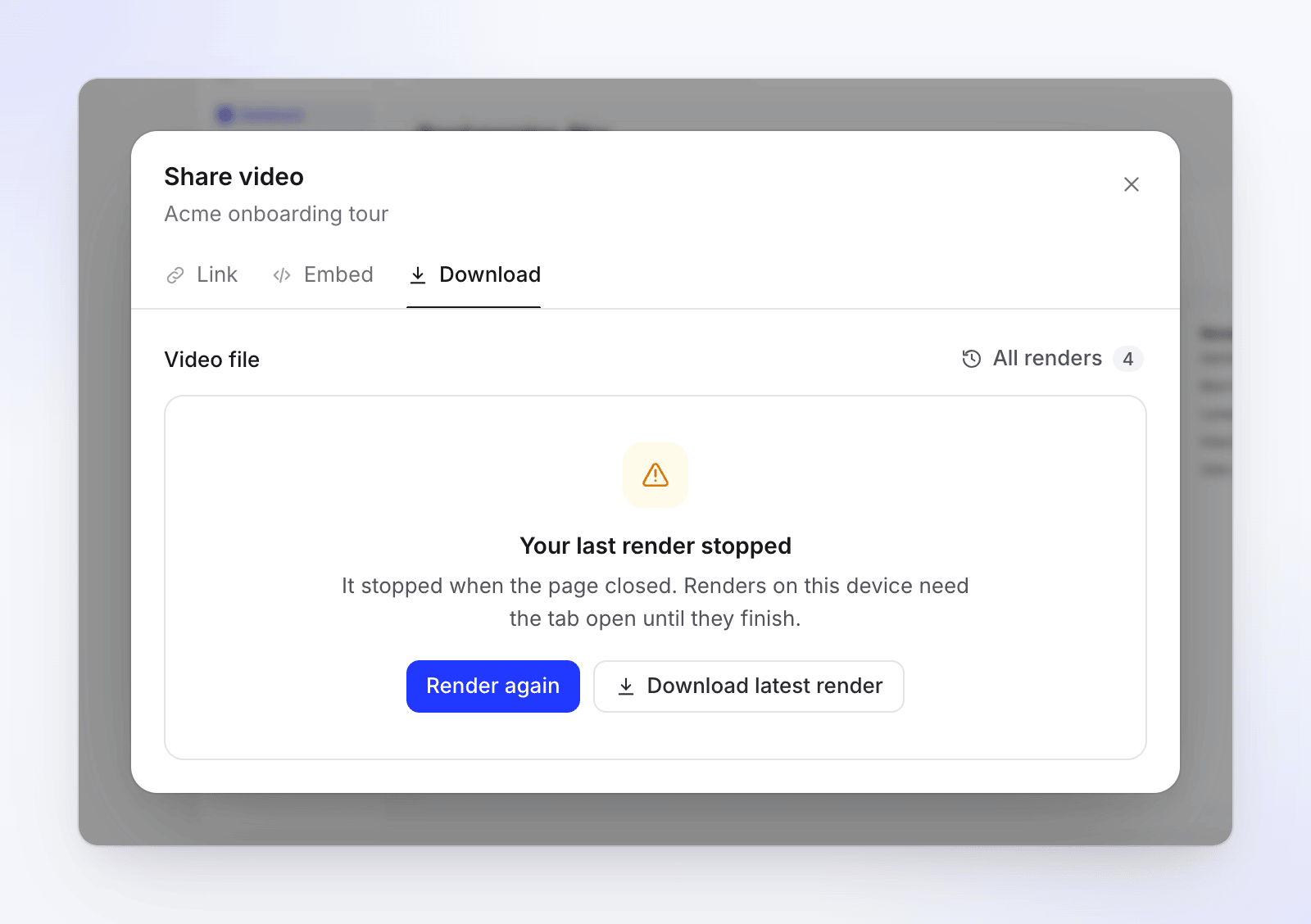
| Message | Cause | Fix |
|---|---|---|
| Your last render stopped — "It stopped when the page closed. Renders on this device need the tab open until they finish." | The tab closed, or you left the page, while the render ran on your device. | Click Render again and keep the tab open. |
| Your last render stopped — "Your browser stopped while rendering. The next render runs on our servers." | The browser crashed or ran out of memory. | Click Render again. The next one runs on our servers, so you can close the tab. |
| Rendering in another tab — "Keep that tab open until it finishes." | The render is running in another tab of the same video. | Switch to that tab and keep it open. |
In All renders, stopped renders show Stopped with "The tab was closed" or "The browser stopped", and renders you cancelled show Cancelled.
The render failed
| Message | Cause | Fix |
|---|---|---|
| We couldn't render this video — "We've been notified. Try again in a few minutes." | The render failed on our side. We're told automatically. | Wait a few minutes and click Try again. |
| We couldn't render this video — "Rendering on our servers is temporarily unavailable. Try again later." | Server rendering is switched off for a short time. | Click Try again later. A device render may still work in Chrome or Brave. |
| Rendering is paused — "We're doing maintenance. Try again in a few minutes." | We're doing maintenance. | Try again in a few minutes. |
| Reload to render — "Rendering was updated since you opened this page." | The editor page is older than the current version of rendering. | Click Reload page, then render again. |
A render that failed shows Didn't finish in All renders.
The render won't start
| Message | Cause | Fix |
|---|---|---|
| "This video has no length yet. Add something to the timeline, then render." | The timeline is empty. | Add a recording, scene or other element first. |
| This device couldn't finish the render — "Finishing renders on our servers is part of paid plans." | Free plan only: your device couldn't render the video, and the workspace has used its 2 server renders for the month (or the video is over 3 minutes). | Try again on a computer with desktop Chrome or Brave, or click Upgrade. |
| "You have reached the rendering limit of the Free plan." | Free plan only: you've used today's 3 renders or this month's 15, or the video is longer than 3 minutes. | Wait for the next day or month, shorten the video, or upgrade. |
| "Please verify your email address before rendering." | Free plan only: your email isn't verified. | Click the link in the verification email, then render. |
| "Your current plan allows exports up to 1080p. Please select a lower resolution or upgrade your plan." | The resolution you picked isn't on your plan (2K needs a paid plan, 4K needs Pro). | Pick a resolution your plan includes, or upgrade. |
| Rendering is locked — "Your last payment failed. Update your payment method in Billing to render again." | The workspace has an unpaid invoice. | Click Go to Billing. The owner can fix the failed payment. |
| Rendering is locked — "Rendering isn’t part of your current plan." | The workspace has no active plan that allows rendering. | The owner can choose a plan in Billing. |
Running out of credits never blocks an export.
Render limits
To keep rendering fast for everyone, there are short-term limits on every plan:
| Message | What to do |
|---|---|
| You have renders in progress — "Wait for one to finish, then start this one." | You have 2 server renders running. Wait for one to finish. |
| Your workspace has renders in progress — "Wait for one to finish, then start this one." | Your workspace has 3 server renders running. Wait for one to finish. |
| Let's slow down for a moment — "You've started a lot of renders in the last hour. To keep rendering fast for everyone, you can start the next one in 12 minutes." | You (or your workspace, or this video) started many renders in the last hour. The message says when you can start the next one. |
| Too many render requests — "Wait a few seconds and try again." | You clicked render many times in a few seconds. |
If you're rendering the same video again only to download it, you don't need a new render: unchanged videos offer the last file. Use Download this version or Download again.
It moved to our servers
These aren't errors. Your device started the render and our servers are finishing it:
| Message | Why |
|---|---|
| "This device would need about 14 min, so our servers are finishing it." | Your device was much slower than our servers. |
| "This tab was in the background too long, so our servers are finishing it." | The tab was hidden for about 2 minutes. |
| "Your browser ran into a problem, so our servers are finishing it." | The browser's video encoder or memory failed. |
| "Resetting this browser’s video encoder — reloading once…" | The page reloads once to reset the encoder, then carries on with your export. |
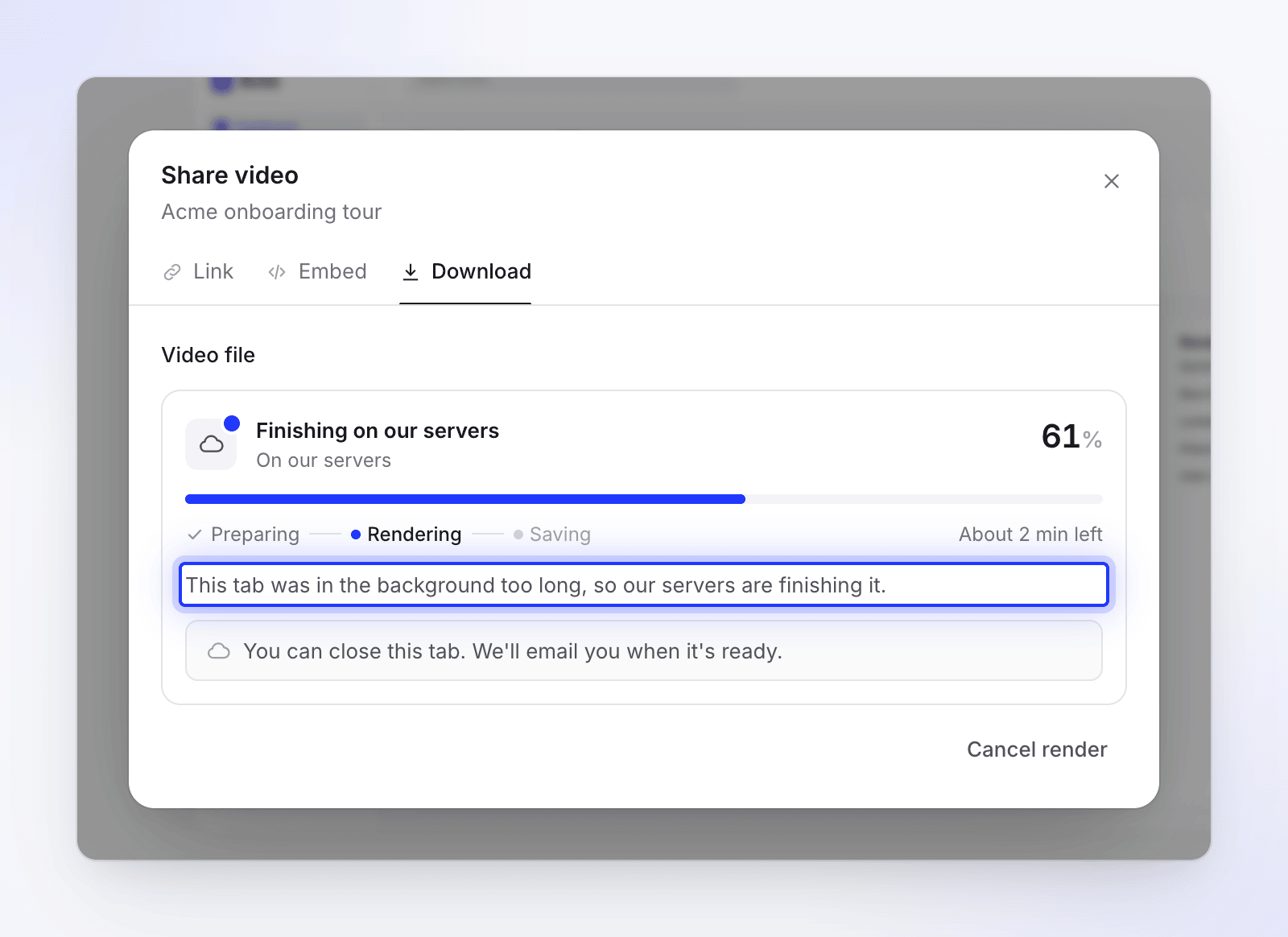
You can close the tab once it says Finishing on our servers. See Understand on-device and cloud rendering.
Notifications about an export
If you've left the page, your inbox (and email, if you don't see it) tells you what happened:
| Notification | Reason line | What to do |
|---|---|---|
| "Export of title stopped" | "The tab was closed before it finished. Open the editor to resume." or "The browser lost its connection. Open the editor to resume." | Open the video, then Share → Download, and render again. |
| "Export of title failed" | "The browser tab was closed before it finished." | Render again and keep the tab open. |
| "The browser lost its connection." | Check your connection and render again. | |
| "Your free server renders are used up." | Render on a computer with Chrome or Brave, or upgrade. | |
| "It stopped making progress." | Render again. | |
| "The export was cancelled." | Render again if you still need the file. | |
| "Something went wrong on our side. Please try again." | Wait a few minutes and render again. | |
| "Export of title moved to our servers" | "We'll tell you when it's ready." | Nothing. You can close the tab. |
The file is gone
Rendered files are kept for 90 days. After that, the render shows No longer available and a download says "This download isn’t available anymore." Render again to get a new file; it's free. See Export a video as MP4.
When to contact support
Contact support from the chat in the app if:
- "We couldn't render this video" comes back after you've tried again a few minutes later,
- the same video fails on both your device and our servers,
- a video keeps stopping with "It stopped making progress."
Include the video's name, the resolution, your browser and the exact message.