

Read video analytics
Read views, completion and watch time for your shared videos and articles, for the whole workspace or one item. Explains exactly how a view is counted, every filter, number and card, and why your own plays don't show.
Analytics shows how your shared videos and articles are watched: how many people watched, how far they got and where they came from. It also counts what your team made and exported. Every member of a workspace can open it.
Open analytics
| To see | Go to |
|---|---|
| The whole workspace | Analytics in the sidebar |
| One video, clip or article | In the editor, ⋯ → Analytics, or Share → Link → Views and engagement |
Views only come from Clevera's own share pages and embeds. Turn on a share link or embed the video to start collecting them. See Share a video with a link.
How a view is counted
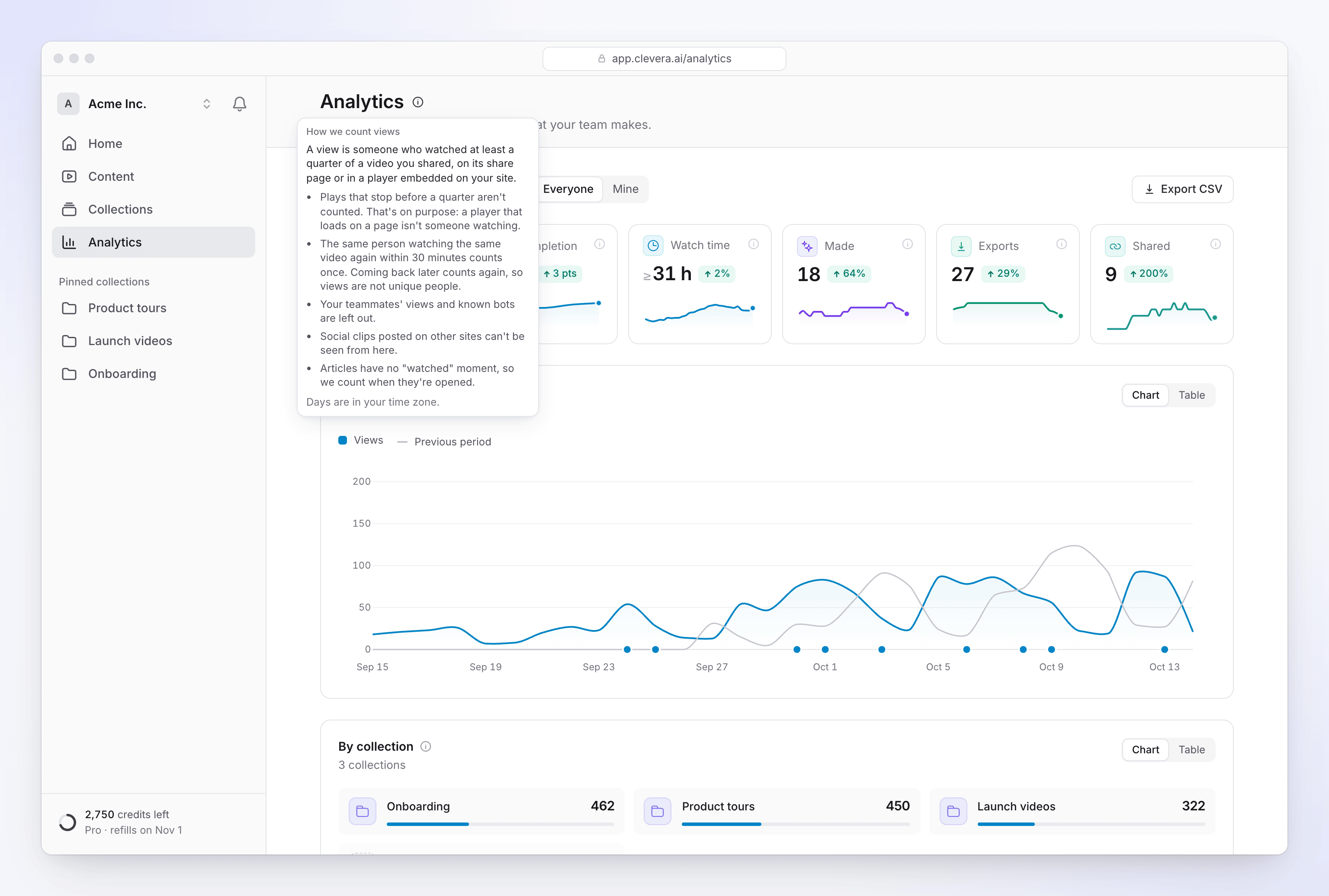
A view is someone who watched at least a quarter of a video, on its share page or in an embedded player.
| Rule | Why |
|---|---|
| At least 25% of the video must actually play. Skipping ahead with the seek bar or arrow keys doesn't add watched time. | A player that loads on a page isn't someone watching. |
| The same person watching the same video again within 30 minutes counts once. Coming back later counts again. | Views are plays, not unique people. |
| Your team's views aren't counted, and neither are known bots. Plays from a network a teammate signed in to Clevera from in the last 90 days count as your team's. | Your own checks don't inflate the numbers. |
| The live preview in the Embed tab never counts. | It's you, not a viewer. |
| Plays that couldn't be real, such as more video "watched" than time passed, are left out. | Keeps the numbers honest. |
| Social clips you download and post on other sites aren't counted. | Those sites don't report back to Clevera. Only views of the Clevera share page or embed count. |
| Articles count opens, not views. Repeat opens by the same reader within 30 minutes count once. | Articles have no "watched" moment. |
| Days are in your time zone. | So "today" means your today. |
The How we count views tip next to the page title sums this up.
Completion and watch time
| Measure | How it's worked out |
|---|---|
| Completion | "Finished views ÷ views. A view finishes when it plays 90% of the video, or at least half of it including the end." Skipping straight to the end doesn't count as finishing. |
| Watch time | Counted in quarters of each video, so it's a minimum: someone who stopped at 60% counts as 50%. Plays under a quarter add nothing. It's shown with a ≥ sign. |
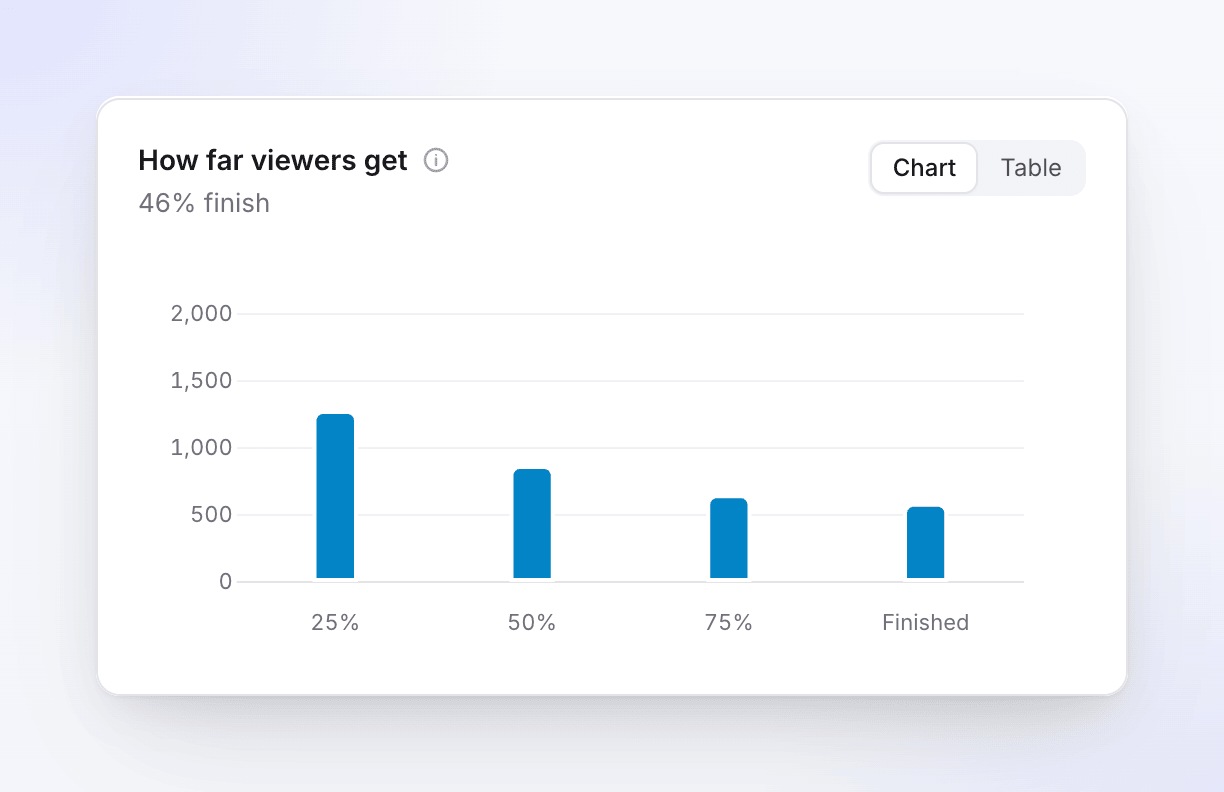
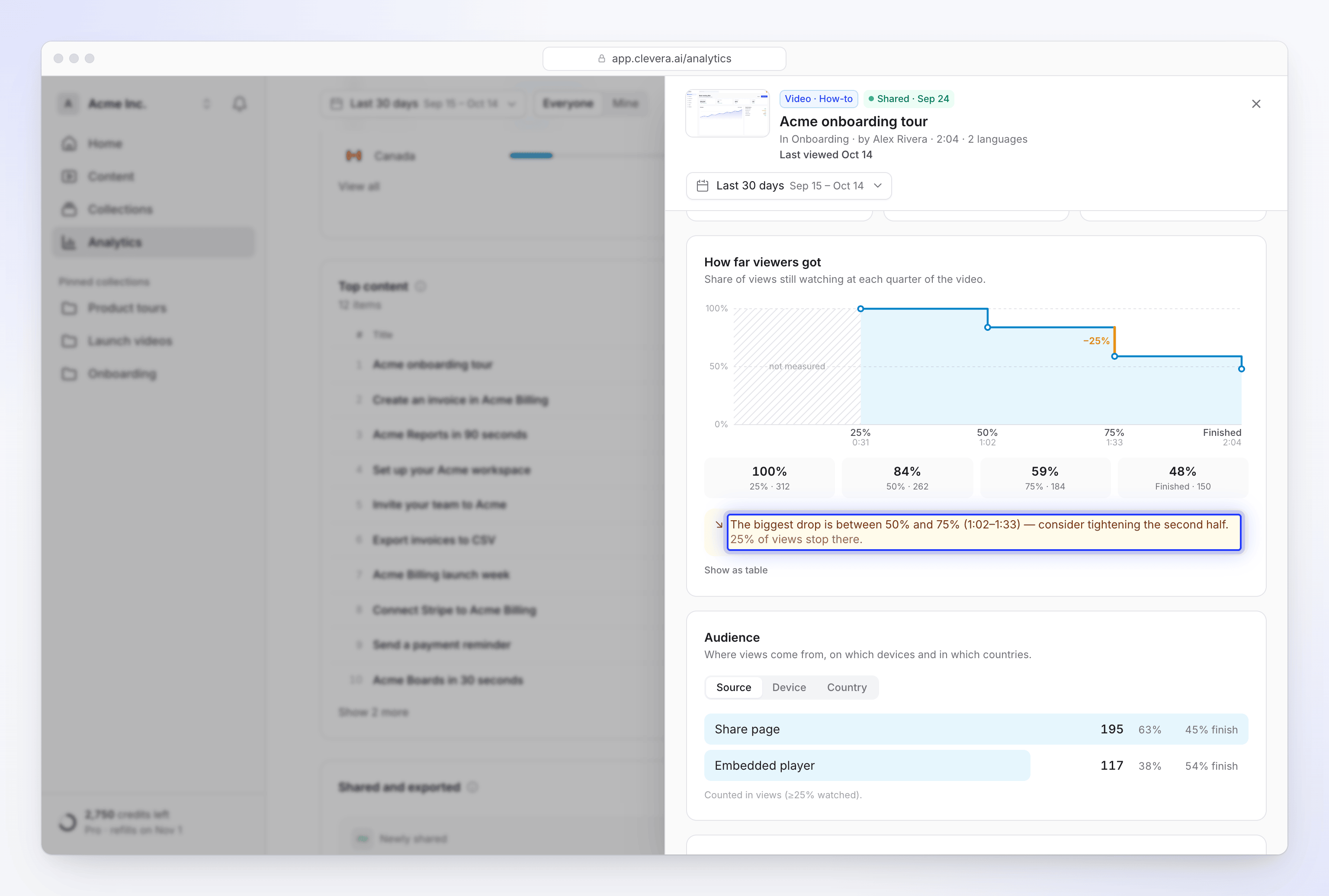
| How far viewers get | Of the views in the period, how many reached 25%, 50%, 75% and the end. The first bar is every view. |
The Analytics page
Filters
| Control | What it does |
|---|---|
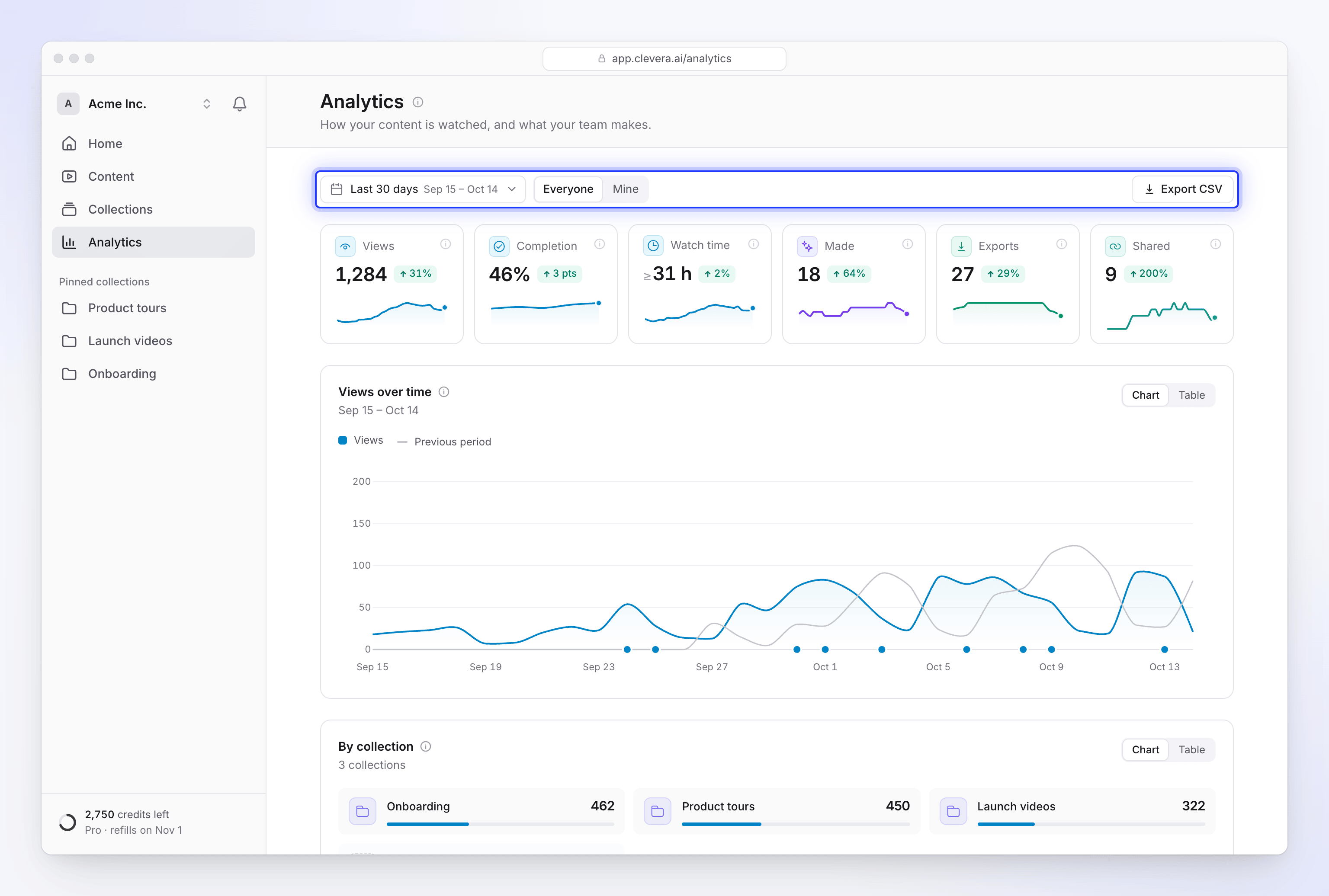
| Date range | Today, Yesterday, Last 7 days, Last 30 days (default), Last 90 days, This month, Last month, This year, Last 12 months or Custom range |
| Compare to previous period | Adds the period before as a grey line and shows the change on each number |
| Everyone / Mine | Owners and admins: the whole workspace, or what you made and exported. Members: everything you can open, or yours. |
| Export CSV | Downloads the numbers for the selected period and scope |
Members only see items they can open. Items in collections you're not part of aren't included.
The numbers at the top
| Number | What it counts |
|---|---|
| Views | "People who watched at least a quarter of your shared videos." |
| Completion | "How many views reached the end." |
| Watch time | "Time spent watching your videos, at least." |
| Made | Videos, social clips, articles and translations finished in the period. Drafts and failed generations aren't counted. |
| Exports | Videos exported, on your device or on our servers. Cancelled or failed exports aren't counted. Exports are always free. |
| Shared | Items that got their first share link or embed in the period, for links that are still on |
The cards
| Card | What it shows |
|---|---|
| Views over time | Views per day (per week for ranges over 90 days). A dot on the axis marks a day something was shared for the first time. |
| By collection | Views and new pieces per collection. Collections you can't open are grouped as "Other collections". |
| Creators | What each person made and the views their content earned. Owners and admins see everyone's numbers. |
| Content types | Pieces finished by type, with the views each type earned |
| How far viewers get | The 25% / 50% / 75% / end funnel |
| Countries | Where views came from. Views without a country are left out. |
| When it's watched | Views by weekday and hour. It appears after 20 views. |
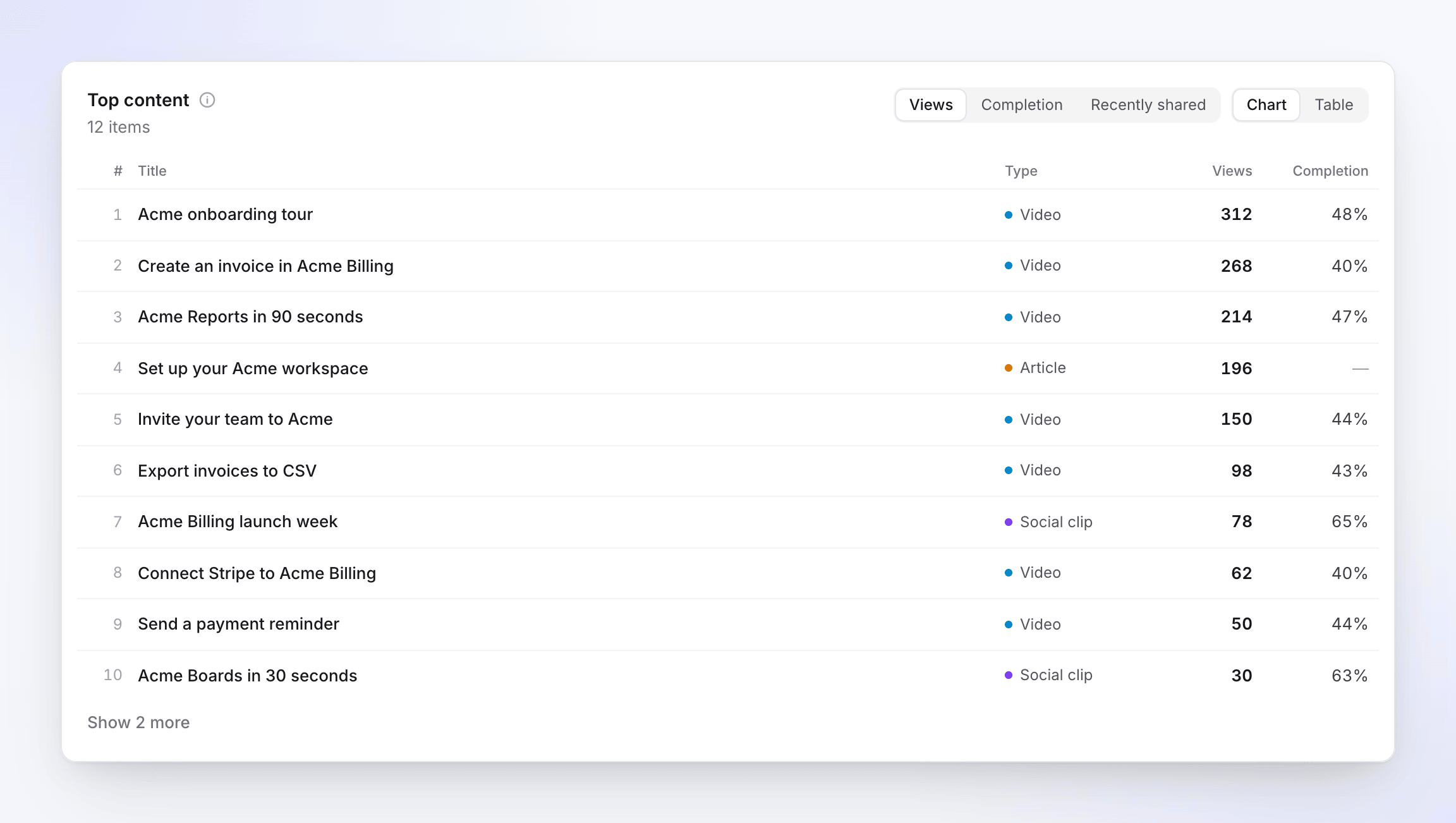
| Top content | Your items with views or opens, sortable by Views, Completion (items with at least 5 views) or Recently shared |
| Shared and exported | First shares and exports in the period |
Click a collection or a person to open their own breakdown.
One video's analytics
The analytics panel for a single item shows:
- whether it's Shared, Link turned off or Not shared yet
- Views (≥25% watched), Completion, Times opened (share page and embeds) and Watch time
- Views and opens per day
- How far viewers got, with a plain-language note on where viewers leave, for example "The biggest drop is between 50% and 75% (1:05–1:38)"
- Audience: views by Source (share page or embed), Device and Country
- Languages: opens of each language version
- Exports and Published to (connected tools)
Times opened is not the same as views: it counts loads of the share page or embed, including people who never press play.
Troubleshooting
| What you see | Why |
|---|---|
| "No views yet. Share a video or embed it on your site, and views show up here once someone watches a quarter of it." | Nobody has watched 25% of a shared video yet. |
| Your own test plays don't appear | Plays from your team, or from a network your team signs in from, are left out on purpose. A private window on the same network still counts as your team. |
| Colleagues at a client's office don't show up | If someone on your team signed in to Clevera from that same network recently, its plays count as your team's. |
| Views are lower than opens | Opens count page loads; views need 25% watched. |
| A social clip shows no views | It's watched on the platform you posted it to. Only its Clevera share page and embeds are tracked. |
| "We couldn't load your analytics." | Click Try again. |
Credit usage isn't on this page. See Check where your credits went.