

Choose permissions for an AI agent
Every permission an API token or connected app can hold, what it allows, which preset includes it, and which roles (owner, admin, editor, Content Creator) can grant it.
Every API token and connected app carries a set of permissions (abilities) that decide what an agent may do in your workspace. This article lists each permission, what it allows, which preset includes it and which roles can grant it.
How permissions work
- An agent acts as the person who created the token, within what that person's role allows. It can never do more than its owner could do in the app, and it only sees the recordings, videos and collections its owner can see.
- Your role decides what you can grant. In the token wizard and on the connect screen, a permission your role can't grant is greyed out with "Your role can’t grant this." (or "Only owners, admins and editors can grant publishing." for publishing). A preset that holds one of them is greyed out with "Your role can’t grant every ability in this preset."
- The role is checked on every call, not only when the token is made. If the owner's role changes later, calls that need a permission the new role doesn't allow are refused, and the token shows Exceeds role in the token list: "The owner’s role changed. Calls needing the struck-out abilities are refused."
- Each permission has a kind, shown as a badge in the wizard: Read, Edit, Publish, Manage or Spends credits.
- An agent only sees the tools (MCP) and endpoints (REST) its permissions allow. Calling one it lacks returns "This token lacks the … ability."
Presets
The first step of the token wizard (What is it for?) offers presets. Picking one ticks its permissions; you can change any of them on the next step, and the wizard then shows Customised with Reset to preset.
| Preset | Description on screen | Permissions |
|---|---|---|
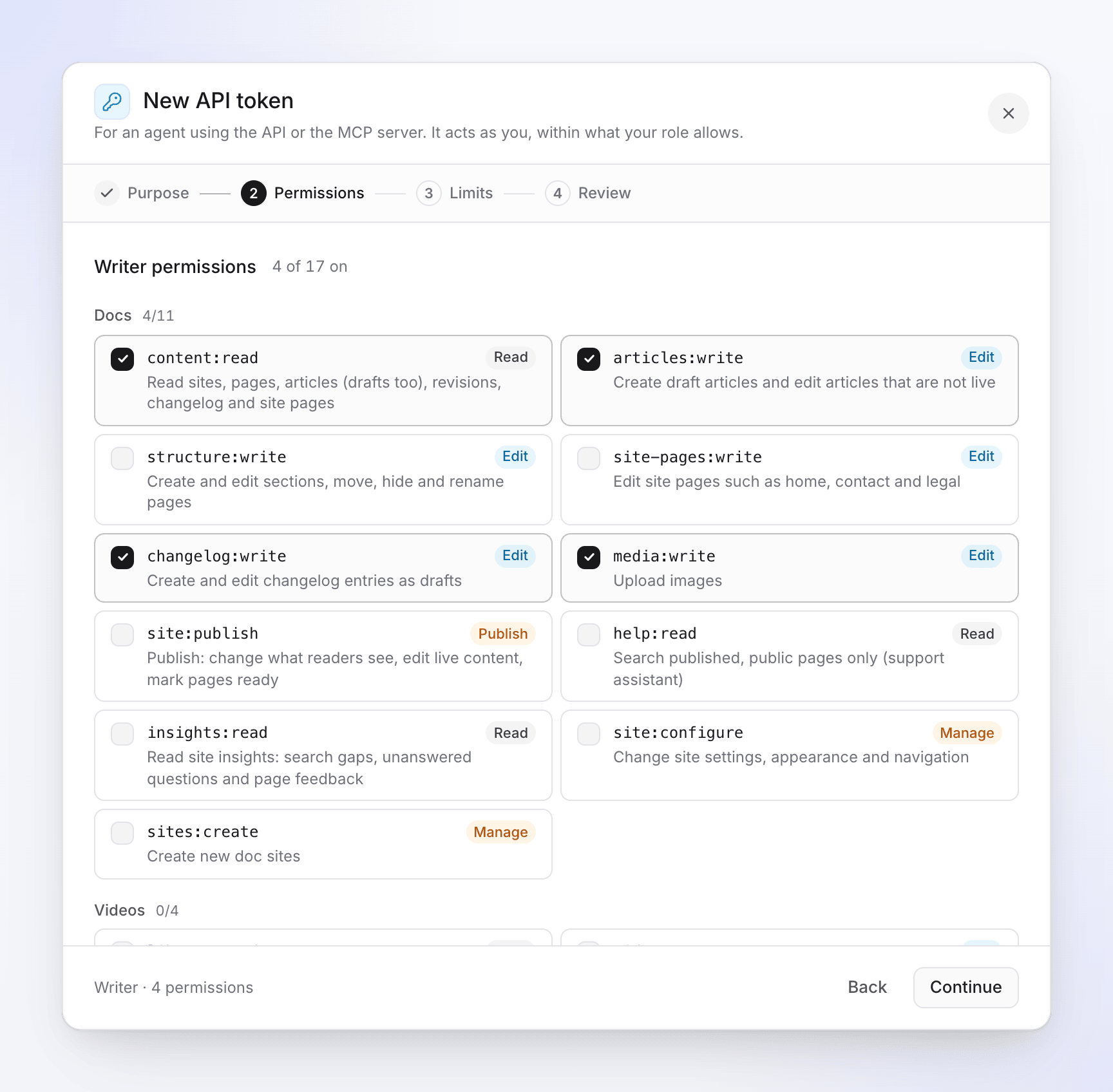
| Writer | "Agents draft; a person reviews and publishes." | content:read, articles:write, changelog:write, media:write |
| Publisher | "Trusted automation that may change what readers see." | Every doc site permission except help:read and insights:read |
| Support assistant | "Answers from published docs. Nothing else." | help:read |
| Read-only | "Research, audits and translation checks." | content:read |
| Analyst | "Reads content and reader signals to suggest fixes." | content:read, insights:read |
| Producer | "Drafts content and starts paid work within spend caps." | Writer, plus site-pages:write, library:read, videos:create, videos:export, materials:write, credits:spend, jobs:read |
| Workspace agent | "Everything an agent can do in this workspace, within spend caps." | Every permission except help:read |
Producer and Workspace agent include credits:spend, so the wizard asks for spend caps on the Limits step. See Control agent spending and approvals.
The Writer, Publisher, Support assistant, Read-only and Analyst presets are for doc sites.
Videos permissions
| Permission | Kind | What it allows |
|---|---|---|
library:read |
Read | "Read recordings, videos, articles and transcripts the owner can see": list the library and recordings, read an item, its transcript and its article, and get an embed. |
videos:create |
Edit | "Quote and request videos, articles from recordings and translations": ask for a quote and request how-to, product demo, cleanup and styled videos from a recording, social clips, articles from a recording and video translations. Starting paid work also needs credits:spend. |
videos:export |
Edit | "Export videos and get embeds": render an MP4 at 1080p (default), 2K or 4K, always 60 fps, and get a download link. Exports cost no credits. |
materials:write |
Edit | "Add images, videos and PDFs to the workspace uploads used for new videos". |
Workspace permissions
| Permission | Kind | What it allows |
|---|---|---|
credits:spend |
Spends credits | "Spend credits on quoted work, within the token's caps". It's the second key every paid start needs, next to the permission for that work (for example videos:create). |
jobs:read |
Read | "See jobs started by the owner's other tokens". A token always sees its own jobs; this adds the jobs of its owner's other tokens. Also lets the agent cancel a job and read the workspace's credit balance. |
Docs permissions
These apply to doc sites. Under Limits → Doc sites, a token covers All sites ("Every doc site in this workspace, including new ones.") or Chosen sites.
| Permission | Kind | What it allows |
|---|---|---|
content:read |
Read | "Read sites, pages, articles (drafts too), revisions, changelog and site pages". Also site settings, appearance, navigation and redirects. |
articles:write |
Edit | "Create draft articles and edit articles that are not live". Translating an article (paid) also needs credits:spend. |
structure:write |
Edit | "Create and edit sections, move, hide and rename pages". |
site-pages:write |
Edit | "Edit site pages such as home, contact and legal". Generating or translating a site page with AI (paid) also needs credits:spend. |
changelog:write |
Edit | "Create and edit changelog entries as drafts". |
media:write |
Edit | "Upload images". |
site:publish |
Publish | "Publish: change what readers see, edit live content, mark pages ready". Also publishing and deleting changelog entries and rolling a site back. |
insights:read |
Read | "Read site insights: search gaps, unanswered questions and page feedback". With articles:write it can also mark a gap as covered. |
site:configure |
Manage | "Change site settings, appearance and navigation", and add redirects. |
sites:create |
Manage | "Create new doc sites". |
help:read |
Read | "Search published, public pages only (support assistant)". A token with only this permission sees nothing else. |
Who can grant what
| Permission | Owner | Admin | Editor | Content Creator |
|---|---|---|---|---|
content:read, help:read, insights:read, jobs:read |
Yes | Yes | Yes | Yes |
library:read |
Yes | Yes | Yes | Yes |
articles:write, structure:write, site-pages:write, changelog:write, media:write |
Yes | Yes | Yes | Yes |
videos:export |
Yes | Yes | Yes | Yes |
videos:create, materials:write, credits:spend |
Yes | Yes | No | Yes |
site:publish, site:configure |
Yes | Yes | Yes | No |
sites:create |
Yes | Yes | No | No |
A Content Creator can give a token credits:spend, but paid work that needs approval is always approved by the workspace owner or an admin, never by the token's owner alone. See Control agent spending and approvals.
Not available to agents yet
Agents can't yet run website research or recorded walkthroughs, or publish videos to other platforms. Those permissions can't be granted.