

Understand Autopilot
Autopilot does whole jobs for you: once, on a schedule, or when something happens (a release, a new video). You set a task up in the chat, approve each plan with its credits, and get a receipt. Recipes, statuses, roles, costs and settings.
Autopilot does whole jobs for you, such as building a help center, keeping it current after each release or writing an article for every new video. A task runs once, on a schedule, or each time something happens. Each time it runs, Clevera makes a plan, you approve it with the credits each line costs, Clevera does the work, and you get a receipt.
How a task works
Set it up in the chat
On Autopilot home, type what should happen and when ("Every time we ship, update the videos that show what changed"), or click a recipe. Clevera opens a setup card in the chat, filled in for you. Check it, click Continue, then Create task. See Set up an Autopilot task.
Wait for the trigger
A one-off task plans right away. A task On a schedule plans at each scheduled time. A task that runs on Each release, A changelog page or Each new video waits until that happens.
Approve the plan
Clevera reads your app, help center, videos or repository and lists what it would make or change. Each line is an item with its own credit estimate. Planning is free. Untick what you don't want and click the run button, for example Run 5 items · 85–185 credits. Ask for changes has the plan redone from a note. Nothing is made and no credits are used until you run it.
A plan you leave alone gets a reminder after 5 days and expires after 7 days.
Run
Clevera works through the approved items. You can leave the page. Help-center articles it writes wait for your approval before they go live.
Receipt
When the run finishes, the receipt shows the estimate and the credits charged for every item. See Read an Autopilot task receipt.
A longer job, such as Build a help center from my app, runs step by step: each step has its own plan and approval, so you see the next step's credits before it starts.
Only one schedule can let runs go ahead without a click: Fill the gaps in my help center every week set to Make drafts, I publish, within its monthly budget. Even then, a run that writes from reader searches waits for your review, because reader searches are someone else's words. Everything else waits for your review each time. See Choose how much Autopilot can do on its own.
Autopilot home
Click Autopilot in the sidebar. Overview is its home page, from top to bottom:
| Section | What it is |
|---|---|
| What should Autopilot do? | A box to describe a job in your own words |
| Or start from a recipe | One card per recipe. Click one to open its setup card. |
| Get started | A checklist for owners and admins: brand, app sign-in, repository, AI assistant. See Use Autopilot suggestions and the setup checklist. |
| Clevera noticed | The top three tasks Clevera suggests from your own workspace, with View all |
| Needs you | Plans waiting for your review and failed steps |
| Running now | Tasks planning or working |
| Always on | Tasks that run on a schedule or when something happens, marked Repeats, Watching or Paused |
A brand-new workspace sees only the first four. New task, at the top right of every Autopilot page, opens the chat with the recipes as buttons.
The recipes
| Recipe | What it does | Runs | Typical credits |
|---|---|---|---|
| Build a help center from my app | Brand, site, videos and articles, from scratch | Once, step by step | 240–560 |
| Keep my help center up to date when we ship | When the product changes, proposes the video and article fixes | Each release, a changelog page, or once | 10–150 |
| Update my videos when the product changes | Fixes the words and re-records changed screens, no help center needed | Once, each release, or a changelog page | 10–150 |
| Record a video for every new feature | Each release, records the features it adds | Each release | 10–150 |
| Turn customer questions into help articles | Writes an article for each question | Once | 5–60 |
| Fill the gaps in my help center every week | Writes what readers searched for and missed | On a schedule, or once | 5–60 |
| Turn new videos into articles | Each new video gets its article, in your help center or a collection | Each new video | 5–60 |
| Explore my app and document what’s missing | The AI explores the app and plans videos and articles for the gaps | Once | 100–260 |
| Document one area of my app | Explores one area in depth and documents it | Once | 100–260 |
| Make getting-started videos for new users | A first-steps path through the app | Once | 100–260 |
| Edit a batch of videos at once | One change, made in every video you pick | Once | Shown on the plan |
| Translate new videos into my languages | Each new video, in every language you pick | Each new video | Shown on the plan |
| Your own task | Each time it runs, Clevera plans what to make from your instructions | Once, each release, or each new video | Shown on the plan |
A collection's Make a help center opens one more: Make a help center from a collection. Typical credits are ranges from past runs; each plan shows the real estimate before you run it.
Blog posts and social clips aren't Autopilot tasks for now: no recipe makes them.
The Autopilot menu
| Group | Page | What it shows |
|---|---|---|
| Overview | Autopilot home (above) | |
| Suggestions | Every task Clevera suggests, with its reason | |
| Tasks | Needs you | Plans and steps waiting for your review, and failed steps |
| Tasks | Running | Tasks planning or working now |
| Tasks | Done | Finished tasks |
| Tasks | All tasks | Every task, with search and a filter |
| Tasks | Repeats | Your scheduled and triggered tasks |
| Tasks | Calendar | Checks, runs and what they made, by month or week |
| Insights | Activity | What Autopilot did over time |
| Insights | Outputs | Every video, article and docs site your tasks made, by type |
| Setup | Connections | Repositories (and blogs). See Connect a repository. |
| Setup | App sign-ins | Test accounts the AI signs in to your app with. See Save an app sign-in. |
| Setup | Settings | Defaults, spending and notifications |
Task lists and the task page name each task by the recipe it was set up with, for example Turn new videos into articles. Help-center pages a task wrote show Written by Autopilot and wait for approval before they publish.
Who can do what
| Role | What you can do |
|---|---|
| Owner and Administrator | Set up every recipe, change Settings, Connections and App sign-ins, see the Get started checklist, set or raise a monthly budget above the suggestion |
| Content Creator | Set up, run, change and cancel tasks, except the two that create a new help center (Build a help center from my app and Make a help center from a collection). Budgets up to the suggested amount. |
| Editor | View everything: tasks, plans, receipts and outputs. Autopilot home shows "Autopilot is set up by your team’s creators" instead of the box and recipes, and every button is turned off with the reason. |
A recipe your role can't start stays on the page, greyed out, with the reason when you point at it.
Task statuses
| Status | What it means |
|---|---|
| Planning | Clevera is making a plan. Nothing runs until you approve it. |
| Plan ready | The plan waits for you: pick what to run, or ask for changes. |
| Running | Working through the approved items. |
| Done | Every item finished. A run with nothing to do ends here too, with "Nothing needed this time." |
| Partly done | Finished, but some steps failed or only partly worked. Open it to see why. |
| Failed | The task stopped before it finished. The reason is on the task. |
| Waiting for a sign-in | Clevera met a sign-in page. Add a sign-in, or go ahead with the public pages. |
| Canceled | Someone on your team stopped it. |
A scheduled or triggered task holds its runs. On Autopilot home it shows Repeats (on a schedule), Watching (waiting for its release, page or video) or Paused. A new triggered task shows No runs yet until it first fires.
What Autopilot costs
| Part | Cost |
|---|---|
| Setting up a task in the chat | Free |
| Planning, research and checking for changes | Free, up to a daily planning limit for each workspace |
| Each item you run | Its credits, estimated on its plan line before you run it. You are charged for what it really uses; the receipt lists any refunds for failed steps. |
| A schedule | At most its monthly budget each calendar month |
If your workspace reaches the daily planning limit, you see "Planning is free up to a daily limit for each workspace, and this workspace has reached it for today. Please try again tomorrow." See Understand credits.
Settings
Owners and admins open Settings in the Autopilot menu. Everyone else sees "Only the workspace owner or an admin can change these settings."
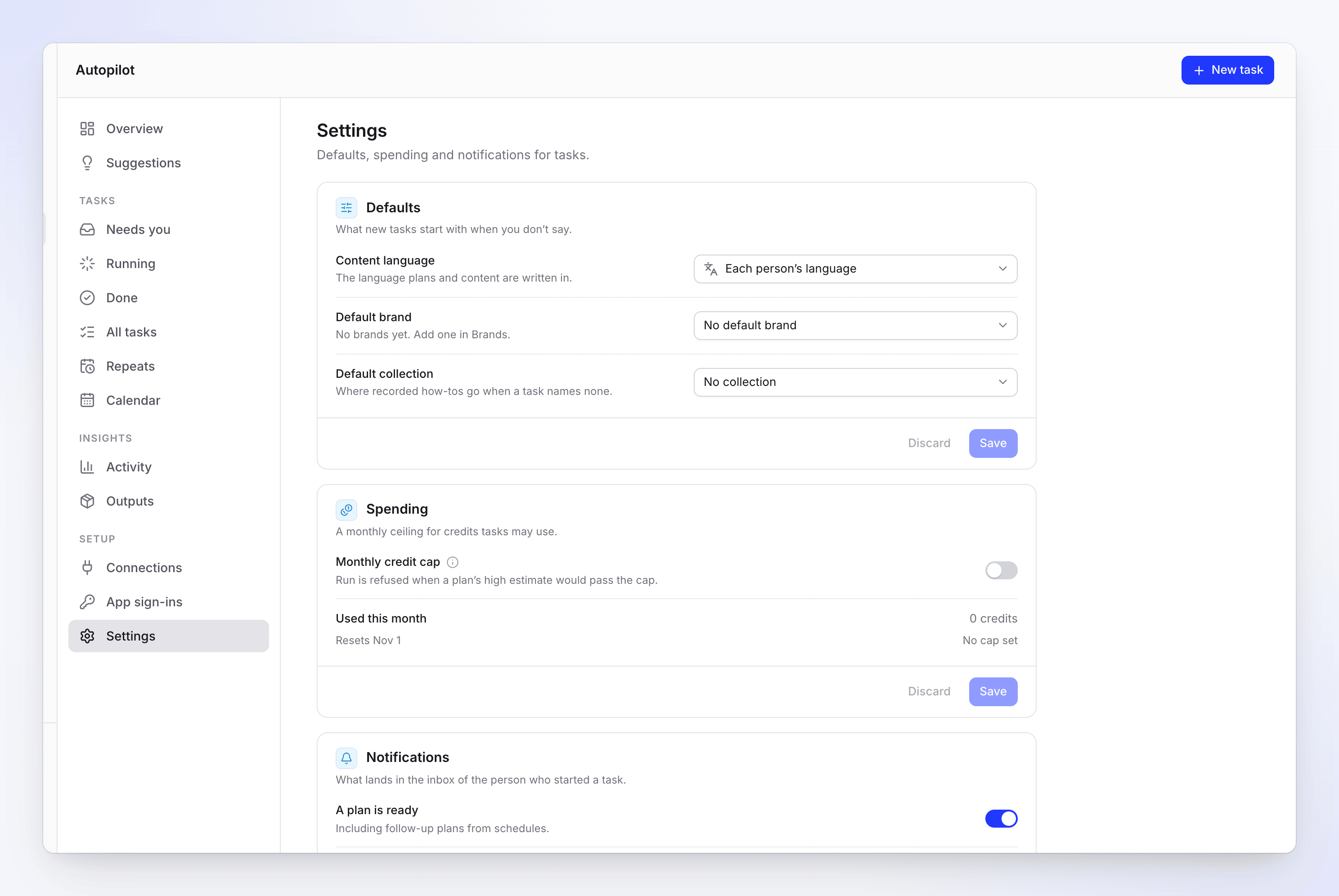
| Section | Setting | What it does |
|---|---|---|
| Defaults | Content language | The language tasks write in. Each person’s language by default. |
| Defaults | Default brand | The brand tasks use when a task names none |
| Defaults | Default collection | Where recorded how-tos go when a task names none |
| Spending | Monthly credit cap | A ceiling on task credits per calendar month (UTC). Run is refused when a plan's high estimate would pass it. |
| Spending | Default budget for repeating tasks | The monthly budget a new scheduled task starts with. Empty: the suggested budget. |
| Notifications | A plan is ready, A task finished | What lands in the inbox of the person who started a task. A failed task is always reported. |