

Set up webhooks for agent events
Get a signed POST on your own https endpoint when an agent's job finishes or fails, an agent waits for approval, or a doc site publishes. Events, payloads, signature verification, retries and auto-disable.
A webhook sends a signed POST to your own endpoint the moment something happens, such as an agent's job finishing or an agent waiting for approval, so your systems don't have to poll. This article covers adding an endpoint, the events, the payload, verifying the signature and what happens when deliveries fail.
Before you start
- Webhooks are on the Pro, Business and Custom plans ("Webhooks are on Pro and up.").
- Only the workspace owner and admins manage webhooks. Other members see "Only owners and admins manage webhooks".
- You need a public https address that answers with a
2xxstatus within 10 seconds. - A workspace can have up to 10 webhooks.
Add a webhook
Open the Webhooks tab
Open the workspace menu, choose AI agents & API, then open Webhooks. Click New webhook.
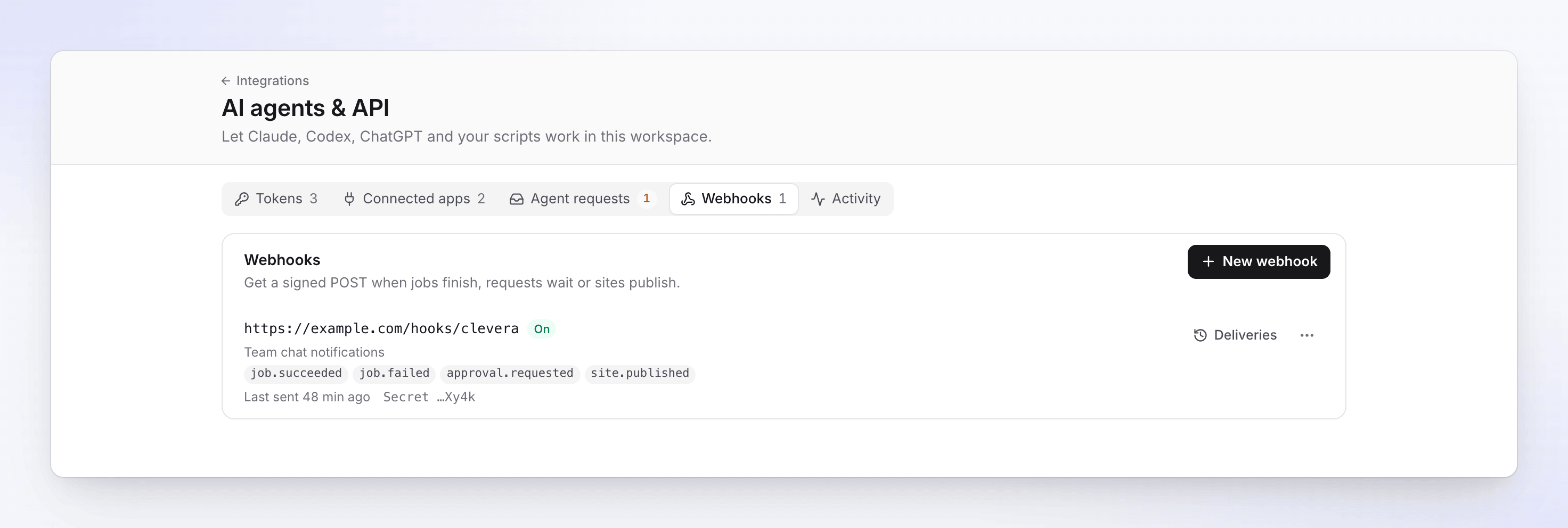
Each webhook shows its events, when it last sent and the end of its secret. Enter the endpoint
- Endpoint URL: "A public HTTPS address." For example
https://example.com/clevera/webhooks. - Description: optional, up to 200 characters, for example "Slack relay".
- Endpoint URL: "A public HTTPS address." For example
Choose the events
Tick the events to receive, or All events, including new ones. Events marked Soon are accepted but "Nothing sends this event yet."
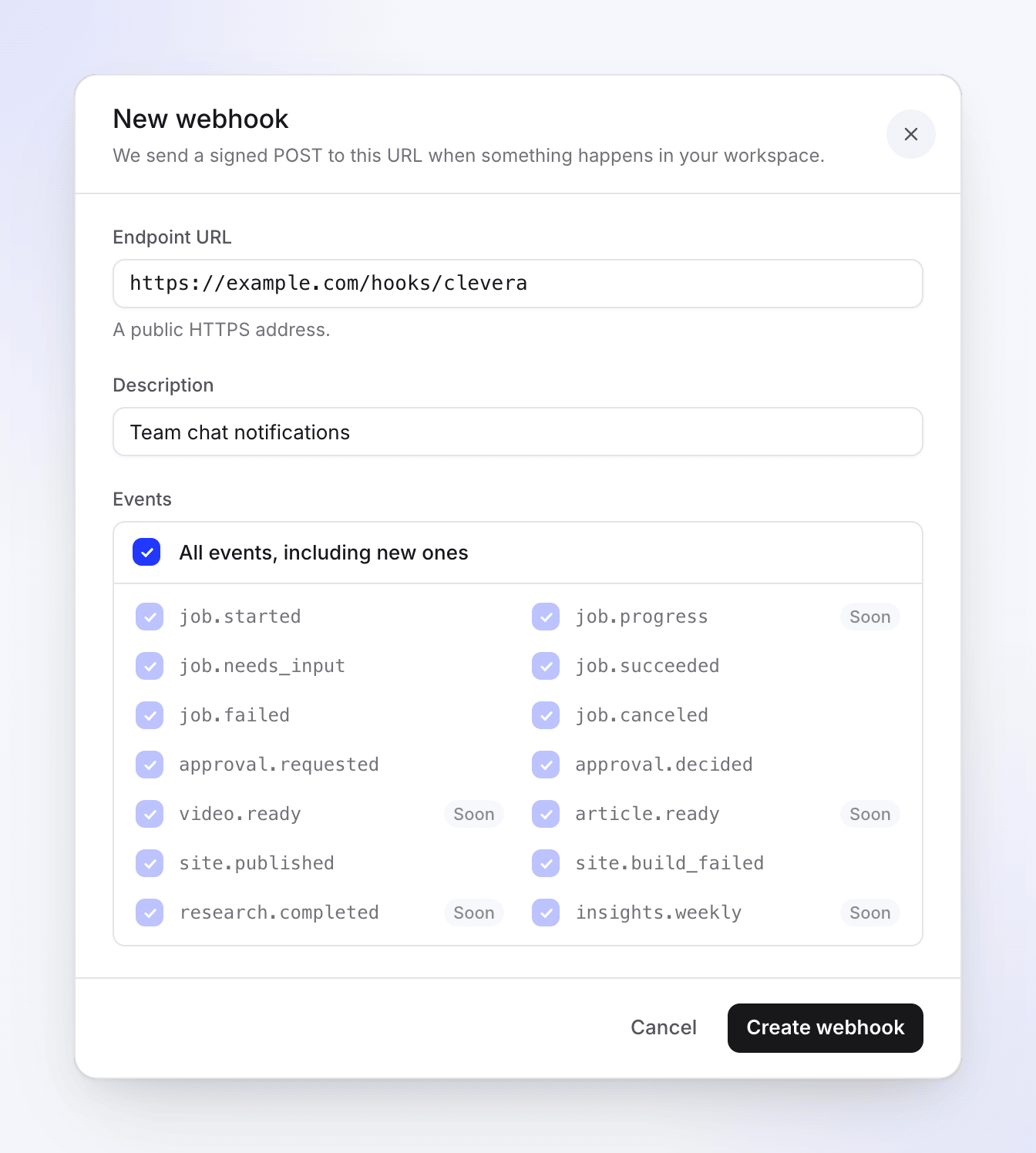
Events marked Soon are accepted but not sent yet. Create it and store the secret
Click Create webhook. The Signing secret (it starts with
whsec_) shows once: "Copy it now: you won’t see it again. Use it to check the Clevera-Signature header." Store it like a password, then click I’ve stored it.Send a test event
Open the webhook's ⋯ menu and choose Send test event. Clevera sends a signed
pingevent once (no retries). "Test event sent" means it left Clevera; check Deliveries for your endpoint's answer.
Events
| Event | Sent when |
|---|---|
job.started |
A job an agent started begins running. |
job.needs_input |
A job waits for a person, for example an approval. Includes the link and when the request expires. |
job.succeeded |
The job finished. |
job.failed |
The job failed. Includes the error code. |
job.canceled |
The job was canceled, or its approval was denied or expired. |
approval.requested |
An agent asked for approval on Agent requests. |
approval.decided |
Someone approved or denied the request, or it expired. |
site.published |
A doc site was published. |
site.build_failed |
A doc site publish failed. |
ping |
You clicked Send test event. Needs no subscription. |
These events are listed as Soon and not sent yet: job.progress, video.ready, article.ready, research.completed, insights.weekly.
Job events cover jobs that agents start (through an API token or a connected app), not videos people start in the app.
What Clevera sends
Every delivery is a POST with a JSON body and these headers:
| Header | Value |
|---|---|
Content-Type |
application/json |
User-Agent |
Clevera-Webhooks/1.0 |
Clevera-Event |
The event name, like job.succeeded |
Clevera-Delivery |
The delivery's unique id. A redelivery repeats the same id, so use it to ignore duplicates. |
Clevera-Signature |
t=<unix time>,v1=<signature> |
Payloads carry ids, links, statuses and numbers, never the content itself. To read a finished video or article, call the API with a token.
{
  "id": "6f1c2d3e-4b5a-4c6d-8e9f-0a1b2c3d4e5f",
  "event": "job.succeeded",
  "created_at": "2026-10-20T14:03:11Z",
  "data": {
    "job": {
      "id": "job_8k2m4n6p8r0t2v4x",
      "kind": "video.create",
      "status": "succeeded",
      "error_code": null,
      "subject": { "type": "video", "id": "vid_example" },
      "credits_spent": 64
    },
    "needs_input": null,
    "workspace": { "id": "tm_example" }
  }
}
{
  "id": "0b9a8c7d-6e5f-4a3b-9c2d-1e0f9a8b7c6d",
  "event": "approval.requested",
  "created_at": "2026-10-20T14:01:02Z",
  "data": {
    "approval": {
      "id": "apr_example",
      "kind": "spend",
      "status": "pending",
      "credits_high": 80,
      "expires_at": "2026-10-21T14:01:02Z",
      "decided_at": null,
      "url": "https://app.clevera.ai/agents?tab=requests&team=tm_example"
    },
    "job": { "id": "job_8k2m4n6p8r0t2v4x", "kind": "video.create" },
    "workspace": { "id": "tm_example" }
  }
}
Verify the signature
Check every delivery before you trust it. The signature is an HMAC-SHA256, keyed with your signing secret, of the timestamp, a dot and the raw request body: <t>.<body>.
- Read
tandv1from theClevera-Signatureheader. - Compute
HMAC-SHA256(secret, t + "." + rawBody)as hex. - Compare it with
v1in constant time. - Reject deliveries whose
tis more than 5 minutes old, so a captured request can't be replayed.
import crypto from 'node:crypto';

export function verifyClevera(rawBody, header, secret, toleranceSeconds = 300) {
  const parts = Object.fromEntries(header.split(',').map((p) => p.trim().split('=')));
  const t = Number(parts.t);
  if (!parts.v1 || !Number.isInteger(t)) return false;
  if (Math.abs(Date.now() / 1000 - t) > toleranceSeconds) return false;
  const expected = crypto.createHmac('sha256', secret).update(`${t}.${rawBody}`).digest('hex');
  return expected.length === parts.v1.length &&
    crypto.timingSafeEqual(Buffer.from(expected), Buffer.from(parts.v1));
}
import hashlib, hmac, time

def verify_clevera(raw_body: bytes, header: str, secret: str, tolerance: int = 300) -> bool:
    parts = dict(p.strip().split("=", 1) for p in header.split(","))
    t, v1 = parts.get("t", ""), parts.get("v1", "")
    if not t.isdigit() or not v1 or abs(time.time() - int(t)) > tolerance:
        return False
    expected = hmac.new(secret.encode(), f"{t}.".encode() + raw_body, hashlib.sha256).hexdigest()
    return hmac.compare_digest(expected, v1)
function verifyClevera(string $rawBody, string $header, string $secret, int $tolerance = 300): bool
{
    parse_str(str_replace(',', '&', $header), $parts);
    $t = $parts['t'] ?? '';
    $v1 = $parts['v1'] ?? '';
    if (! ctype_digit($t) || $v1 === '' || abs(time() - (int) $t) > $tolerance) {
        return false;
    }
    return hash_equals(hash_hmac('sha256', $t.'.'.$rawBody, $secret), $v1);
}
Use the body exactly as received. Parsing and re-encoding the JSON first changes the bytes and the signature won't match.
Retries and failures
A delivery counts as delivered when your endpoint answers with a 2xx status. Anything else fails the attempt:
- any other status, including redirects (
3xxare not followed); - no answer within 10 seconds (5 seconds to connect);
- an address that no longer resolves to the public internet.
Clevera retries a failed delivery 5 times, after 1 minute, 5 minutes, 30 minutes, 2 hours and 6 hours. Your endpoint's response body is never read.
When 15 deliveries in a row fail every attempt, the webhook is switched off: "Turned off after 15 failed deliveries in a row. Fix the endpoint, then turn it on." The owner and admins get a "Webhook to host switched off" notification: "Its deliveries kept failing. Fix the endpoint, then switch it back on." Events that happen while it's off are not sent. Test events don't count towards this.
Manage a webhook
Click Deliveries on a webhook to see its log, or open its ⋯ menu for the rest:
| Option | What it does |
|---|---|
| Edit | Change the URL, events or description. |
| Deliveries | The latest 100 deliveries with their status (Delivered, Failed, Sending), Attempts and the HTTP code. Redeliver sends one again. Deliveries are kept for 30 days. |
| Send test event | Sends a signed ping. |
| Regenerate secret | "Deliveries are signed with the new secret right away. Update your endpoint to check it." There's no overlap, so update your endpoint straight after. |
| Turn off / Turn on | Pause and resume deliveries. |
| Delete | "We stop sending events to it and drop its delivery log. This can’t be undone." |
If the workspace leaves Pro
Webhooks stay listed and can still be edited and deleted, but nothing is sent. Deliveries waiting for a retry end as failed with plan_locked, and Send test event and Redeliver say "Webhooks are not on your plan." Upgrading back to Pro starts sending again; nothing is deleted.
Troubleshooting
| Message | Cause | Fix |
|---|---|---|
| "Webhooks are not on your plan." | The workspace isn't on Pro, Business or Custom. | Upgrade to Pro. |
| "Use an https:// address." | The URL starts with http://. |
Serve the endpoint over HTTPS. |
| "Use a host name, not an IP address." | The URL uses an IP address. | Use a domain name. |
| "This address isn’t reachable on the public internet." | The host resolves to a private or local address. | Use a public endpoint, or a relay. |
| "Remove the user name and password from the address." | The URL has user:password@. |
Remove them; check the signature instead. |
| "Enter a valid web address." | The URL isn't valid. | Check for typos. |
| "Choose at least one event." | No event ticked. | Tick at least one event. |
| "This workspace already has 10 webhooks." | The workspace limit. | Delete one you don't use. |
| "Switch the webhook back on first." | You tried to redeliver on a webhook that's off. | Turn it on, then redeliver. |
| "This delivery is still being sent." | The delivery is still retrying. | Wait for it to finish. |
| Deliveries fail with an HTTP code | Your endpoint answered with an error. | Check your endpoint's logs and that it returns 2xx quickly; do slow work after answering. |
| Signatures never match | The body was changed before checking, or the secret is old. | Verify against the raw body; regenerate the secret if unsure. |