

Set up your own Autopilot task
Your own task covers work no recipe does: write instructions, pick Once, Each release or Each new video, and Clevera plans videos, articles and translations from them each time. Every plan waits for your review.
Your own task is for work no recipe covers: you write instructions in your own words, pick when it runs, and each time it runs Clevera plans what to make from them, for example "For each release, write a short what's-new article for the features it adds" or "Record a how-to of the new Reports page, then write a help article from that video". Every plan waits for your review.
Before you start
- Autopilot must be on for your workspace, and your role must be able to record videos. See Get access to Autopilot.
- Check the recipes first. If a recipe does the job, the agent sets up that recipe instead, with your extra wish added to its instructions ("…and mention the version number"). See What Autopilot does.
- To run on each release, connect a repository first under Autopilot → Connections. See Connect a repository.
- To record videos, your app needs a public
https://address, and a saved sign-in if it needs one. See Save an app sign-in.
Set it up
Open Your own task
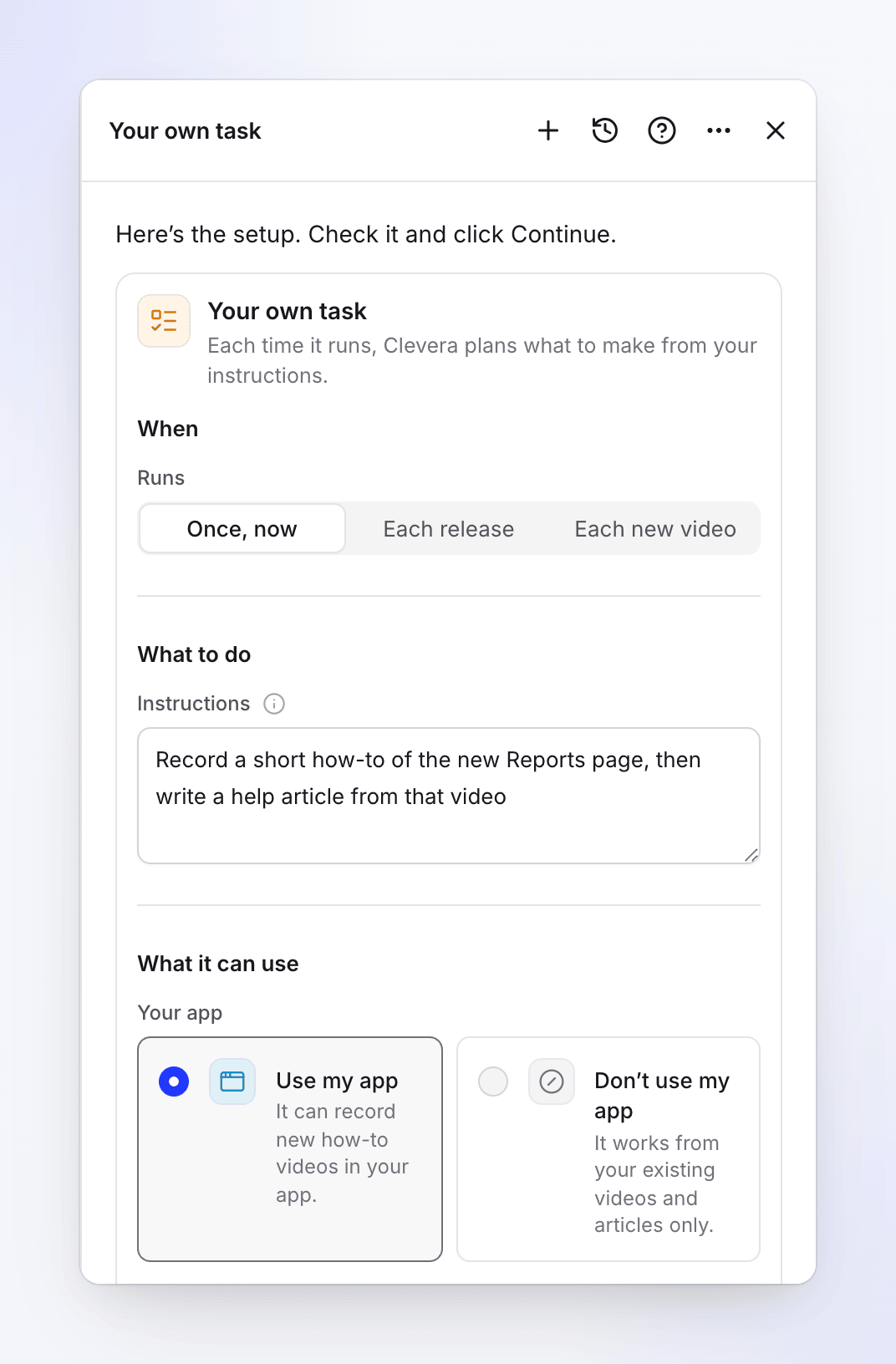
On Autopilot, click the Your own task card (the last one under Or start from a recipe), or describe the job in the What should Autopilot do? box. When no recipe fits what you wrote, the agent opens this card with your words in Instructions. Its fields fit on the card, so there is no separate dialog.
Pick when it runs
Under When, Runs offers Once, now, Each release and Each new video. See Triggers.
Write the instructions
Say what to make each time, as you would tell a colleague. Name the output (a video, an article), what it covers, and any rule ("one article per feature", "skip billing").
Choose what it can use
Under What it can use, decide whether it may use your app (to record videos), where articles go, and the languages. See Fields.
Continue and create the task
Click Continue. The review shows When, Approval (for Each release and Each new video: "Each run waits for your review"), Changes in your app if you allowed them, and Language. Click Create task.
A one-off is planned straight away ("free, a few minutes"). A task on Each release or Each new video does nothing until its trigger fires: it shows Watching on Autopilot home and "No runs yet" on its page.
Triggers
| On the card | Review says | When a run is planned |
|---|---|---|
| Once, now | "Runs once, now" | Right after you create it |
| Each release | "After every release" or "After every merged change" | When the repository gets a release (or a merged pull request). Repositories are checked about every hour. |
| Each new video | "When a new video finishes" (or "… in" a collection) | When a video in your library (or the chosen collection) finishes. Checked about every 15 minutes. Social clips and the task's own videos don't count. |
There is no schedule for Your own task: it can't run every day, week or month, and it can't record new videos on a timer. For a weekly job, the only recipe on a schedule is Fill the gaps in my help center every week. What starts a task can't be changed later: set up a new task with the new trigger and delete the old one.
Fields
What to do
| Field | Options and limits |
|---|---|
| Instructions | 3–2,000 characters. Placeholder: "e.g. For each release, write a short “what’s new” article for the features it adds". "Each time it runs, Clevera plans what to make from these and shows you the plan first." |
| Connection and Repository (Each release only) | The connected account and the repository to watch. With none allowed yet: "No repository is allowed yet. Connect an account and choose the repositories Autopilot may read." and Open Connections. |
| Read (Each release only) | Releases ("Each release you publish.", the default) or Merged changes ("Each merged pull request.") |
| Which videos (Each new video only) | All new videos, or one collection |
What it can use
| Field | Options | Default |
|---|---|---|
| Your app | Use my app: "It can record new how-to videos in your app." (on a release: "It can also record new how-to videos of what changed.") · Don’t use my app: "It works from your existing videos and articles only." (on a release: "It writes from the release notes and your existing videos and articles.") | Not answered, which works like Don’t use my app |
| App address (Use my app) | Your app's https:// address |
Your brand's website |
| Sign-in (Use my app) | Use a sign-in or My product doesn’t need a sign-in | Not answered |
| Let the AI save changes in your app (use a test account) (Use my app) | Off: the AI only looks around while it records. On: "The AI may create, edit or delete real data while it records." | Off |
| Collection (Use my app) | "Where new videos go. Else your default collection from Autopilot settings." | Your default collection |
| Where should articles go? | My help center ("Drafts land there for your review.", then pick the site) · A collection ("Library articles, in a collection or at the top of your library.", then pick a collection or Top of the library) | Your help center if you have one |
| Content language | What it makes is in this language | Your workspace's language |
| Translations | Translated after it's made | None; up to 5 languages in total |
With no help center, only A collection is offered: "You have no help center yet, so articles go to your library."
What it can do: the four actions
Each run's plan is made of lines, up to 12 per run. Every line is one of four actions:
| Action | What it makes | Needs |
|---|---|---|
| Record a how-to video | The AI opens your app and does the steps on camera; the video goes to the chosen collection | Use my app with an address |
| Write an article | A draft article on your help center, or a library article when you chose a collection. It can be written from one video or from the instructions alone. | — |
| Write a library article from a video | A library article from one existing video's recording, not placed on a help center | A video to write from |
| Translate existing videos | Translations of videos already in your library into the task's Translations | At least one language under Translations |
Chains. A run can record a video and then write an article from that same video ("record …, then write a help article from it"): the article line waits for the recording and says "Runs after …". Whatever a run makes is translated into the Translations languages automatically.
Articles on your help center are drafts that show Waiting for approval. They aren't published until someone approves them.
What it can't do yet
If you ask for one of these, the agent says so in one sentence, offers the nearest thing that works, and notes the request for our team:
| You ask for | What the agent offers instead |
|---|---|
| Editing or cutting existing videos | Edit a batch of videos at once or Update my videos when the product changes |
| Recording or exploring on a schedule ("every week, record…") | A one-off, or Record a video for every new feature on each release |
| Social clips, or blog posts to WordPress or Ghost | Not available as tasks right now. Make clips from Create. |
| Posting or sending anything: Slack, email, Notion, YouTube, social networks | Nothing is sent. A team-wide collection is already visible to everyone on the team. |
| Any other trigger (a date, every hour, a changelog page) | One of the three triggers above, or a recipe that has it |
Review and approval
- Every run waits for your review. There is no setting to let Your own task run on its own.
- The plan shows each line with its credits and why it's there. Untick what you don't want, Ask for changes, or Run.
- When a run has nothing to do ("Nothing in this run calls for your instructions."), it ends quietly as done.
- A plan you don't act on gets a reminder after 5 days and is canceled after 7.
Cost
| Part | Credits |
|---|---|
| Setup, watching and planning | On us |
| Each line | Shown on its plan line before you run. A recorded video's estimate grows with its steps; an article is about 5–15; a translation about 3–10 per language for a video of up to five minutes. |
You are charged for what each line really uses. The setup card shows no Typical run for Your own task, because it depends on your instructions.
Change it later
Click Change on the task page and tell the agent what to change: the instructions, the app, where articles go, the languages. It shows the change before → after with an Apply button. You can also pause and resume it. See Change an Autopilot task.
Troubleshooting
| What you see | What it means |
|---|---|
| "This task can’t be started that way. Pick one of the choices under When." | Pick Once, now, Each release or Each new video. |
| "Fill this in to go on." | Write the instructions (at least 3 characters). |
| "Connect a repository first." / "Pick a repository." | Each release needs a connected repository. |
| "Pick a help center of this workspace." / "Pick a collection you can add articles to." / "Pick a collection you can add videos to." | Choose a destination you have access to. |
| "This task has nothing it can make with its settings. Add your app’s address or a help center to it." | Nothing it's allowed to use fits. Click Change and add your app or a help center. |
| "We couldn’t make a plan this time. Please try again." | Click Try again on the task. |
| The agent opened a different recipe | A recipe covers what you asked; your extra wish is in its instructions. |