

Choose a plan
Compare Free, Starter, Pro and Custom: monthly and yearly prices, included credits, creator seats, export resolution, social clips and the AI avatar, with the full Pro seat price list and how to subscribe.
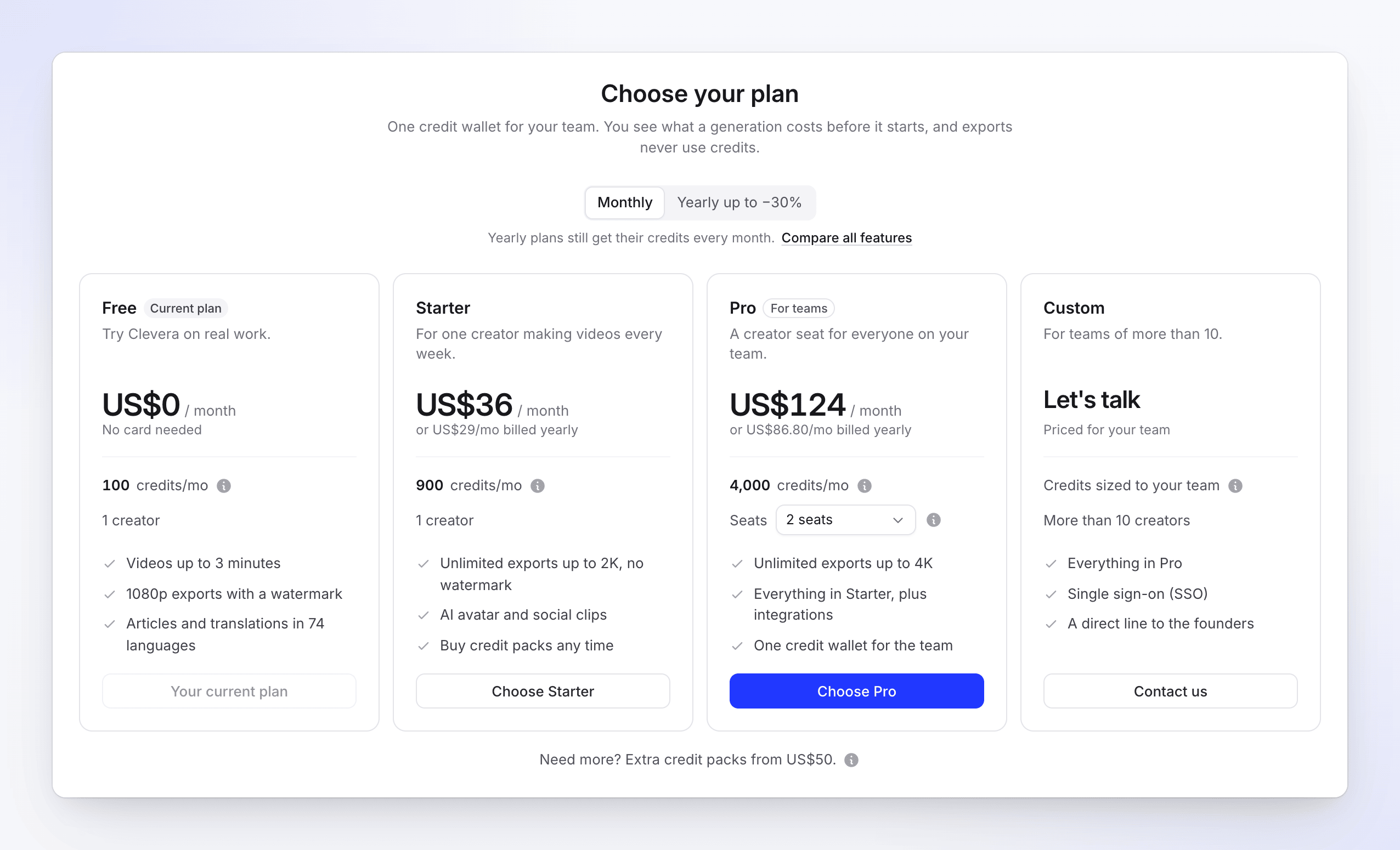
Clevera has four plans: Free to try it on real work, Starter for one creator, Pro for teams of 2–10 creators, and Custom for larger teams. Every plan includes credits each month; paid plans add social clips, the AI avatar, higher export resolutions, no watermark and your own branding on share pages and embeds.
Plans at a glance
| Free | Starter | Pro | Custom | |
|---|---|---|---|---|
| Monthly price | $0 | $36 | From $124 (2 seats) | Quoted |
| Yearly price | — | $29 / mo ($348 a year) | From $86.80 / mo ($1,041.60 a year) | Quoted |
| Included credits a month | 100 | 900 | 4,000–9,200 | Tailored |
| Creator seats | 1 | 1 | 2–10 | More than 10 |
| Editors | Unlimited, free | Unlimited, free | Unlimited, free | Unlimited, free |
| Social clips and AI avatar | — | Yes | Yes | Yes |
| Video length | Up to 3 min | No plan limit | No plan limit | No plan limit |
| Generations at a time | 1 | No plan limit | No plan limit | No plan limit |
| Video exports | 15 a month, 3 a day | Unlimited | Unlimited | Unlimited |
| Max export resolution | 1080p | 2K | 4K | 4K |
| Watermark | Yes | No | No | No |
| Your branding on embeds | — | Yes | Yes | Yes |
| Extra credit packs | — | Yes | Yes | Through our team |
Prices are in US dollars; the app shows them as US$36, US$124 and so on. Yearly billing saves 19% on Starter and 30% on Pro. Yearly plans still get their credits every month, not as one yearly pool.
Which plan fits
| You are | Pick |
|---|---|
| Trying Clevera, or making a few short how-to videos and articles | Free — "Try Clevera on real work." No card needed. |
| One person making videos every week, including social clips | Starter — "For one creator making videos every week." |
| A team where more than one person creates videos | Pro — "A creator seat for everyone on your team." |
| More than 10 creators, or you need single sign-on | Custom — "Priced for your team." |
Everything each plan includes
Credits
| Free | Starter | Pro | Custom | |
|---|---|---|---|---|
| Included credits a month | 100 | 900 | 4,000 with 2 seats, +650 per extra seat | Tailored |
| Unused included credits | Reset every month, no rollover | Same | Same | Same |
| Bonus and bought credits | Never expire | Never expire | Never expire | Never expire |
| Extra credit packs | — | From $50 | From $50 | With our team |
| Low-credit reminder | — | Yes | Yes | — |
| Referral credits | Yes | Yes | Yes | Yes |
| Shared credit wallet for the team | Yes | Yes | Yes | Yes |
Creating
| Free | Starter | Pro | Custom | |
|---|---|---|---|---|
| How-to and demo videos | Yes | Yes | Yes | Yes |
| Articles | Yes | Yes | Yes | Yes |
| Translations | 74 languages | 74 languages | 74 languages | 74 languages |
| AI voice-over, AI assistant edits, templates, brand kits | Yes | Yes | Yes | Yes |
| Social clips | — | Yes | Yes | Yes |
| AI avatar | — | Yes | Yes | Yes |
Sharing, team and support
| Free | Starter | Pro | Custom | |
|---|---|---|---|---|
| Share links, embeds and analytics | Yes | Yes | Yes | Yes |
| Your branding on embeds | — | Yes | Yes | Yes |
| Publishing integrations (Notion, Confluence, Help Scout, GitBook, WordPress and more) | — | — | Yes | Yes |
| Single sign-on (SAML or OIDC, such as Okta or Azure AD) | — | — | — | Yes |
| Support chat | Yes | Yes | Yes | Yes |
| A direct line to the founders | — | — | — | Yes |
Your branding on embeds means "Your collection’s logo and player watermark in place of the Clevera branding." You set them per collection. See Organize videos in collections and folders.
Roles are the same on every plan: owner, admin, content creator and editor. Creators are the owner, admins and content creators, and each takes a seat; editors are free and unlimited. See Understand workspaces, roles and creator seats.
Pro seat prices
Pro starts at 2 seats (you plus one). Each extra seat adds $36 a month and 650 included credits a month, up to 10 seats.
| Seats | Monthly | Yearly | Included credits a month |
|---|---|---|---|
| 2 | $124 | $1,041.60 | 4,000 |
| 3 | $160 | $1,344 | 4,650 |
| 4 | $196 | $1,646.40 | 5,300 |
| 5 | $232 | $1,948.80 | 5,950 |
| 6 | $268 | $2,251.20 | 6,600 |
| 7 | $304 | $2,553.60 | 7,250 |
| 8 | $340 | $2,856 | 7,900 |
| 9 | $376 | $3,158.40 | 8,550 |
| 10 | $412 | $3,460.80 | 9,200 |
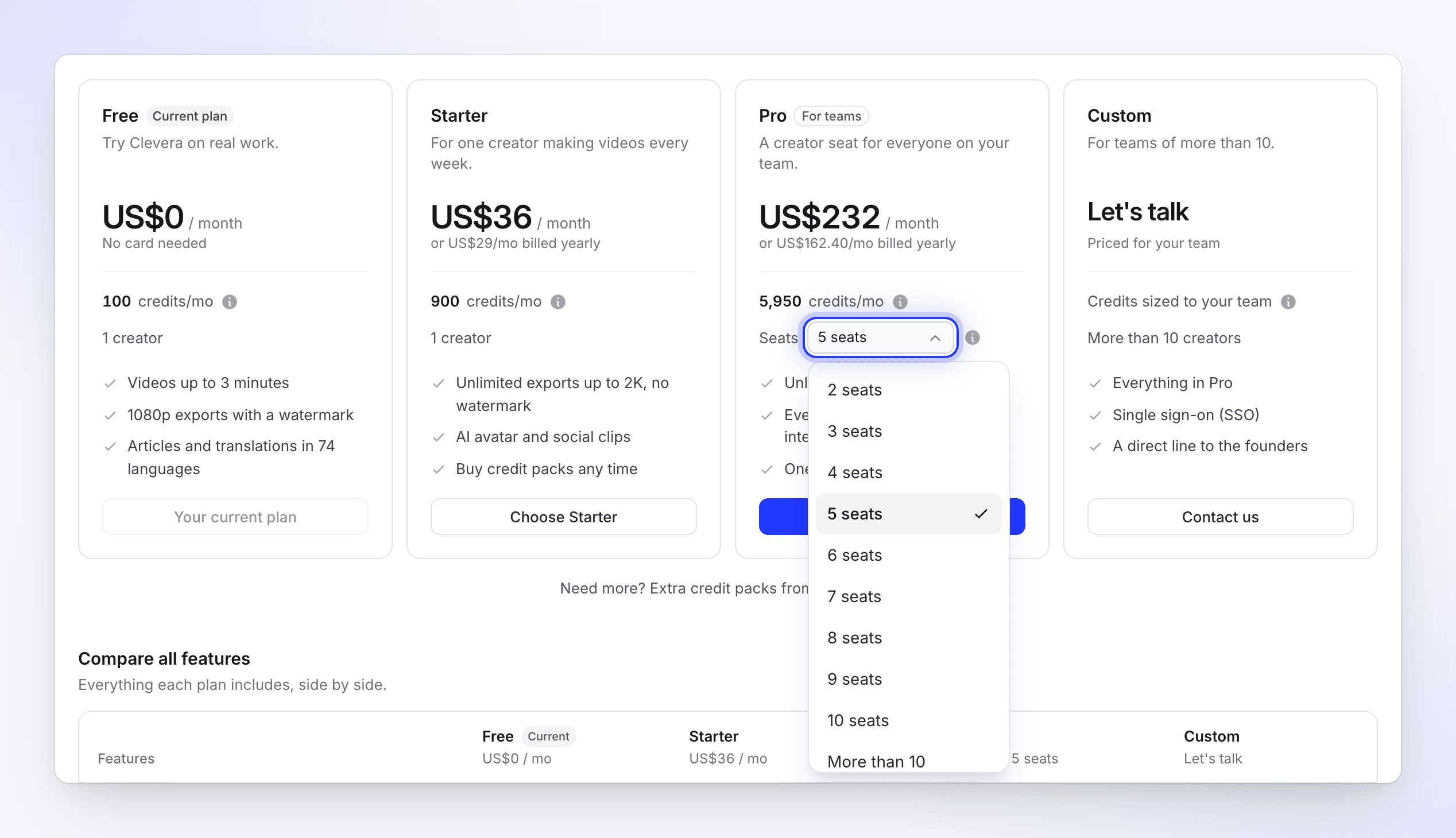
For more than 10 creators, choose Custom. Contact us opens the support chat with a message ready to send.
For how many videos a month of credits makes on each plan, see What a month of included credits makes.
Subscribe to a plan
Every new workspace starts on Free. To move to a paid plan:
Open the plans
Click Upgrade in the credits menu in the sidebar, or See plans in Billing. Only the workspace owner can subscribe.
Pick monthly or yearly, then a plan
Choose Monthly or Yearly at the top. For Pro, pick the number of seats. Open Compare all features to see every difference side by side.
Continue to payment
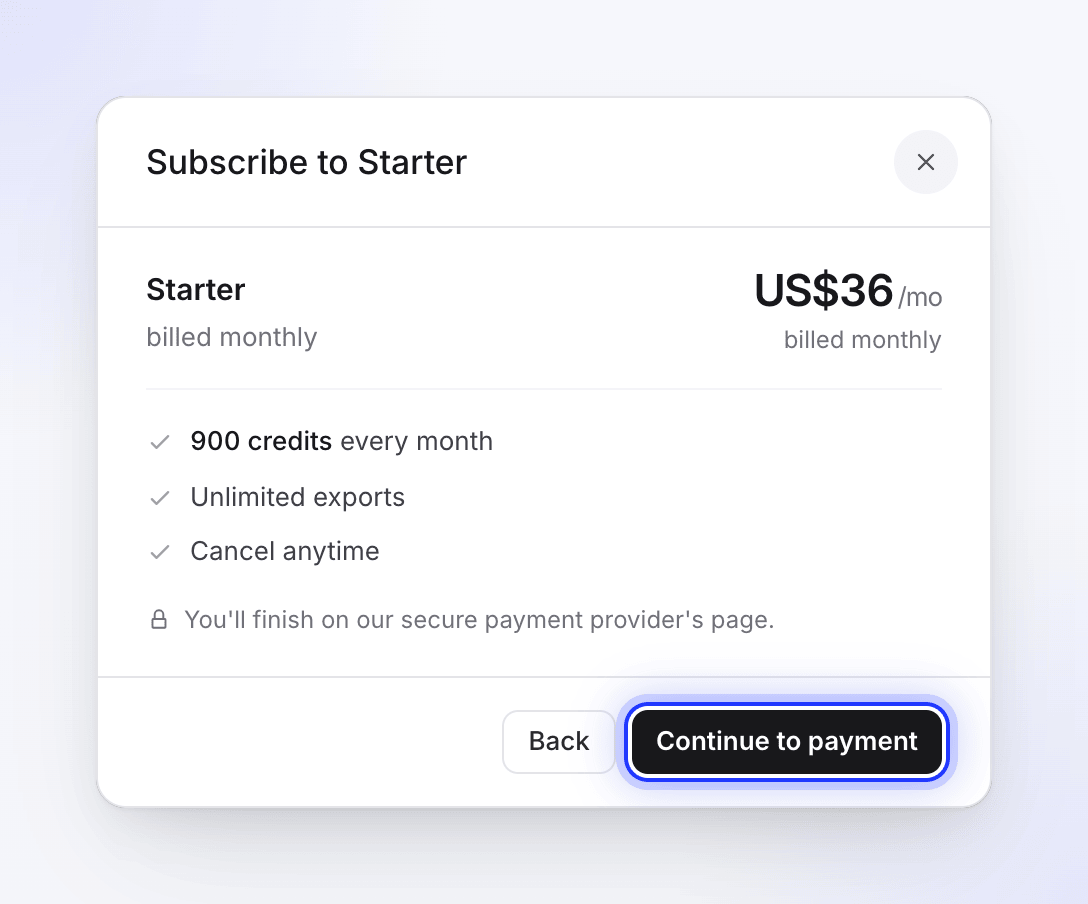
Click Choose Starter or Choose Pro, check the summary, and click Continue to payment. A secure checkout page opens; your bank may ask you to confirm the payment.
Start creating
After the payment goes through, your inbox shows "You're on Starter now — 900 credits a month." and the new plan's credits are in your wallet.
If you're already on a paid plan, use Change plan instead — see Change your plan or seats.