

Doc site plans and limits
What each Clevera plan includes for doc sites: number of sites, custom domains, private sites, assistant answers, languages, redirects, history and navigation limits, plus the hard limits and what happens to your sites when you downgrade.
Doc sites are included on every Clevera plan. Plans differ in how many sites you get and which extras they unlock, such as your own domain, private sites and more assistant answers. This page lists every difference, the limits that apply to everyone, and what happens to your sites when you change plan.
Doc sites per plan
| Plan | Doc sites |
|---|---|
| Free | 1 |
| Starter | 1 |
| Pro | 2–5, by seats (below) |
| Business | 5 |
| Custom | 10, or what we set with you |
On Pro, every two seats add a doc site:
| Pro seats | Doc sites |
|---|---|
| 2–3 | 2 |
| 4–5 | 3 |
| 6–7 | 4 |
| 8–10 | 5 |
Sites that count: drafts, live sites and unpublished sites. Paused sites don't count.
Features per plan
| Feature | Free | Starter | Pro | Business and Custom |
|---|---|---|---|---|
Free .clevera.help address |
Yes | Yes | Yes | Yes |
| Your own domain | No | Yes | Yes | Yes |
| Remove the "Powered by" badge | No | Yes | Yes | Yes |
| Private sites (password or workspace sign-in) | No | No | Yes | Yes |
| Assistant answers per month | 300 | 1,000 | 5,000, plus 1,000 per seat above 2 | 20,000 |
| Assistant name, tone and product notes | No | Yes | Yes | Yes |
| Contact form | No | Yes | Yes | Yes |
| Analytics integrations | No | Yes | Yes | Yes |
| Scheduled pages and changelog entries | No | Yes | Yes | Yes |
| Your own home-page hero image | No | Yes | Yes | Yes |
| Languages per site | 2 | 5 | Every language | Every language |
| Manual redirects per site | 20 | 500 | 2,000 | 2,000 |
| Insights history | 30 days | 90 days | 365 days | 365 days |
| Publishing history you can roll back to | Last 3 builds | Last 30 days | Every kept build | Every kept build |
| Site pages per site | 5 | 25 | 100 | 200 |
| AI agents & API (API tokens, Claude and ChatGPT connectors, webhooks) | No | No | Yes, 50 active tokens | Yes, 50 active tokens |
Assistant answers are counted per workspace, across all its sites, and reset on the 1st of each month (UTC). Readers' searches, page views and hosting are never limited by plan. Site pages exclude the contact page and the home page.
On Custom plans the numbers are what we agree with you; the table shows the defaults.
Navigation limits per plan
| Item | Free | Starter and up |
|---|---|---|
| Header items | 3 | 6 |
| Header dropdown menus | 0 | 3 |
| Header buttons | 1 | 2 |
| Footer columns | 4 | 5 |
| Links per footer column | 8 | 10 |
| Legal links | 6 | 6 |
See Set up doc site navigation.
Limits on every plan
| Limit | Value |
|---|---|
| Pages per site | 5,000 |
| Sections and groups per site | 50 together |
| Manual redirects per site | 2,000 (redirects made when you move or rename a page don't count) |
| New doc sites | 5 in any 24 hours, deleted ones included |
| Publishes per site | 60 an hour (rollbacks don't count) |
| Versions kept | The 10 most recent, plus the live one and up to 3 you pin |
| Languages to pick from | 74 |
| Logo | 2 MB |
| Images | 25 MB each |
| Home-page hero image | 8 MB |
When you reach a limit
The site limit
At your plan's site count, New doc site opens a dialog that names your options:
- Free and Starter: "Upgrade to Pro for more doc sites." The dialog compares your plan with Pro.
- Pro: Add seats. Pick a seat count under Pro seats: "Every two seats add a doc site, up to 5. Editors are free." It shows the new price, sites and credits. "Nothing is charged here. You confirm at checkout." Added seats are billed now for the rest of the period, prorated.
- Pro at 10 seats, Business and Custom: Contact us. A Custom plan sets seats, sites and features to what you need.
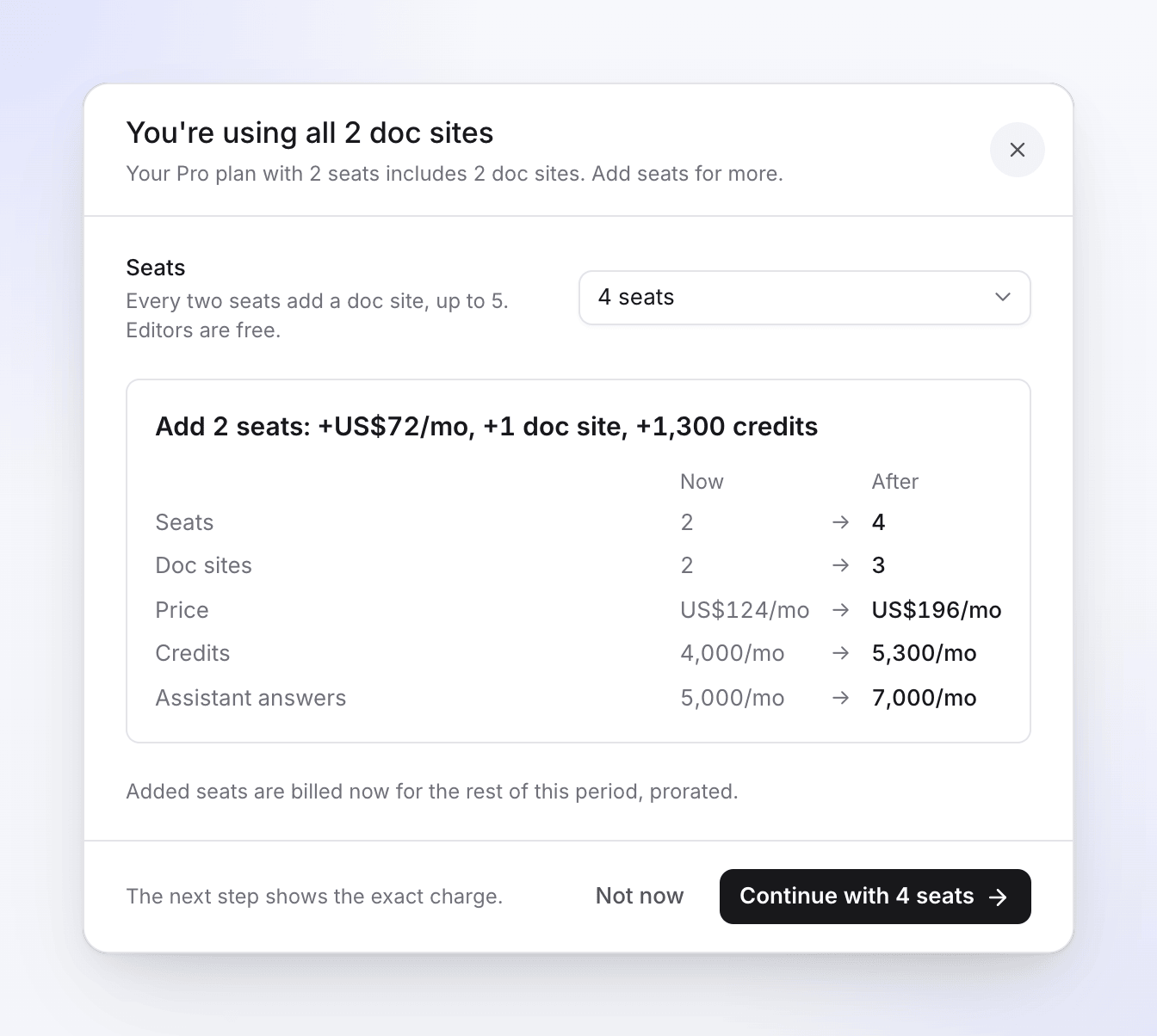
Only the workspace owner can change seats or the plan. Anyone else gets Copy link for the owner: "Copy the link with your choice and send it to them."
Other limits
A locked option shows the plan that unlocks it. Messages name the next plan, for example "Your plan publishes up to 2 languages per site. Starter includes 5 languages." or "Your plan includes up to 20 redirects per site. Starter includes 500 redirects."
If you downgrade
A downgrade never deletes anything. Features your new plan lacks stop being published, and come back if you upgrade again.
Sites over the new limit are paused
If you have more sites than the new plan includes, the newest ones are paused:
- A paused site is read-only. Its status reads Paused: "Over your plan's site limit. Read-only until you keep it."
- It stays live on its last version for 30 days, then goes offline. Readers see that it's offline; the site, its pages and its history are kept.
- Doc sites shows "Your plan now includes 1 doc site. 1 site is paused and goes offline on Nov 19, 2026. Nothing is deleted."
- Owners get a notification when a site is paused, and again before it goes offline ("Acme Help goes offline in 7 days").
To pick which sites stay active, click Choose sites to keep (owners, administrators and editors). Select exactly as many as your plan includes and click Keep these 1. "The ones you keep are editable again; the others stay paused and go offline later." If you upgrade or add seats, paused sites become active again by themselves.
What else changes
| Feature lost | What happens |
|---|---|
| Your own domain | The domain keeps working for 14 days, then it's disconnected and the site is reached at its free address. On a paused site, the domain stops when the site goes offline. Upgrade within that time and it stays connected. |
| Private sites | Private sites are set to not published. They can't publish until you make them public in Settings → Access, or upgrade. |
| Extra languages | Languages over the cap stay in the dashboard with their articles but aren't published. Settings shows "Not published on your plan: …" |
| Redirects over the cap | Kept. The oldest ones, up to the cap, keep working. |
| Site pages over the cap | Kept. The oldest ones, up to the cap, are published; the rest show "Not published on your plan". |
| Badge removal | The "Powered by" badge comes back on the next publish. |
| Assistant name, tone, product notes | The assistant uses its default wording. Your text is kept. |
| Contact form, analytics integrations | They stop. Your settings are kept. |
| AI agents & API (below Pro) | Tokens and connected apps stay listed but every call is refused; webhooks send nothing. Upgrade again and they work. See Understand AI agents and the API. |
| Insights and publishing history | You see and roll back only within the new plan's window. |