

Track runs in progress
Content › In progress lists every video, clip and article being made that you can follow, yours and your teammates'. Answer the AI's questions, cancel a run, try a failed one again or clear it from the list.
Content → In progress is one list of everything being made in your workspace that you can follow: videos, social clips and articles, yours and your teammates'. Use it to see what's running, answer the AI when it's waiting for you, stop a run, or deal with one that failed.
Open it
Open Content in the sidebar and choose In progress in Content's left-hand list. In the narrow sidebar, the animated In progress icon opens it too while something is running.
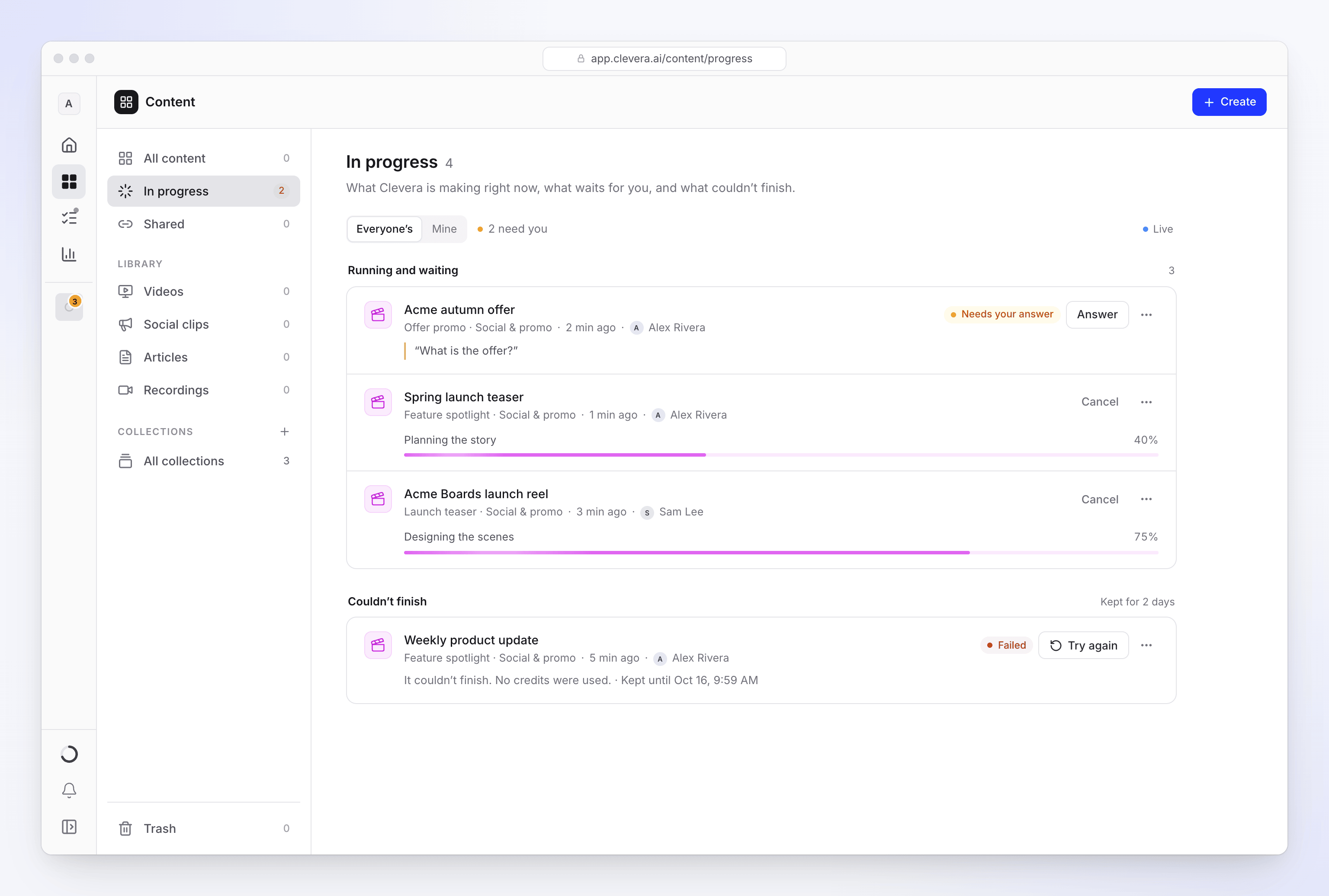
The list updates by itself while it's open (a Live marker shows this). Inside a collection, it shows only that collection's runs.
Whose runs
The Whose runs switch at the top chooses Everyone’s or Mine. Workspace owners and admins start on Everyone’s; other members start on Mine. You only see runs for items you can open. With Everyone’s, each row shows who started it.
What each row shows
Runs are in two groups: Running and waiting, and Couldn’t finish.
| Status | What it means |
|---|---|
| Running | Clevera is making it now. The row shows the current step and a progress bar. |
| Queued | "Starts as soon as a slot frees up." Nothing is charged until it starts. |
| Needs your answer | "Clevera asked a question and waits for you." The row shows the question. |
| Not responding | The run has gone quiet for a while. It may still recover; if it doesn't, it fails on its own. |
| Failed | "It couldn’t finish." Failed runs stay under Couldn’t finish for 2 days; each row says Kept until a date and time. When a run failed on our side, the row says "No credits were used." |
When a teammate's run finishes while you're watching, a notice says it's ready, with Show to open it. Your own runs tell you through your notifications.
Act on a run
Each row's ⋯ menu has the actions that fit its status:
| Action | When | What happens |
|---|---|---|
| Open | Always | Opens the run's page, or the finished item. |
| Answer | Needs your answer | Opens the question ("Clevera has a question for you.") so you can reply without leaving the list. Then: "Thanks — Clevera carries on." |
| Cancel run | Running, queued or not responding | Asks "Cancel “title”?" first. A running one: "Clevera stops now. Credits are only charged for finished work." A queued one: "It hasn’t started, so nothing is charged." Click Cancel run to stop it, or Keep it. |
| Try again | Failed | Starts the run again. It uses credits like a new start. Editors see it disabled ("Your role can edit existing content but cannot create new content."). |
| Dismiss | Failed | Clears the failed run from your list. |
| Discard for everyone | Failed | Asks "Discard “title”?" ("It leaves this list for everyone in the workspace.") and removes it for the whole workspace. |
Clevera checks each action against your role, so you may not see every action on a teammate's run.
Troubleshooting
| Message | What to do |
|---|---|
| "That didn’t work. You can start over instead." | Try again couldn't restart the run. Start the video again from Create. |
| "We couldn’t stop it. Try once more." | Cancel didn't go through. Try Cancel run again. |
| "We couldn’t clear that one." | Dismiss or discard didn't go through. Try again in a moment. |
| "This question is no longer open." | The question was already answered, or it timed out and the AI carried on. |