

Customize how a doc site looks
Set a doc site's logo, favicon, brand color, fonts, corners, default theme and home page header, and choose whether the "Powered by Clevera" badge shows. Preview every change before you save and publish.
Appearance controls how your doc site looks to readers: the logo and favicon, one brand color, the fonts, the shape of corners, the default light or dark theme and the header of your home page. Every change shows in a live preview as you make it, and goes live with your next publish.
Before you start
- Owners, admins and editors can change the appearance. Others see "Only admins and editors can change how the site looks."
- A paused site is read-only: "This site is paused. Resume it to change how it looks."
- The site's name is set in Settings → General, not here.
Change the appearance
Open Appearance
Open your doc site and go to Appearance under Site. The form is on the left and the Live preview on the right. On a narrow window, click Preview to open it.
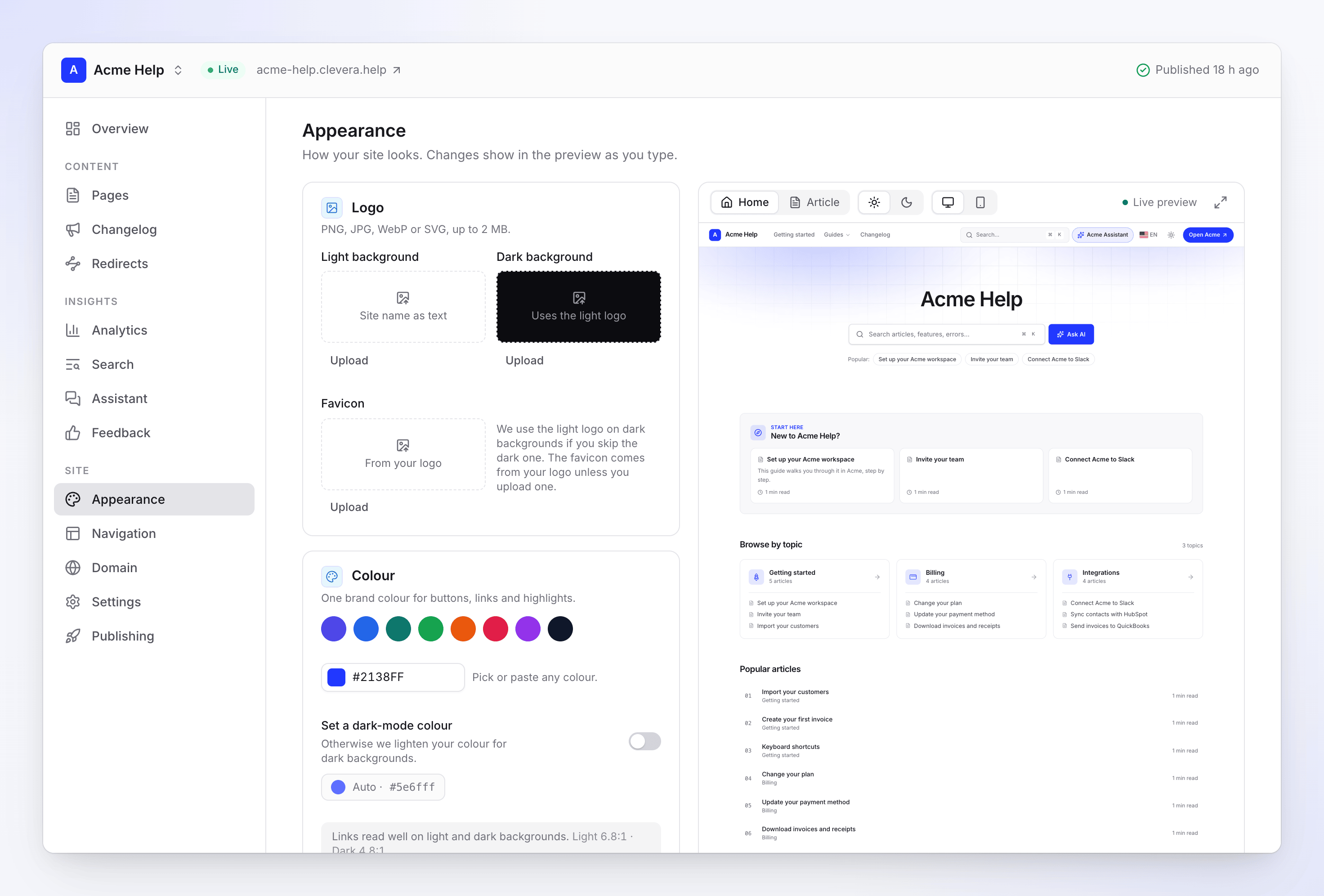
The Appearance screen with its live preview Make your changes
Work through the sections below. The preview updates as you type.
Check the preview
Switch the preview between Desktop and Phone, Light and Dark, and between the Home page and an Article page.
Save and publish
A bar shows Unsaved changes with Discard and Save. Click Save, then publish the site to put the new look live. If auto-publish is on, it goes live on its own a couple of minutes later.
If you leave the page with unsaved changes, Clevera asks before you lose them.
Logo and favicon
"PNG, JPG, WebP or SVG, up to 2 MB."
| Slot | What it's for | When empty |
|---|---|---|
| Light background | The logo in the header in light mode | The site name shows as text ("Site name as text") |
| Dark background | The logo in dark mode | "Uses the light logo" |
| Favicon | The small icon in the browser tab | "From your logo" |
Each slot has Upload, Replace and Remove. "We use the light logo on dark backgrounds if you skip the dark one. The favicon comes from your logo unless you upload one."
Colour
"One brand colour for buttons, links and highlights."
- Click one of the 8 swatches, or use the color picker to "Pick or paste any colour." as a hex value such as
#2563eb. The default is#4f46e5. - Turn on Set a dark-mode colour to choose the color used on dark backgrounds. Off: "Otherwise we lighten your colour for dark backgrounds." The derived color shows as Auto with its hex value.
- A contrast note below checks your links. "Links read well on light and dark backgrounds." means you're fine; "Links may be hard to read. We'll darken them slightly." means the site adjusts the link color for readability.
Typography
"Popular pairings that work in every language, or any Google font."
| Pairing | Headings | Body text |
|---|---|---|
| Inter (default) | Inter | Inter |
| Geist | Geist | Geist |
| Manrope | Manrope | Manrope |
| Plus Jakarta Sans | Plus Jakarta Sans | Plus Jakarta Sans |
| DM Sans | DM Sans | DM Sans |
| IBM Plex Sans | IBM Plex Sans | IBM Plex Sans |
| Space Grotesk + Inter | Space Grotesk | Inter |
| Source Serif + Sans | Source Serif 4 | Source Sans 3 |
For something else, click More fonts… and pick any Google font for Headings, Body text or both. The list starts with the most popular fonts; type to search it by name. Each font shows its style: Sans, Serif, Display, Handwriting or Mono.
"Any Google font. We host it with your site, so readers never load it from Google. Languages it lacks use the pairing." So if your font has no Japanese letters, Japanese pages fall back to the pairing you picked.
Shape and theme
| Setting | Options | Default |
|---|---|---|
| Corners | Sharp, Soft, Round: the rounding of buttons, cards and boxes | Soft |
| Default theme | System (follows the reader's device), Light, Dark. "Readers can switch it in the header." | System |
Home page header
Home sets "The top of your site's front page."
| Field | What it does | Default |
|---|---|---|
| Title | The big heading, up to 120 characters | Your site's name |
| Subtitle | The line under it, up to 300 characters | Empty |
| Search box | A search box under the title | On |
| Background | What sits "Behind the title and search box." | Gradient (Soft glow) |
Title and Subtitle can differ per language: open Other languages under the field, or click Translate to all languages to fill the missing ones for free. Empty languages show the default language's text.
Background
"Text colours adjust to stay readable, in light and dark mode." A contrast reading such as "Title contrast · Light 7.1:1 · Dark 9.4:1" shows how well the title reads.
| Option | Choices |
|---|---|
| Plain | No color, gradient or image behind the title |
| Colour | A tint or shade "Suggested from your brand colour, or pick any.": Faint tint, Light tint, Soft tint, Brand colour, Deep shade, Ink, Paper, Charcoal |
| Gradient | Soft glow, Wash, Aurora, Sunrise, Brand, Midnight, Mist, Sand, Graphite |
| Image | A drawn pattern (Waves, Mesh, Dots, Blueprint, Contours, Rings, Lines, Constellation) or Your own image |
Patterns follow your brand color and are on every plan. Your own image needs Starter or higher: "PNG, JPG or WebP up to 8 MB. Wide images work best; we resize and compress it for readers." It's "Shown instead of a pattern, darkened so the title reads."
Badge
Show "Powered by Clevera" adds "A small badge in the footer."
| Plan | Badge |
|---|---|
| Free | Always shown; the switch is locked |
| Starter, Pro, Business, Custom | On by default; turn it off to hide it |
What each plan includes
| Option | Free | Starter and up |
|---|---|---|
| Logo, favicon, colors, fonts, corners, theme | Yes | Yes |
| Home background: plain, color, gradient, pattern | Yes | Yes |
| Home background: your own image | No | Yes |
| Hide the badge | No | Yes |
See Doc site plans and limits for everything else.
Troubleshooting
| You see | What to do |
|---|---|
| "That image is over 2 MB." | Make the logo smaller or save it as WebP or SVG. A home image may be up to 8 MB. |
| "Use a PNG, JPG, WebP or SVG image." | Logos and favicons take only these types. Home images take PNG, JPG or WebP. |
| "We couldn't use this image. Try a PNG or JPG." | The file couldn't be read. Export it again as PNG or JPG. |
| "That image didn't upload. Try again." | The upload was interrupted. Try again. |
| "Couldn't save the appearance. Try again." | Nothing was saved. Check any field marked in red, then click Save again. |
| "The font list didn't load." | Click Try again. Your current fonts stay as they are. |
| The live site still looks the old way | Saving doesn't publish. Click Publish at the top of the site. |