

Fix a website the AI couldn't read
Every message you can see when website research can't read a site, from security checks and sign-in pages to empty pages and PDF links, with what each means and how to get your social clip made anyway.
Sometimes the AI can't read a website: the site blocks automated visits, asks for a sign-in, or shows nothing useful. This article lists every message you can see, what it means and what to do, so you can still get your social clip made.
Where you see the problem
| Where | What it looks like |
|---|---|
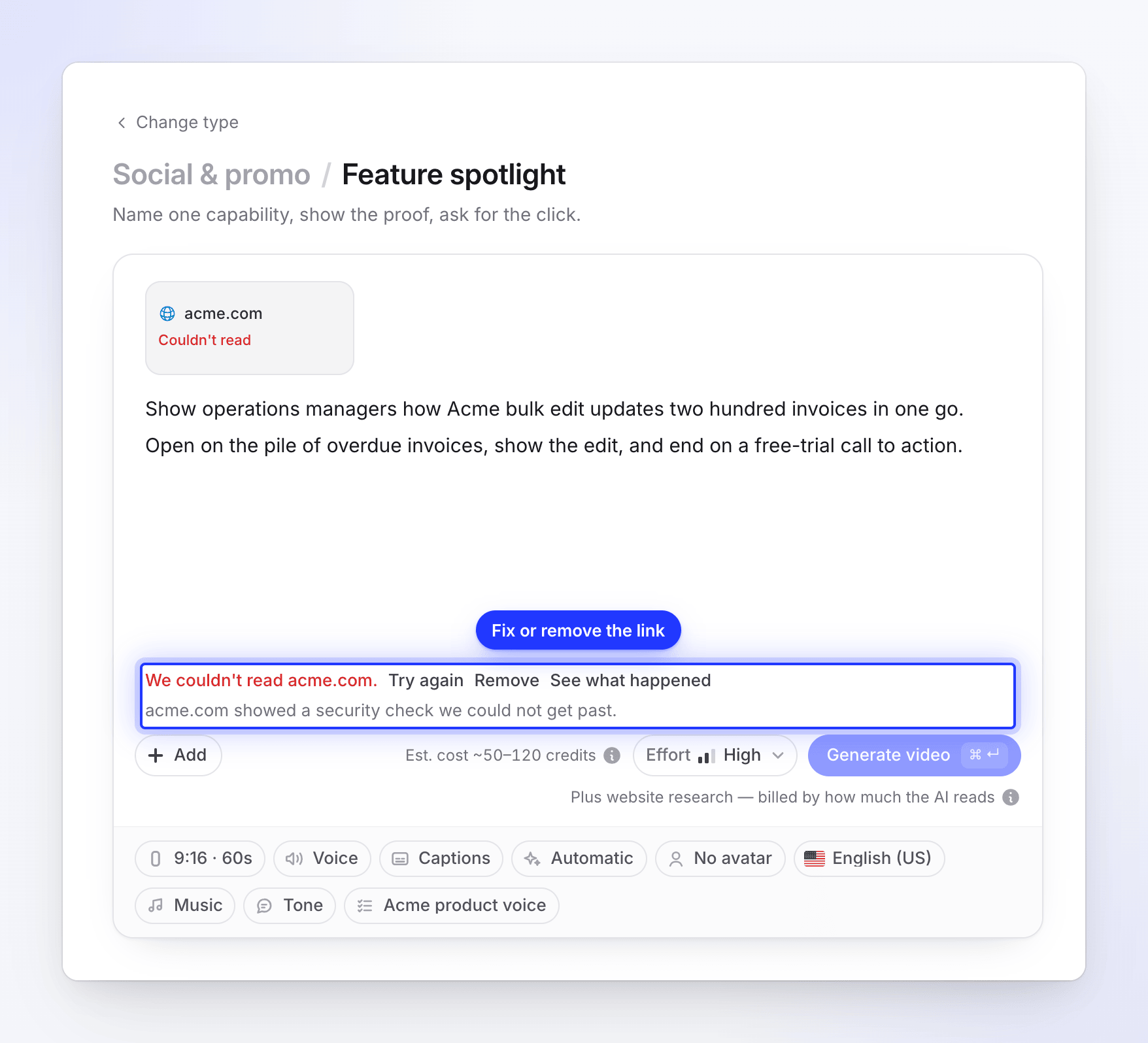
| The link's tile in Compose | The status Couldn't read, with the reason on the tile. |
| Under Generate video | "We couldn't read acme.com." with Try again, Remove and See what happened. Generate waits until you fix or remove the link. |
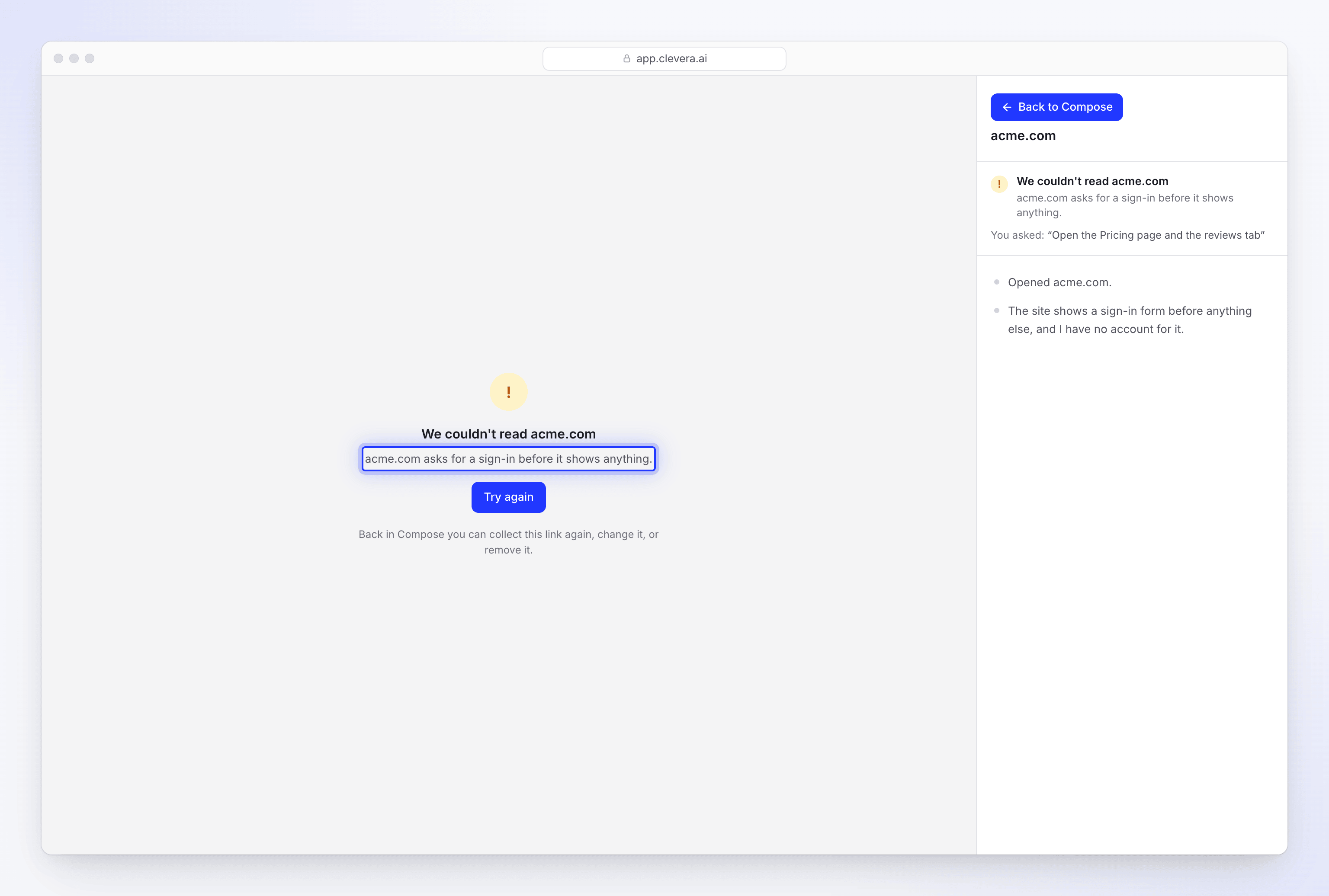
| The live page | "We couldn't read acme.com" and the reason, a Try again button, then "Back in Compose you can collect this link again, change it, or remove it." |
| The generation page | "We couldn't read acme.com: reason. Fix the link (or remove it) and start again." The video stops before it's made. |
Messages about the site
These come from the AI's visit. In each message, acme.com stands for your site.
"acme.com showed a security check we could not get past."
The site put up a bot check, such as "Checking your browser…" or a CAPTCHA, and it didn't clear. The AI waits for these checks and retries once on another connection, but some sites block every automated visit.
What to do:
- Try a different page of the same site, for example a product or pricing page instead of the home page. Some sites only guard the home page.
- Take screenshots of the pages yourself and add them with + Add → Upload images or PDF, then put the facts in your brief.
- If it's your own site, ask whoever runs it whether bot protection can allow visits to public marketing pages.
"acme.com turned our browser away."
The site refused the visit outright, for example with an "Access denied" or "Too many requests" page. Wait a few minutes and click Try again. If it keeps happening, use screenshots and your brief instead.
"acme.com asks for a sign-in before it shows anything."
The first page is a sign-in form. Website research never signs in, so it can't read pages behind a login.
What to do:
- Point research at a public page instead, such as the marketing site, a pricing page or a public product page.
- To show the inside of your app, film it with Record with AI, which can sign in, or record it yourself with the desktop app.
- Upload screenshots of the signed-in pages.
"acme.com showed an empty page."
The page loaded with almost no text and no pictures. This happens with pages that only work after an interaction, pages still being built, or a wrong address. Check the address in your own browser, then try a page with real content.
"We could not open acme.com."
The page didn't load at all. Check that the address is right and that the site is up, then click Try again.
"We collected acme.com but could not read what we collected. Try again."
The visit worked, but reading the results failed. This is usually temporary. Click Try again.
Messages about the run
| Message | What it means | What to do |
|---|---|---|
| "Collecting was stopped before it finished." | Someone clicked Stop on the live page. | Click Try again to research the site again. |
| "This collection expired before it finished." | The research took too long and was given up. | Click Try again. |
| "Something went wrong while reading the site." or "The AI could not collect anything from this page." | The run ended without results. | Click Try again. If it fails twice, use screenshots and your brief. |
| "The browser worker did not finish in time." or "The browser worker was stopped unexpectedly." | A problem on our side. | Click Try again. If it keeps happening, contact support. |
| "Website research did not finish." | The run ended without a clear reason. | Click Try again. |
Messages when you start research
| Message | What to do |
|---|---|
| "Use an https:// address." | Use the https:// version of the address. |
| "We can only open public internet pages over https." | The address is private (an intranet, a local or internal address). Use a public page. |
| "Your team is already collecting as many websites as it can at once. Wait for one to finish, then try again." | Two researches are already running in your workspace. Wait for one to finish. |
| "All our browsers are busy right now. Try again in a few minutes." | Try again shortly. |
| "Recording with AI is switched off right now. Try again later." | Research is paused for maintenance. Try again later. |
| "Your Free workspace is under review, so new recordings are paused. Upgrade to a paid plan to keep going, or contact us." | Your workspace is being reviewed. Upgrade or contact support. |
Messages during generation
If you pasted a link into the brief, or a link was still waiting when you pressed Generate, the AI reads the site while your video is being made. If it can't, the video stops with "We couldn't read acme.com: reason. Fix the link (or remove it) and start again." The reason is one of the site messages above, or one of these:
| Reason | What to do |
|---|---|
| "The video was stopped before the site was read." | You stopped the video. Start it again. |
| "Collecting it was stopped before it finished." | The research was stopped. Research the link again from Compose. |
| "Nothing we could use came back from it." | Research the link from Compose with Research a website to see what happened, or use screenshots. |
| "We could not make sense of what was collected from it." | Try again, or try a different page of the site. |
| "Collecting it stopped before the site was read." | Try again from Compose. |
Try again isn't offered on the generation page for these, because the same link would stop the same way. Fix or remove the link in Compose, then press Generate video again.
Two other lines can appear on the generation page:
- "I read acme.com, but I couldn't use what's on it: its content falls outside what our AI can work with. Try another link, or add pictures and a description instead." The site was read, but its content can't be used in a video. Use another link, or describe the product in your brief and add your own pictures.
- "Heads-up: I couldn't read acme.com, so I worked from what you wrote." This only appears for a link you added to match a site's style. The video carries on without it.
PDF links
Research reads web pages, not PDF files, so a link that opens a PDF can't be read. Download the PDF and add it with + Add → Upload images or PDF instead. A social clip takes up to 3 PDFs of up to 40 MB and 30 pages each.
YouTube links
A YouTube address isn't researched. It's added as a video, not a website, so it never shows Couldn't read.
Get your clip made anyway
If a site can't be read, you have three ways forward:
- Use a different page of the same site, and say what you need in What should we look at?.
- Bring the content yourself: screenshots or product images with Upload images or PDF, and the facts (offer, price, features, proof) in your brief.
- Use earlier research: if the site was read before, pick it under Previous research.