

Understand AI agents and the API
What AI agents such as Claude, ChatGPT, Claude Code, Codex and Cursor can do in your Clevera workspace, the ways to connect them, plans (Pro and up), limits, roles, costs and safety.
AI agents & API lets AI apps such as Claude, ChatGPT, Claude Code, Codex and Cursor, and your own scripts, work in your Clevera workspace: find recordings, request videos, social clips and articles, export videos, and work on doc sites. You decide exactly what each agent may do, how many credits it may spend and when a person has to approve.
What agents can do
| Area | What an agent can do |
|---|---|
| Videos | List and read your recordings, videos, articles and transcripts; request how-to, product demo, cleanup and styled videos from a recording, social clips, articles from a recording and video translations; export MP4s up to 4K; add images, videos and PDFs to your uploads. |
| Doc sites | Read, draft, organize, translate and publish doc site pages and the changelog, answer readers from published pages, read reader insights, and change site settings or create sites. |
Agents can't yet run website research or recorded walkthroughs.
The agent does the asking; Clevera's own AI makes the video or article, the same way as when you start it in the app. An agent never sees more than its owner could see: recordings in a private collection stay hidden unless the token's owner has access.
Ways to connect
| Way | For | Set up in |
|---|---|---|
| API token | Claude Code, Codex CLI, Cursor, any MCP client, and your own scripts over the REST API | Tokens → New token. See Create an API token. |
| Connected app | Claude (claude.ai) and ChatGPT as a custom connector; no token, you sign in | The app, with the connector URL from Connected apps. See Connect AI apps and agents. |
| REST API | Scripts and backend services | An API token. See Use the REST API. |
The MCP server is https://app.clevera.ai/mcp and the REST API is under https://app.clevera.ai/api/v1.
Find the page
Open the workspace menu and choose AI agents & API. On doc sites, it's also on the Docs home page and in a site's Settings menu. The page ("Let Claude, Codex, ChatGPT and your scripts work in this workspace.") has five tabs, each with its count:
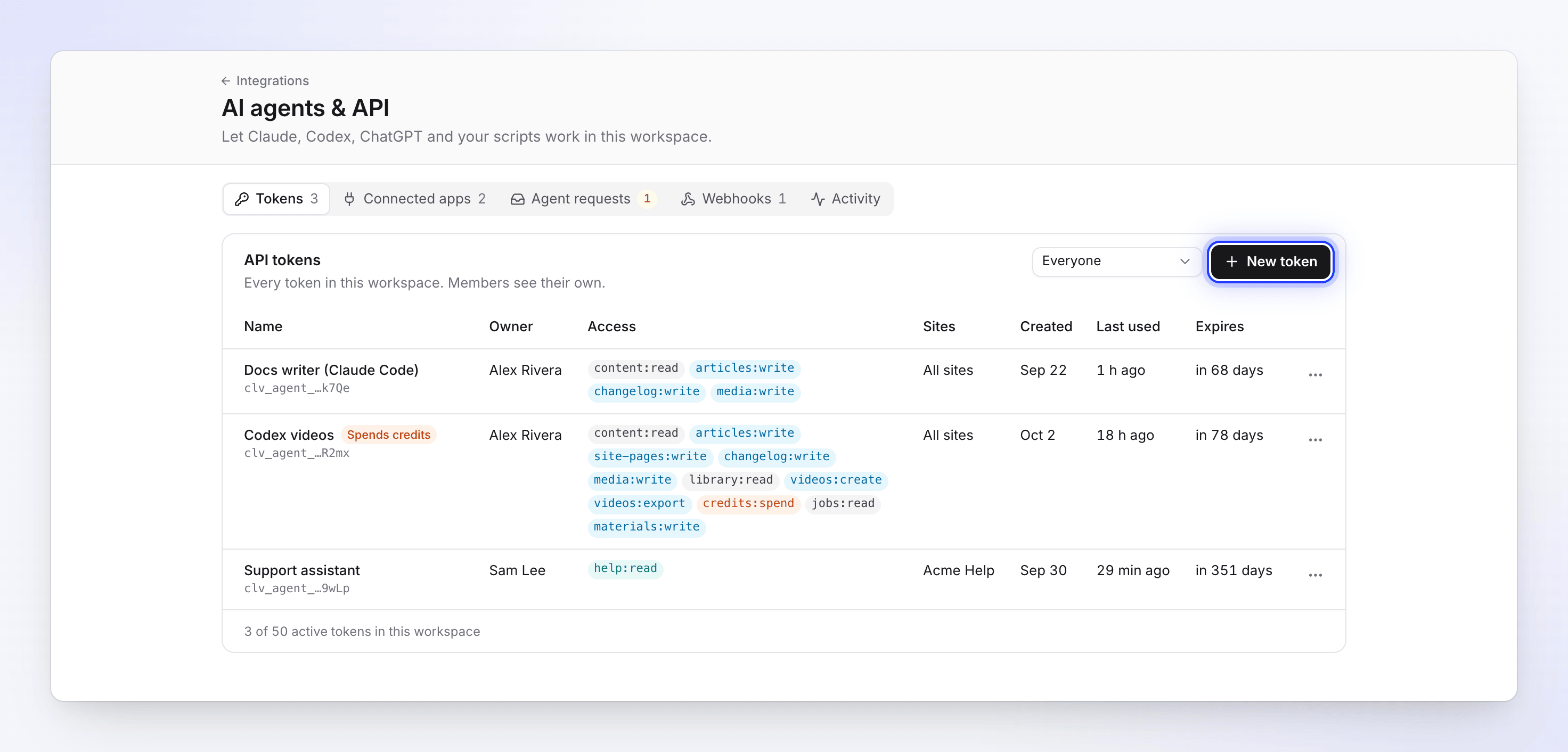
| Tab | What's there |
|---|---|
| Tokens | Your API tokens; owners and admins see every token. Manage API tokens |
| Connected apps | The connector URL, and the apps people connected. Connect AI apps and agents |
| Agent requests | Paid work waiting for a person to approve, with a count badge, and the history. Control agent spending and approvals |
| Webhooks | Signed notifications to your own systems. Set up webhooks |
| Activity | What agents did. Read agent activity |
Plans
AI agents & API is on the Pro, Business and Custom plans. That includes API tokens, connectors for Claude and ChatGPT, and webhooks.
On Free and Starter, the page shows "AI agents & API are included in Pro": "Upgrade to let Claude, ChatGPT and your scripts work in this workspace. Existing tokens and apps stop working until then; you can still revoke them here." Click Upgrade to Pro. Locked controls say "The API and agent access are on Pro and up.", "Claude.ai and ChatGPT connectors are on Pro and up." or "Webhooks are on Pro and up."
| Limit | Pro, Business, Custom |
|---|---|
| Active API tokens per workspace | 50 |
| Connected apps per person | 20 |
| Webhooks per workspace | 10 |
| Approve automatically below at most | Pro and Business: 500 credits. Custom: 1,000 credits. |
If the workspace leaves Pro
Nothing is deleted, but everything pauses until you upgrade again:
| After moving to Starter or Free | |
|---|---|
| API tokens | Stay listed and can be revoked. Every call is refused: "The agent API is not on this workspace's plan. It is on Pro and up." They can't be regenerated (Regenerate secret opens the upgrade dialog). |
| Connected apps | Stay listed and can be disconnected. Their calls fail; Claude or ChatGPT may only say it couldn't connect. |
| Webhooks | Stay listed, but nothing is sent. Send test event and Redeliver say "Webhooks are not on your plan." |
| Agent requests | Approve says "The API and agent access are not on your plan." Deny still works. |
| New tokens | "The API and agent access are not on your plan." |
Upgrading back to Pro makes tokens, apps and webhooks work again. Tokens still expire on their original dates.
Who can do what
An agent acts as the person who created its token or connected it, within what that person's role allows. It can never do more than that person could do in the app, and the role is checked on every call, so a role change takes effect at once.
| Task | Owner | Admin | Editor | Content Creator |
|---|---|---|---|---|
| Create tokens and connect apps for yourself | Yes | Yes | Yes | Yes |
| See and revoke every token and app in the workspace | Yes | Yes | Own only | Own only |
| Give an agent permission to request videos and spend credits | Yes | Yes | No | Yes |
| Give an agent permission to publish doc sites | Yes | Yes | Yes | No |
| Approve paid work agents ask for | Yes | Yes | No | No |
| Manage webhooks | Yes | Yes | No | No |
The full list is in Agent permissions.
What it costs
- API and MCP calls are free: reading, searching, quoting and checking a job cost no credits. So do video exports.
- Work that uses AI costs credits, the same as when you start it in the app: videos, social clips, articles from recordings, translations and AI-generated site pages.
- An agent can only start paid work with a token that has
credits:spend. Every start is quoted first and checked against the token's spend caps, and a person approves it unless it's below the token's Approve automatically below line. See Control agent spending and approvals.
How Clevera keeps agents safe
- Tokens always expire: after 7 days, 30 days, 90 days or 1 year. There is no "never".
- Secrets are shown once. Clevera stores only a fingerprint and shows the last four characters.
- Least access. Each token has only the permissions, doc sites and IP addresses you pick.
- People approve money. An agent can't approve its own spending; only the workspace owner or an admin can.
- Leaked tokens are revoked. A Clevera token found in a public GitHub repository is revoked automatically.
- Unusual activity is stopped. Bursts of refused calls revoke the token; bursts of changes or spending pause it, and the owner is notified.
- Everything is logged on Activity, kept for 13 months. An agent's doc site edits also show in the page's history as "Agent name (token)".