

Make a video in another language
Clevera makes videos and articles in 74 languages and variants. Set the Language option before you generate, or translate a finished video later. See every language, which voices speak it and what translation costs.
Every video and article in Clevera can be made in any of 74 languages and variants. You choose the language before you generate, and you can translate a finished video into more languages later.
Choose the language before you generate
Click the Language pill
On the Compose page, click the pill with a flag (it reads English (US) by default). Its menu says what it changes: "For the script, voice and on-screen text."
Pick a language
Type in Search languages to filter by name or country. Your recent languages are listed first under Recent, then All languages.
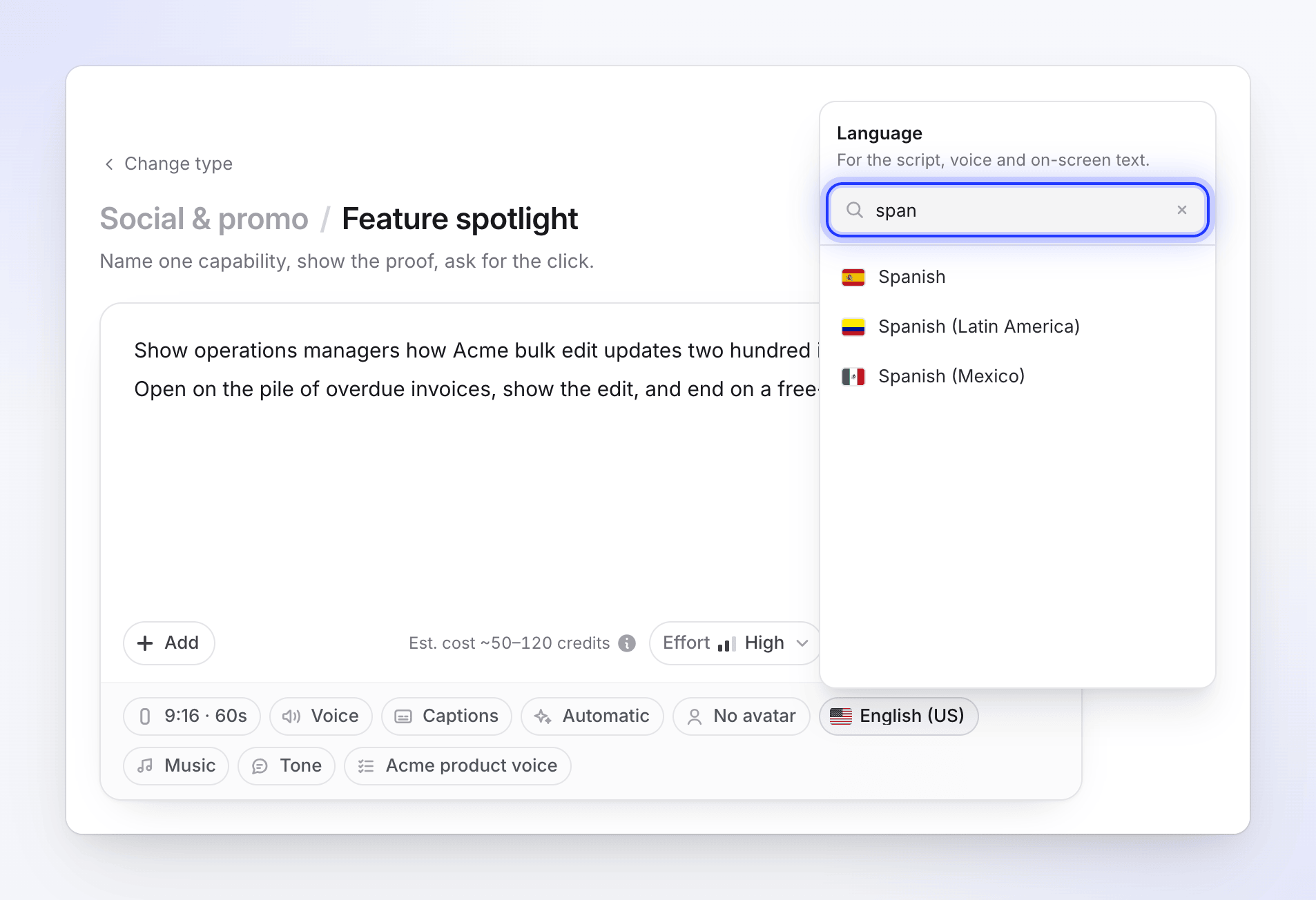
The language sets the script, the voice and the on-screen text. Check the voice
Changing the language reloads the voice list for it. If the voice you had speaks the new language, it stays; otherwise a suitable voice is picked. Press play on a voice to hear it. See Choose a voice and preview it.
Clevera remembers the last language you used in this browser, so your next video starts with it.
Polish videos (Clean-up and Styled for sharing) also have a Language pill, but they can't be translated after they're made, so pick their language before you generate.
What the language changes
| Part of the video | In the chosen language? |
|---|---|
| Voice-over script and narration | Yes |
| Captions | Yes, they're the spoken words |
| On-screen text in social clips (titles, labels, calls to action) | Yes |
| Article text and screenshot captions | Yes |
| Your recording's own audio | No. A Clean-up keeps your voice as you recorded it. |
| Text inside your product, screenshots or pictures | No. The AI doesn't change what's on screen in your footage. |
Your own words don't have to match. You can write the brief in one language, record yourself speaking another, and make the video in a third. In the setup chat you can also write in any language; the chat replies in yours and the video's language is a separate step.
Which voices speak which language
| Voice source | Languages |
|---|---|
| Built-in | Every built-in voice speaks all 74 languages. The list puts the voices that suit your language first. |
| ElevenLabs (your own account) | Voices are filtered to the video's language. If none match, the whole list is shown. |
| Avatar voices (social clips with an AI avatar) | Each avatar voice supports a set of languages; the list shows the ones that fit. |
All 74 languages
English (US), English (UK), English (Australia), English (India), Hindi, Spanish, Spanish (Latin America), Spanish (Mexico), French, French (Canada), Arabic, Arabic (World), Bengali, Portuguese, Portuguese (Portugal), Russian, Indonesian, German, Japanese, Korean, Vietnamese, Turkish, Thai, Italian, Polish, Ukrainian, Romanian, Dutch, Telugu, Tamil, Marathi, Afrikaans, Armenian, Azerbaijani, Belarusian, Bulgarian, Catalan, Cebuano, Mandarin Chinese, Mandarin Chinese (Taiwan), Croatian, Czech, Danish, Estonian, Filipino, Finnish, Galician, Georgian, Greek, Gujarati, Hebrew, Hungarian, Icelandic, Javanese, Kannada, Latvian, Lithuanian, Luxembourgish, Macedonian, Malay, Malayalam, Nepali, Norwegian (Bokmal), Norwegian (Nynorsk), Pashto, Persian, Punjabi, Serbian, Sindhi, Slovak, Slovenian, Swahili, Swedish, Urdu.
Every plan, including Free, can use every language.
Translate a finished video
You don't need to generate a video again for each market. Open the finished video and use Translate… in the editor's language menu to add more languages. Each language becomes its own version, with the script translated and the voice-over recorded again. Zooms and elements are copied from the original into the new version.
| Cost | 3–10 credits per language, based on the video's length and whether the voice-over is recorded again |
| Social clips | Up to 5 languages translating at once |
| Social clips with an AI avatar | The translated version keeps the voice in the new language but drops the avatar's face |
| Text you added yourself | Not translated. Edit it in each language version. Captions may need regenerating. |
| Redoing a language | There's no re-translate button. Delete that translation and translate again; zooms and elements are copied from the original again. |
| Polish videos | Can't be translated |
| Articles | Translate them with the article assistant, which shows the credit cost first |
See Translate a finished video.