

See what each kind of video costs
The usual credit range for every kind of video, social clip, article and translation, what makes a job cost more or less, what is charged on top, and what is always free — with worked examples.
Every AI job in Clevera uses credits, and most jobs of the same kind cost about the same. This page lists the usual range for each kind of video, what moves the cost within it, and what is always free. Before you generate, the estimate under Generate shows the range for your exact choices.
Cost of each kind of content
These are the ranges most jobs fall in, based on our benchmarks and recent generations. They are the same on every plan.
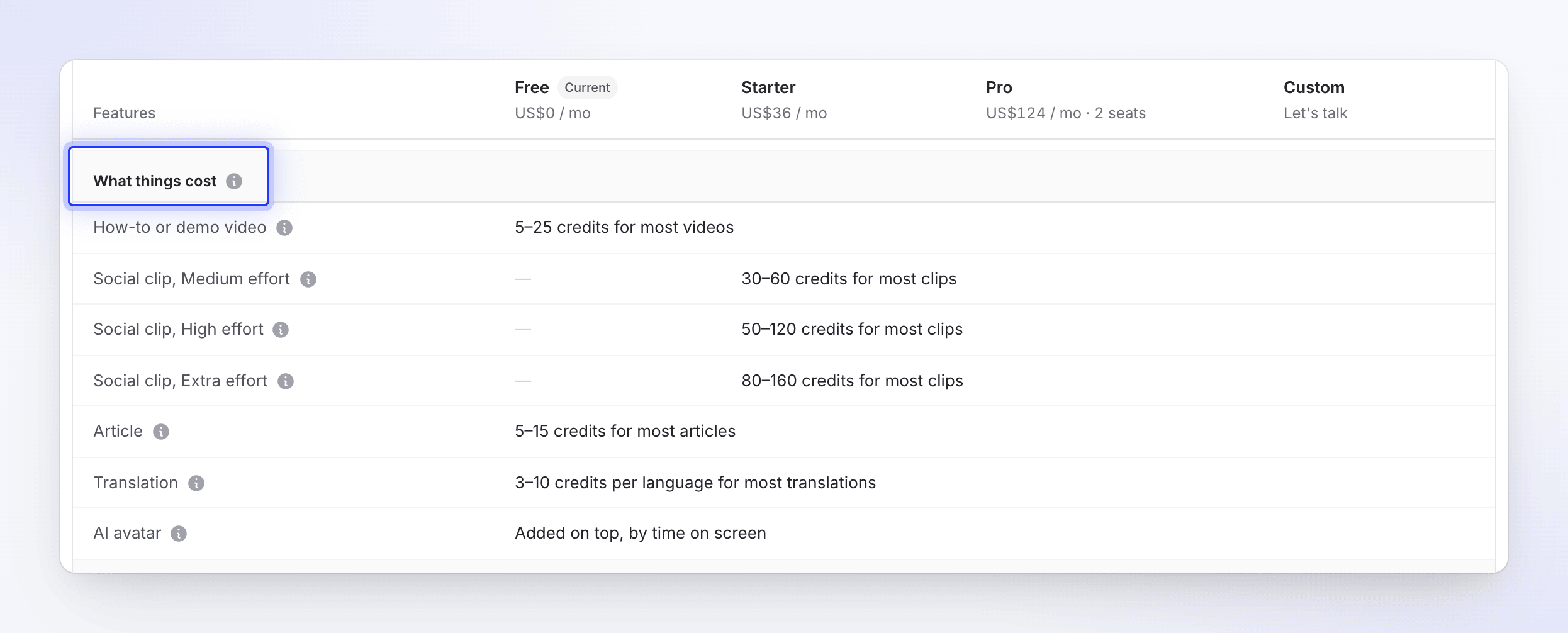
| What you make | Usual cost | Notes |
|---|---|---|
| How-to or product demo video | 5–25 credits | About 95% of how-to and demo videos cost this. A recording of 5 minutes or less is priced as one video; longer recordings cost more. |
| Styled for sharing in Polish | 1–5 credits | Only the automatic zoom pass uses the AI. A recording of 5 minutes or less is priced as one video; longer recordings cost more, and the estimate never shows more than 6 credits. |
| Social clip, Medium effort | 30–60 credits per clip | "Quick and clean, ready sooner." |
| Social clip, High effort (default) | 50–120 credits per clip | Richer motion and more scenes, checked as it is built. |
| Social clip, Extra effort | 80–160 credits per clip | Extra review rounds on every scene. Takes longest. |
| Article | 5–15 credits | How-to articles, troubleshooting guides, SOPs, blog posts and product updates. |
| Translation | 3–10 credits per language | For a finished video or article. Three languages cost three times one. |
| AI avatar | Added on top, by time on screen | Included in the estimate's range when you add one. Paid plans only. |
Work that is charged on top of the estimate
Some work depends on how much the AI has to do, so no estimate can price it in advance. It is billed as it happens, and the estimate shows it as an extra line.
| Work | How it is billed | Line under the estimate |
|---|---|---|
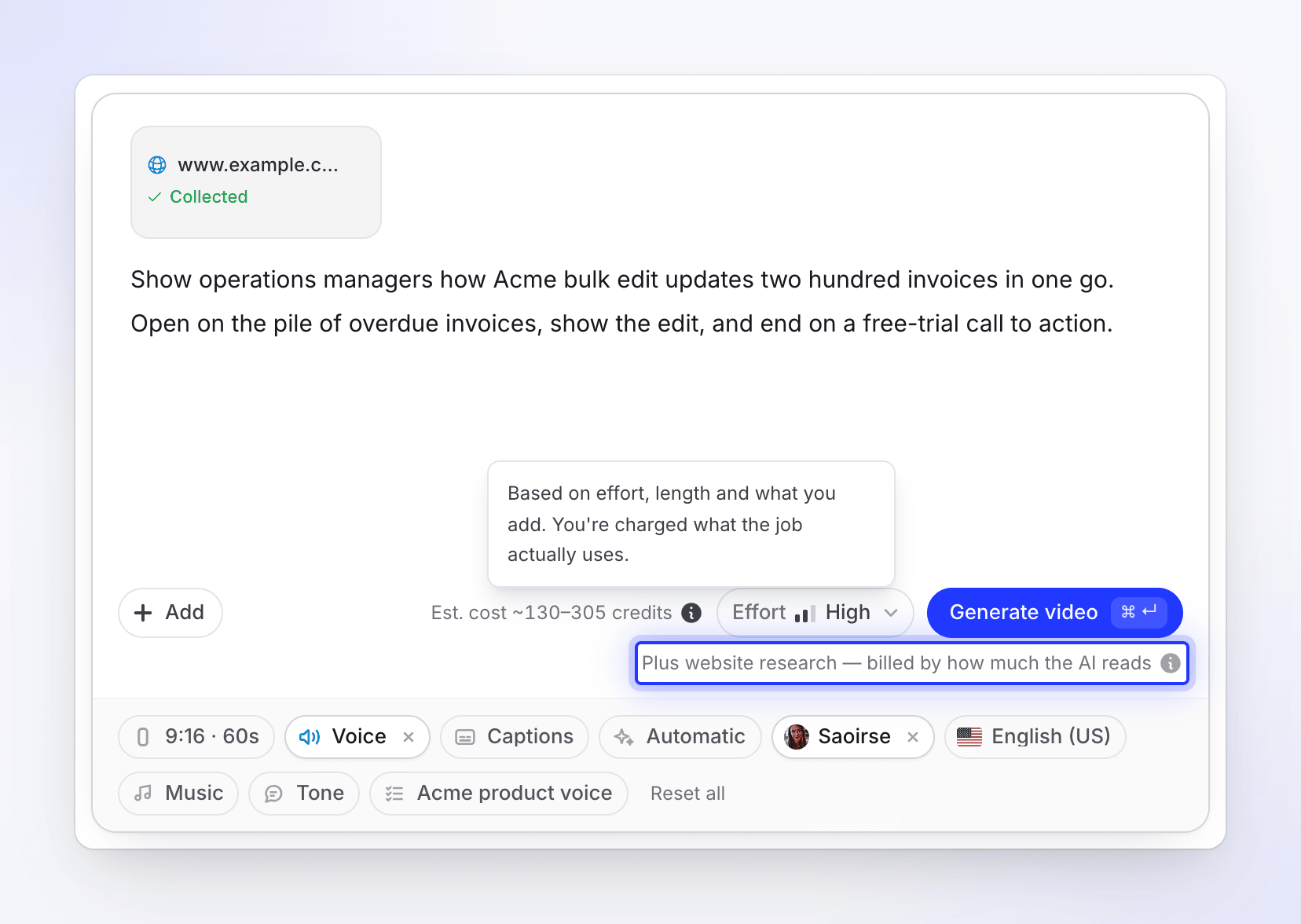
| Website research — the AI visits a link you added and reads it | By the pages and pictures it reads and the time it spends on the site. Bigger sites use more. | "Plus website research — billed by how much the AI reads" |
| Record with AI — the AI drives a browser and records your product | By the time the AI spends in the browser. More steps use more credits. | "Plus AI recording time — billed by how long the AI works" |
| AI assistant edits — changes you ask the assistant for after the video is made | By what each edit does, as it happens. There is no estimate. | — |
See Understand what website research and Record with AI cost and Ask the assistant to change your video.
What is always free
- Exporting videos. Exports never use credits, on any plan, and an empty wallet never blocks an export.
- Editing by hand: zooms, styles, music, scenes and on-screen text.
- Sharing links, embeds and analytics.
- Recording with the desktop app and uploading recordings, pictures and PDFs.
- Avatar look previews.
- Runs that fail on our side. Every credit a failed video, clip, article, translation, website research or Record with AI run used is returned. See Know when credits are charged.
What makes a job cost more or less
| Kind | What moves the cost |
|---|---|
| How-to or demo video | Mostly the length of your recording, then the number of steps and scenes, the voice-over and any extra material you add. An AI avatar costs extra. |
| Styled for sharing | The length of your recording. |
| Social clip | Effort sets how much work goes into the clip. Within an effort level: the clip's length, number of scenes, voice-over, and how much footage, material and research it draws on. An AI avatar costs extra. |
| Article | How long the article is and how much material it is written from, such as a recording, documents, pages or links. |
| Translation | The cost is per language, and depends on how long the video or article is and whether there is a voice-over to record again in the new language. |
Very long recordings and other complex jobs can cost more than the usual range. You are always charged the credits a job actually uses — see Know when credits are charged.
Worked examples
A 60-second social clip with an avatar
You make a Feature spotlight clip at High effort, add your website link and turn on an AI avatar. The estimate beside Generate video shows one range for everything it can price, and a separate line for the research:
| Part | What it covers |
|---|---|
| Social clip | 50–120 credits for the clip itself |
| AI avatar | The avatar video, priced by how long the avatar is on screen |
| Avatar voice | The avatar's narration, priced by seconds of speech |
| Plus website research | Reading your site, billed by how much the AI reads |
The first three parts are added into the one range on the chip. The website research is charged on top as it happens.
A how-to video in four languages
You turn a 4-minute recording into a how-to video, then translate it into Spanish, German and French:
| Step | Usual cost |
|---|---|
| How-to video from a 4-minute recording | 5–25 credits |
| Translation into 3 languages | 9–30 credits (3–10 per language) |
| Exporting all four versions | Free |
| Total | 14–55 credits |
A month on Starter
Starter includes 900 credits a month. A typical month for one creator might be:
| Work | Usual cost |
|---|---|
| 4 social clips at High effort | 200–480 credits |
| 10 how-to videos | 50–250 credits |
| 6 articles | 30–90 credits |
| Total | 280–820 credits |
If a busy month needs more, buy a credit pack.
What a month of included credits makes
About how many of each a month of included credits makes, at the usual range. The low end assumes every job costs the top of its range, the high end the bottom. Each row is an alternative, not a combination.
| Free (100) | Starter (900) | Pro, 2 seats (4,000) | |
|---|---|---|---|
| How-to or demo videos | About 12–60 min of recording | About 180–900 min | About 800–4,000 min |
| Social clips, Medium effort | Not included | About 15–30 | About 65–130 |
| Social clips, High effort | Not included | About 7–18 | About 30–80 |
| Social clips, Extra effort | Not included | About 5–11 | About 25–50 |
| Articles | About 6–20 | About 60–180 | About 260–800 |
| Translated languages | About 10–30 | About 90–300 | About 400–1,300 |
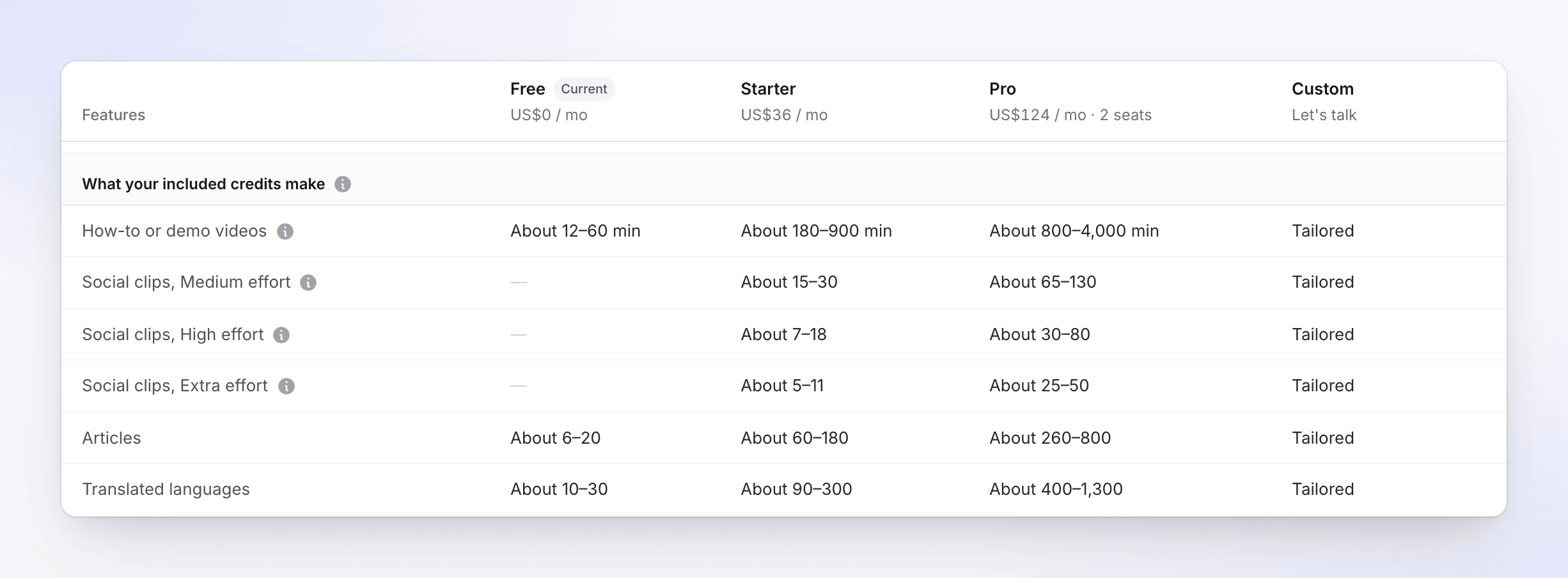
Minutes of recording count each video as a 5-minute recording (3 minutes on Free). Your own mix of lengths gives a different number. Each extra Pro seat adds 650 credits a month.