

Read an Autopilot task receipt
An Autopilot task receipt shows, line by line, the estimate the plan showed and the credits charged, planning on us, refunds for failed items, the total and the time taken. Find it on the task or in Analytics; hours saved lives in Analytics.
A task receipt shows what an Autopilot task cost once it ran, line by line: the estimate the plan showed, the credits actually charged, anything refunded and how long it took. It is in credits only. Planning a task is free and is shown on the receipt as "on us".
Where to find the receipt
- On the task. Open any task that has run (from Done, All tasks, a Repeat's Runs, or the link in a notice). The Receipt card sits under the items, with the date it finished.
- In Analytics. Open Analytics → Automation (Autopilot's Activity link goes there too) and click a task in the Tasks list. The Task receipt panel shows the same card, with Open task. A task that never ran says "This task has no receipt yet."
A task that was canceled or failed before it ran has no receipt. While a task runs, a line shows the credits used so far against its limit, for example "24 credits so far · limit 60".
Read the receipt
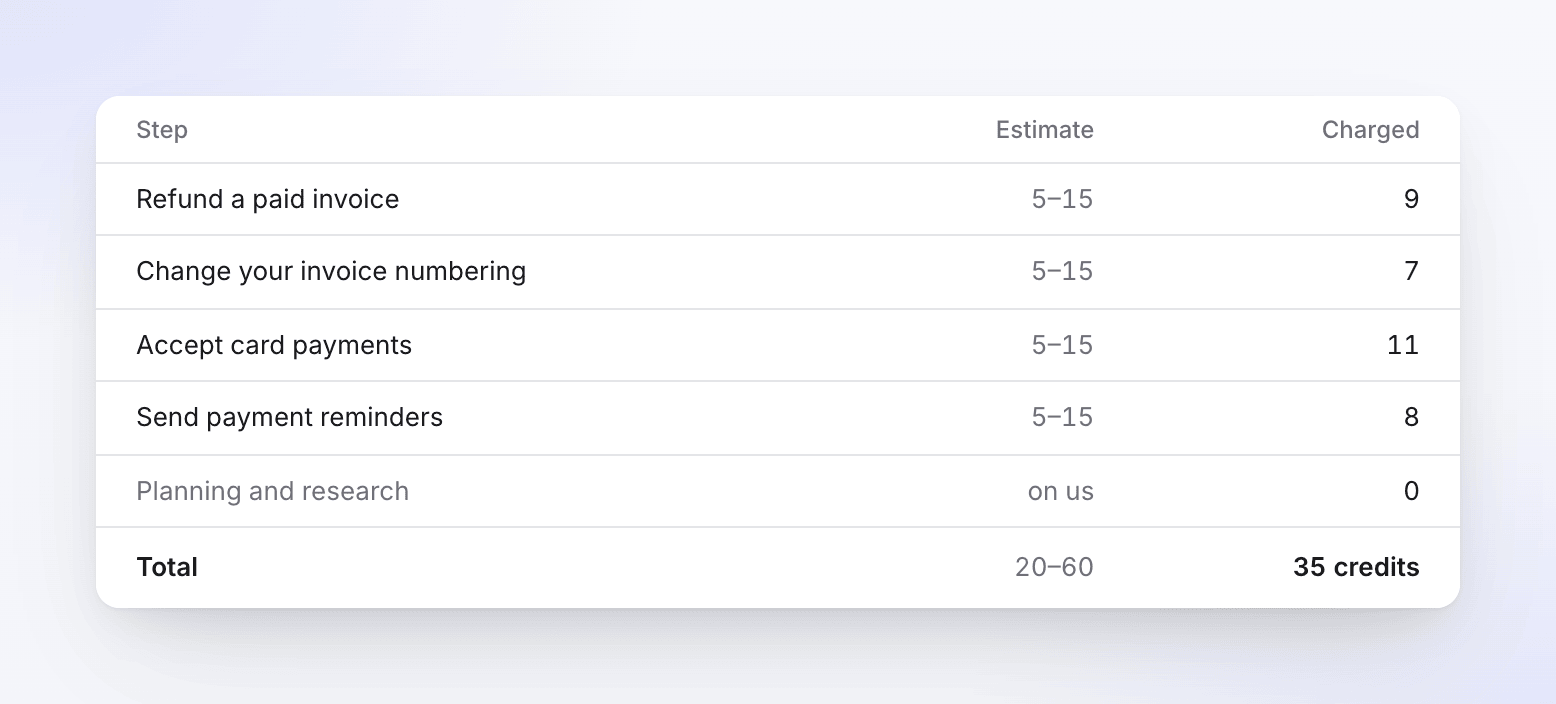
| Row | What it means |
|---|---|
| Each line (Step) | One line per item that ran. Estimate is the range the plan showed you. Charged is what the item really used. A failed item has failed next to its name. |
| Planning and research | Always on us, charged 0. Reading your app, your content and the web to make the plan is free. |
| Refunded | Credits given back, for example "Refunded (1 failed step)" with the amount as a negative number. It appears only when something was refunded. |
| Total | The estimate range for all lines and the credits charged, for example "35 credits". Refunds are already taken out. |
| Took | How long the task ran, for example "Took 17 min". |
Charged often differs from the estimate. The estimate is a range set before anything was made; the charge is what the credit ledger actually took for that item, net of anything it gave back. A line can land inside the range, under it, or now and then a little over. A task's total is exactly what your credit balance moved by.
Tasks that run step by step
A task that runs in steps, such as Build my help center, shows a block per step ("Step 1 · Brand") with its own lines and subtotal. A step that ran nothing, because you skipped it or it was only a review, shows its heading with skipped.
Failed items and refunds
A failed item shows failed on its line. Credits refunded for failed work appear in the Refunded row and are already taken out of Charged and Total. From the task you can Retry a failed item; its confirmation says what it may cost (for example "“Refund a paid invoice” runs again and may use 5–15 credits."). Contact support if something failed on our side and you don't see a refund.
Receipts for a Repeat
A Repeat makes a new run at each scheduled time, and each run has its own receipt: open it from the Repeat's Runs. The Repeat itself shows how much of this month's budget its runs used, for example "86 / 300 credits this month".
Hours saved
The receipt doesn't show hours saved. Analytics → Automation does, for the period and per task, written like "≈ 14 h": "An estimate of the hand work the pieces tasks made would have taken. Failed, undone and imported pieces don’t count."
| Piece | Minutes of hand work counted |
|---|---|
| Video | 30 for each finished minute, at least 30 |
| Article | 60 |
| Video translation | 15 for each finished minute, at least 15 |
| Article translation | 20 |
These are our current estimates and may change. Hours saved isn't charged and doesn't change a receipt.