

My video couldn't be finished
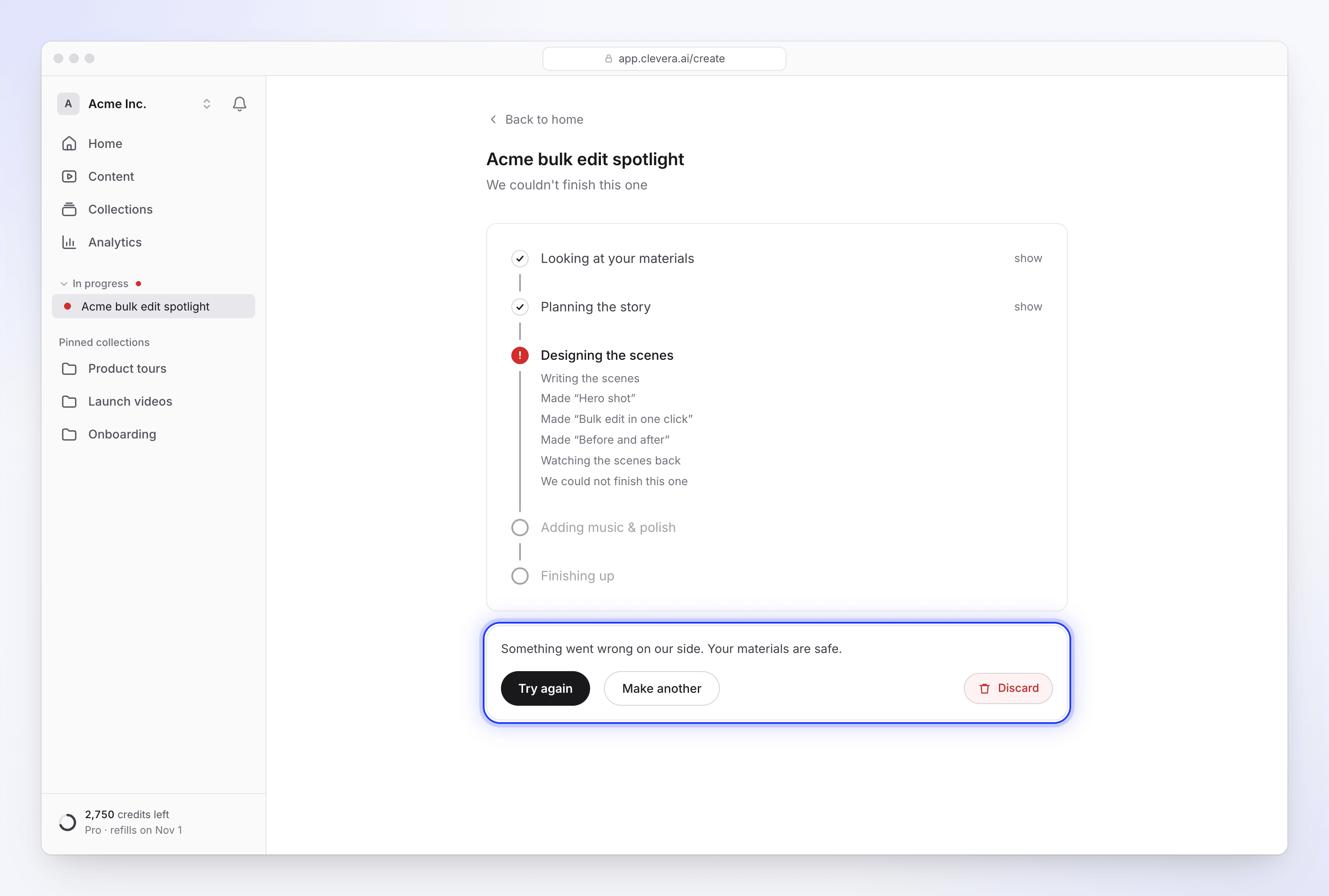
Your video or article stopped with "We couldn't finish this one". Find the exact message you see, what caused it and how to fix it: a missing fact, a link that couldn't be read, a problem on our side, or a run that stopped making progress.
When a video, social clip or article can't be finished, the generation page says "We couldn't finish this one" with one line underneath that tells you why. This page lists every one of those lines, what causes it and what to do next.
Your recording, uploads and brief are never lost when a run fails. You can always start again from them.
Quick checks
Before you read on, check these:
- Read the line under "We couldn't finish this one". It is the most precise explanation you'll get. Find it in the table below.
- Look for a Try again button. If it's there, the run can be picked back up. If it isn't, the same run would fail the same way, so fix the cause and use Make another.
- Check your brief. Offer, event and customer-story clips stop when the fact they rest on is missing.
- Check your links. A link the AI couldn't read stops a social clip.
- Check the stage that failed. On the generation page, the stage where it stopped is marked. It tells you how far the run got.
Messages and fixes
Something went wrong on our side
| Message | Cause | Fix |
|---|---|---|
| "Something went wrong on our side. Your materials are safe." | A step failed for a reason that isn't about your brief or materials, for example a service we rely on didn't answer. | Click Try again if it's shown. If it isn't, or it fails again, use Make another with the same recording and brief. If it keeps happening, contact support. |
A fact the video needs is missing
Customer story, Offer promo and Event promo clips are built on one fact you have to supply. If the AI can't find it in your brief or materials, it asks you during generation. When it still doesn't have it, the run stops with one of these lines. Try again isn't offered, because the run would stop at the same point. Add the fact to the brief and use Make another.
| Message | Fix |
|---|---|
| "A customer-quote video needs the customer's own words, and I could not find any in what you gave me. Paste their words (and who said them) into the brief, then try again." | Paste the customer's quote and their name and role into the brief. |
| "A customer story needs a customer's own words or a result with a number, and I could not find either in what you gave me. Paste their words or their result (and who they are) into the brief, then try again." | Add a quote, or a result with a number such as "cut onboarding time by 40%", and who the customer is. |
| "An offer promo needs the offer itself, and I could not find one. Add the deal, the price and the deadline to the brief, then try again." | Write the deal, the price and the end date into the brief. |
| "An event promo needs the event's name, date and place, and I could not find them. Add them and the reason to come to the brief, then try again." | Add the event's name, date, place and why people should come. |
If the AI asked and nobody answered within the question's time limit (10 minutes), the line says so instead:
| Message | Fix |
|---|---|
| "I asked for your customer's words but didn't hear back in time, so I stopped. Start again with their words, and who said them, in the brief." | Put the quote and the speaker in the brief and start again. |
| "I asked for a customer's words or a result with a number but didn't hear back in time, so I stopped. Start again with their words or their result, and who they are, in the brief." | Put the quote or result in the brief and start again. |
| "I asked for the offer but didn't hear back in time, so I stopped. Start again with the deal, the price and the deadline in the brief." | Put the offer details in the brief and start again. |
| "I asked for the event's name, date and place but didn't hear back in time, so I stopped. Start again with them, and the reason to come, in the brief." | Put the event details in the brief and start again. |
What each type needs, with examples: Make an offer, event or customer-story clip. How questions and their time limits work: Answer the AI's questions during generation.
A link couldn't be read
When a social clip is made from a website link and the AI can't read that site, the run stops instead of making a generic video. The line names the site and the reason:
| Message | Fix |
|---|---|
| "We couldn't read example.com: reason. Fix the link (or remove it) and start again." | Check the address opens in a normal browser window without a login, cookie wall or bot check. Use a public page, or remove the link and describe the product in the brief instead. |
| "We couldn't read example.com: reason. We couldn't read example.org: reason. Fix the links (or remove them) and start again." | The same for several links. Fix or remove each one. |
If you researched the link from Compose first, its live page shows the same reason before you generate:
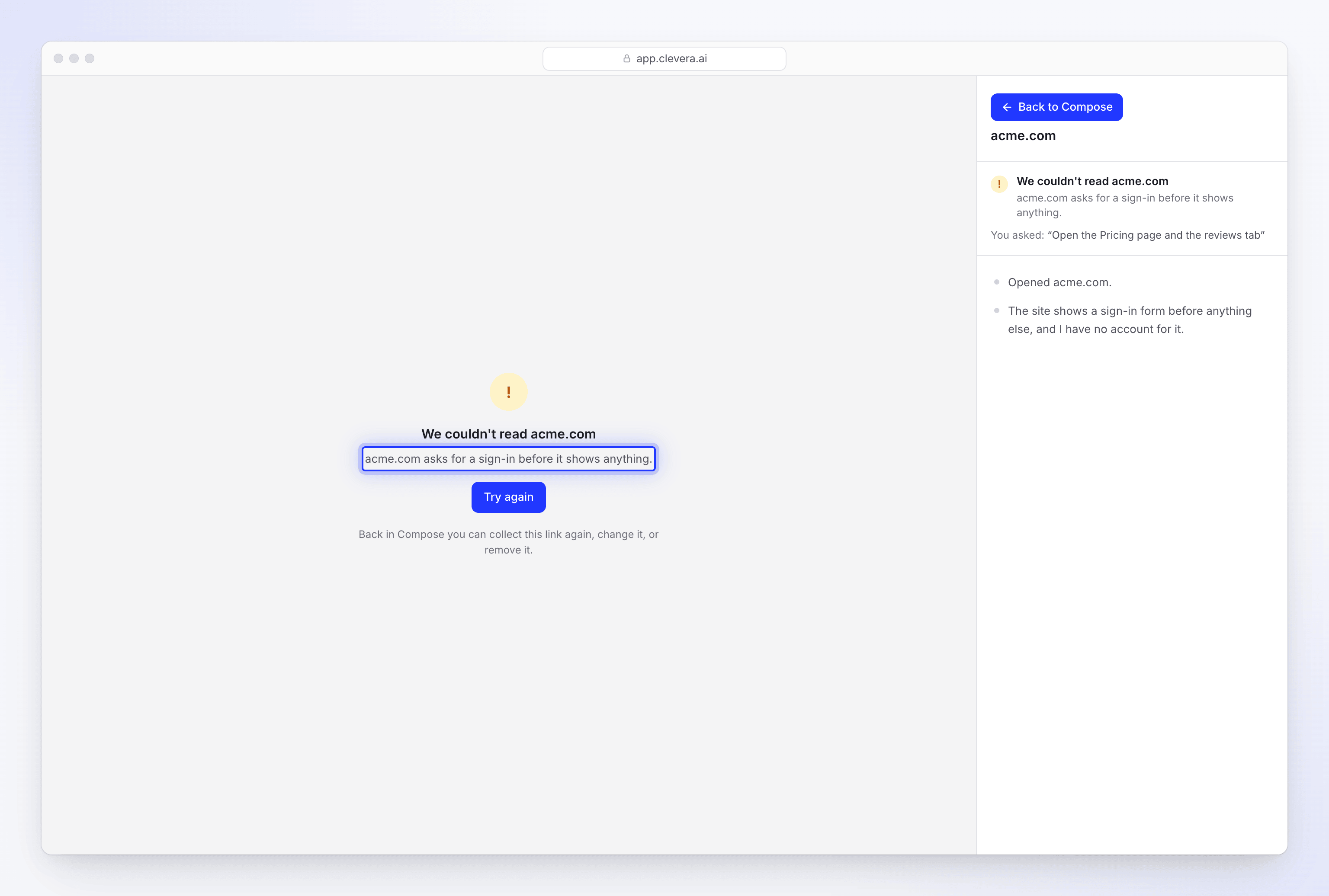
Try again isn't offered here either, because the same link would stop the run again. Every reason and how to get past it: Fix a website the AI couldn't read.
The run stopped making progress
| What you see | Cause | Fix |
|---|---|---|
| Not responding since… in In progress on Home or in the sidebar | The run hasn't moved for 30 minutes. It may still recover. | Wait a little longer. Long recordings and Extra effort clips can sit on one stage for a while. |
| "We couldn't finish this one" after a long wait | A run with no progress at all for 2 hours is stopped and marked as failed. | Click Try again if it's shown, or Make another. |
Try again: what it does and what it can say
| Type | What Try again does |
|---|---|
| Social clips | Picks the run up from the step that failed. Finished steps aren't redone. |
| Articles | Starts a new run with the same settings, reusing the draft if it was already written. |
| How-to videos, product demos and Polish | Can't be retried: there's no Try again button. Use Make another with the same recording. |
These messages can appear when you click it:
| Message | What it means | What to do |
|---|---|---|
| "We could not pick this one back up. Start over and we will run it fresh." | The step that failed can't be resumed. | Use Make another. |
| "This one is still going." | It's already running again, perhaps from another tab. | Refresh the page and follow it. |
| "This one already finished." | It completed in the meantime. | Refresh the page to open it. |
| "There is nothing to try again." | There's no run to pick up. | Use Make another. |
| "That didn't work. You can start over instead." | The retry request itself failed. | Use Make another. |
Try again runs the same plan checks as Generate, so you can also see a plan or billing message here:
| Message | What to do |
|---|---|
| "The Free plan runs one generation at a time. Wait for the current one to finish, or upgrade to run more at once." | Wait for your other video to finish. |
| "Free plan generations are paused for the rest of today. Upgrade to a paid plan to keep creating now, or try again tomorrow." | Try again tomorrow, or upgrade. |
| "You have used this month's Free plan credits. Upgrade to keep creating, or wait for your credits to renew on date." | See I ran out of credits. |
| "This needs about N credits and you have M left. Buy more credits or upgrade your plan in Billing to continue." | See I ran out of credits. |
| "We couldn't process your latest payment. Open Billing to update your billing details and restore access." | Fix the failed payment, then try again. |
Every other Free plan message: Know what the Free plan includes.
Stopping and clearing
| Message | What it means | What to do |
|---|---|---|
| "We stopped before there was a video. Start again whenever you're ready." | You (or a teammate) stopped the run. A stopped run can't be resumed. | Use Make another. |
| "We couldn't stop it. Try once more." | The stop request didn't go through. | Click Stop again. |
| "We couldn't clear it. Try once more." | Clearing the run off your dashboard failed. | Click Discard again. Nothing is deleted either way. |
See Stop, retry or clear a generation.
It finished, but with a heads-up
If the video finished but the page shows an amber Heads-up note, such as a silent voice-over or a missing avatar, see My video came out silent, without music or without the avatar.
Notifications about a failed run
You don't need to keep the page open to find out. When a run fails, your inbox shows "title couldn't be made" (or "title, started by Alex Rivera, couldn't be made" for a teammate's run), and you get an email if it's still unread after 10 minutes. A failed translation says "The French version of title couldn't be made"; see Translate a finished video.
Credits for a failed run
A run that fails on our side doesn't cost you anything: every credit it used, including an AI avatar it had already rendered, goes back to the kind of credits it came from. The Usage page's credit history shows it as its own line, such as "Failed run refunded · Social clip generation".
| How the run ended | Credits |
|---|---|
| "Something went wrong on our side" | Returned. |
| Stopped after 2 hours without progress | Returned. |
| A fact the video needs was missing | Charged for what it used before it stopped. |
| A link couldn't be read | Charged for what it used before it stopped. |
| Your workspace ran out of credits | Charged for what it used before it stopped. |
| You or a teammate clicked Stop | Charged for what it used, including an AI avatar that had started rendering. |
Try again on a failed social clip is charged only for the new work it does. The failed attempt has already been refunded, and the steps the retry reuses from it stay free. See Know when credits are charged.
When to contact support
Contact support from the chat in the app if:
- the line says "Something went wrong on our side" and Try again or Make another fails again,
- a run fails at the same stage more than once with the same materials.
Include the video's name, the time it failed and the exact line you saw. You don't need to keep the failed run; clearing it doesn't delete anything we need.