

Set a Repeat schedule and monthly budget in Autopilot
Run Fill the gaps on a schedule inside a monthly budget: the Repeat settings, the suggested budget, who may raise it, what happens at each run and at the budget, and how triggered tasks differ.
A Repeat runs an Autopilot task again on a schedule, inside a monthly budget you set. Today the recipe that repeats is Fill the gaps in my help center every week: each run reads what your help center is missing again and writes up to a set number of articles. Tasks that start on a release, a changelog page or a new video don't use a schedule; they are covered at the end of this article.
Before you start
- Autopilot is on for your workspace and your role can start tasks (owner, admin or Content Creator). See Get access to Autopilot.
- Fill the gaps works on a help center, so you need one. Without one, the setup card only offers Build my help center.
- A Repeat always has a monthly budget. Setting a budget above the suggested one, or raising it later, takes the workspace owner or an admin.
Set up a Repeat
You set a Repeat up with the Autopilot agent, like any other task. The full walkthrough is in Set up an Autopilot task.
Open the recipe
On Autopilot home, click the Fill the gaps in my help center every week recipe, or type something like "every Monday, write what my help center is missing" in What should Autopilot do?. The agent panel opens with the setup card.
Fill in the details
Click Fill in the details. Under When, keep On a schedule (the other choice is Once, now). Pick the help center, then set the schedule, At most each time, Monthly budget and When a plan is ready. See The Repeat settings.
Continue and create
Click Continue. Clevera checks the setup and shows a review: When ("Every Monday at 09:00 (Europe/Berlin)"), Monthly budget, Approval ("Each run waits for your review", or with Make drafts, I publish "Makes drafts; runs that write from reader searches wait for your review") and the rest. Click Create task. Nothing is planned before the first scheduled time.
The Repeat then appears under Repeats in the Autopilot menu and under Always on on Autopilot home with a Repeats badge.
Repeat a finished task
A finished help-article task (for example from Turn customer questions into help articles) shows Repeat this at the top. It opens the agent with the Fill the gaps setup card already set to On a schedule. A Repeat always re-reads what is missing, so it doesn't repeat your original list of questions. The button is hidden when the task already has a schedule, ran in steps, or is a run of another Repeat.
The Repeat settings
| Setting | Options | Default |
|---|---|---|
| How often | Daily, Weekly, Every 2 weeks, Monthly | Weekly, or what you told the agent ("every Monday at 9") |
| Day | A weekday for Weekly and Every 2 weeks; Day 1 to Day 28 for Monthly | — |
| Time | Every quarter hour, shown as "Times in" your time zone | 09:00 |
| At most each time | 1–12 articles a run | 5 |
| Monthly budget | 1–100,000 credits | The suggested budget, or your workspace's default |
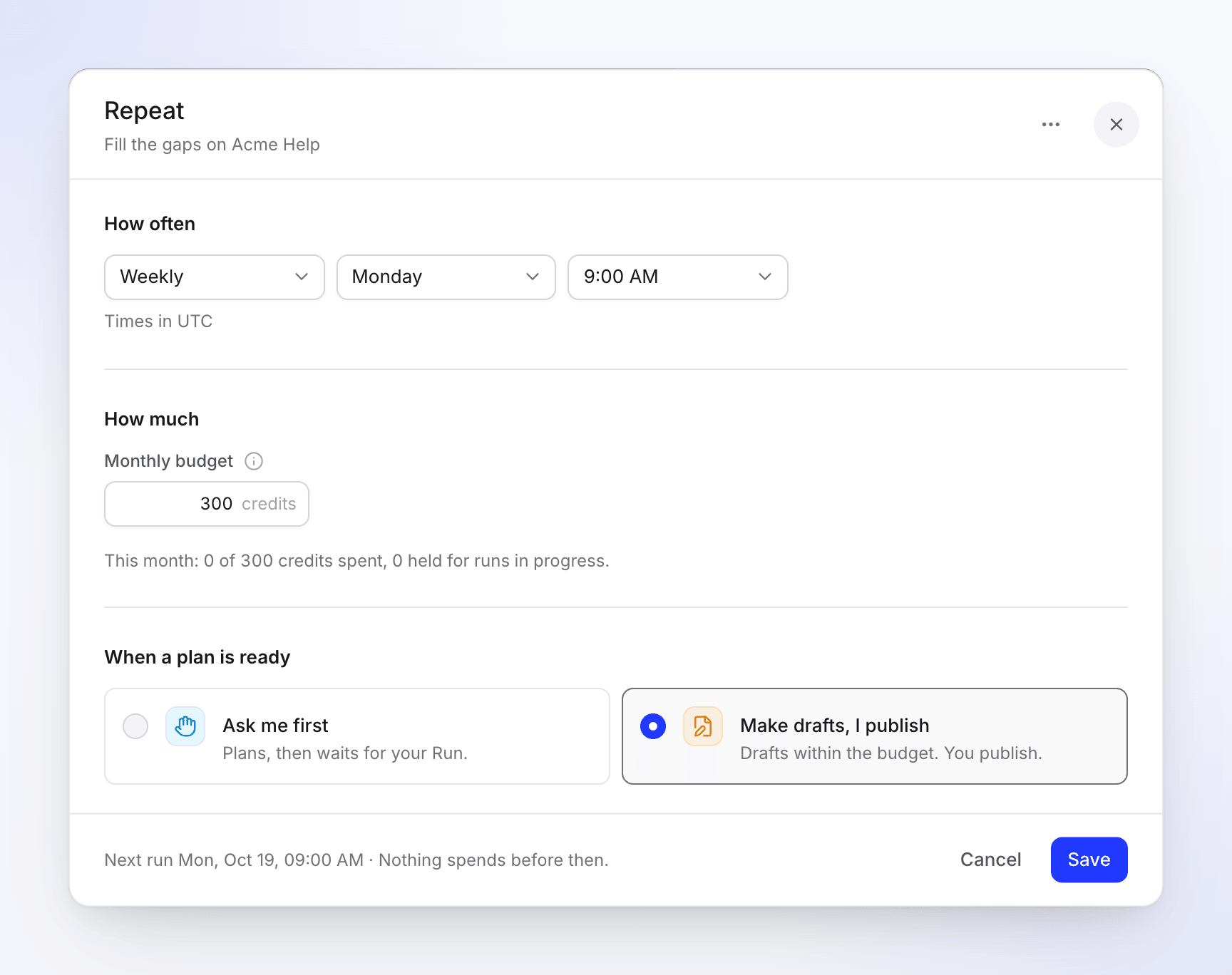
| When a plan is ready | Ask me first or Make drafts, I publish | Ask me first |
The time zone is yours (the one your browser last reported), else the workspace's. There is no end date: a Repeat runs until you pause or delete it. Hourly runs and runs on a single calendar date aren't available.
For what When a plan is ready changes, see Choose how much Autopilot can do on its own.
Monthly budget
The budget is the most a Repeat may spend in a calendar month. Its tooltip says: "A Repeat never spends more than this in a month. At the budget it pauses and tells you."
- Suggested budget. Clevera fills in a month of runs at the high estimate of each article, rounded up to the next 10 (at least 10). It counts 30 runs a month for Daily, 4 for Weekly, 2 for Every 2 weeks and 1 for Monthly, at 15 credits per article. A weekly Repeat of 5 articles suggests 4 × 5 × 15 = 300 credits. The line under the field says "Covers about 20 articles a month.", or "Suggested 300 for about 20 articles a month." with Use 300 when you typed another number.
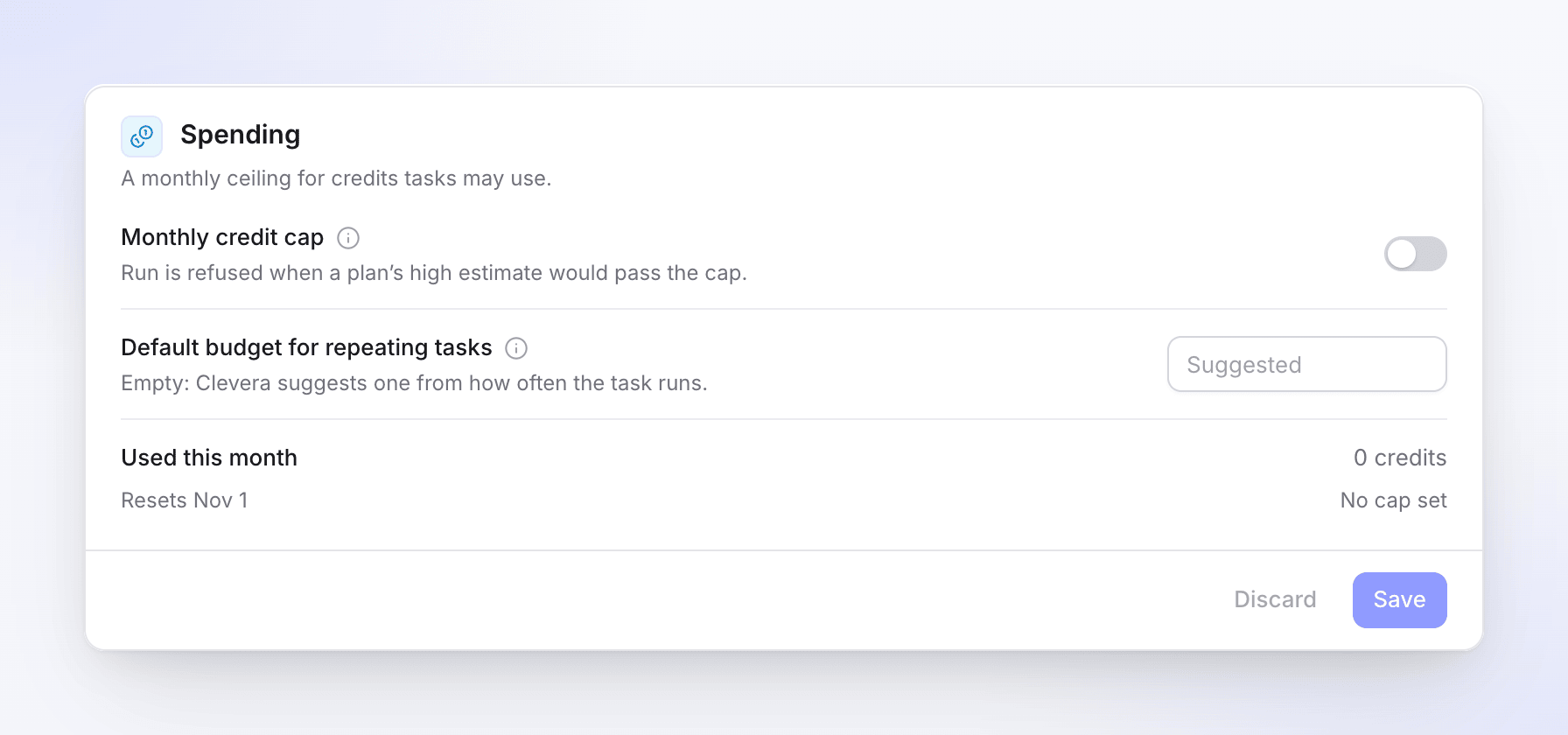
- Workspace default. An owner or admin can set Default budget for repeating tasks in Autopilot Settings. New Repeats set up by an owner or admin start with it. Left empty, Clevera suggests one.
- Who may set what. Anyone who can start the task may set a budget up to the suggested one. Above it, Continue says "Only the workspace owner or an admin can set a budget above 300 credits." (with the suggested amount). Later, only an owner or admin can raise it ("Only the workspace owner or an admin can raise this budget."); anyone who can change the task can lower it.
- The month follows the Repeat's time zone, so the budget starts again on the 1st at midnight there.
- An empty or out-of-range budget at Continue gives "Set a monthly budget between 1 and 100000 credits."
What happens at each scheduled time
- Clevera plans the next run. Planning is free and doesn't touch the budget. A run appears under the Repeat's Runs.
- What happens to the plan depends on When a plan is ready:
| When a plan is ready | What happens |
|---|---|
| Ask me first | The plan waits in Needs you and you get a "plan is ready" notice. Nothing is spent until you click Run. |
| Make drafts, I publish | The run starts by itself inside the budget, and the articles land in your help center as drafts that wait for your approval. A run whose plan used your readers' searches or questions still waits for your Run: see What always waits for review. |
- If there is nothing to write, the run ends Done with "Nothing needed this time." and you get no notice.
- If planning fails, Clevera tries once more an hour later, then waits for the next scheduled time.
- While a run is still open (planning, waiting for you or running), the next scheduled time doesn't start another one. The next run covers everything.
Staying inside the budget
- Trimming. If a run that starts by itself doesn't fit what is left of the month, Clevera leaves out lines from the plan until it fits and writes "Left out to stay within this Repeat’s budget:" with their titles in the run's activity.
- When you run a plan yourself. A Repeat's plan shows Limit: stops at … credits (at most what the budget has left) and, when the ticked lines could cost more than that, "This task has 40 credits of its monthly budget left. Untick some lines or raise the budget." An owner or admin also sees Run this one anyway, which runs it once over the budget.
- The run's limit. A run stops before an item that would go over its limit and says, for example, "1 item is waiting: it would go over the limit. Raise the limit to run it." Click Raise limit, enter a New limit and click Raise and continue.
- The workspace cap. Monthly credit cap in Autopilot Settings sits above every budget: "Run is refused when a plan’s high estimate would pass the cap." It counts every task in the calendar month (UTC).
Paused at budget
When nothing fits, the Repeat pauses and shows Paused at budget ("It used this month’s budget. It starts again on the 1st, or raise the budget."). The Repeat's activity says "Paused at its budget for this month. It starts again on Nov 1, or raise the budget to carry on now." The person who set it up, the owner and the admins get the notice "Repeat paused at its budget: …" by email and in the inbox, with Open Repeat.
It resumes by itself when the new month begins, without catching up on missed runs. To carry on sooner, an owner or admin raises the budget in Edit; it resumes at once if the new budget leaves room.
Manage a Repeat
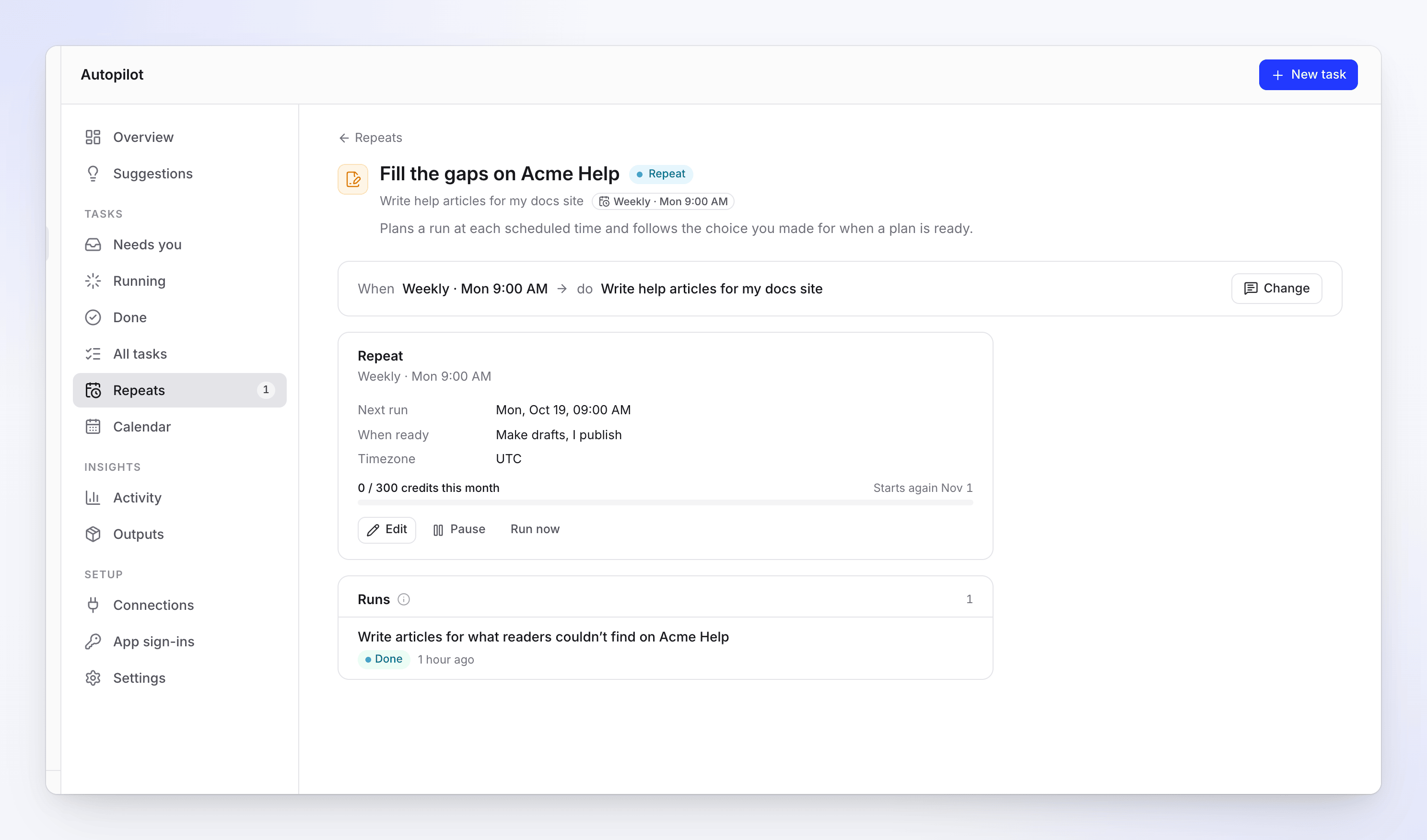
Open the Repeat (from Repeats, Always on on Autopilot home, or the task list). Its page shows the Repeat card and its Runs, newest first.
| On the Repeat card | What it shows or does |
|---|---|
| Next run | The next scheduled time, or why it is paused |
| When ready | Ask me first or Make drafts, I publish |
| Timezone | The time zone the schedule and the budget month follow |
| Budget meter | "86 / 300 credits this month", "Starts again Nov 1" and what is held for runs in progress |
| Edit | Opens the Repeat dialog: How often, Monthly budget, When a plan is ready. ⋯ → Delete Repeat is there too. Click Save; you see "Repeat saved". |
| Pause / Resume | Stops or restarts the schedule. Runs already open carry on. |
| Run now | Plans the next run at once ("Planning the next run now. It shows under Running."). Hidden while paused. Refused with "This task already has a run in progress." when a run is open. |
To change how many articles each run writes or what it writes about, click Change on the task and tell the agent. It shows a Change the task card; click Apply. You can also ask it to pause the Repeat, run it now or change its budget. In the chat, pausing happens at once; resuming and running now show a card you click first (Resume, Run now). See Change an Autopilot task.
Delete Repeat asks "Delete this Repeat?" — "No more runs are planned. What its runs already made stays."
The Repeats page
Repeats in the Autopilot menu lists every Repeat and every triggered task, with a count line such as "2 schedules · 1 active · 1 paused". A Repeat row shows Runs (the schedule), Next, When ready, Last run and its budget meter. Its ⋯ menu has Open, Pause or Resume, Edit, Run now and Delete.
| Status | What it means |
|---|---|
| Repeat | Active: runs on its schedule. |
| Paused | Paused by hand. Resume it any time. |
| Paused at budget | This month's budget is used. |
| Paused: connection | A connection it uses lost access. Reconnect it in Connections. |
| Paused: lost access | Its person left the workspace or lost access. |
| Paused: creator removed | The person who made it was removed. |
| Paused by Clevera | Clevera support paused it. Contact us to resume. |
Tasks that start on a trigger
Some recipes don't run on a schedule but when something happens: Each release (a repository), A changelog page (checked Daily or Weekly), or Each new video. These have no monthly budget field and no approval choice: every run makes a plan and waits for your review before anything is made.
| Trigger | How often Clevera checks |
|---|---|
| A repository's releases or merged changes | About every hour |
| A changelog page | Daily or weekly, as you chose. Later, Edit on the task's Keep it up to date card offers Every day, Every week, Every 2 weeks or Every month. |
| A new video | About every 15 minutes, so a run is planned within roughly 15–25 minutes |
A changelog-page task shows its cadence on the task page the same way, for example Every day or Every week.
A new triggered task shows No runs yet — "Nothing has happened since it was set up. The first run is planned when it does." — and a Watching badge on Autopilot home. On the Repeats page it shows Last checked, Next check and Last follow-up, and Connection lost when its repository connection needs you.
What starts a triggered task can't be changed afterwards: to watch something else, set up a new task. You can still change what it does each time and its budget, pause it or run it now. See Change an Autopilot task.
A finished task of some kinds also shows a Keep it up to date card ("Plans a follow-up when something changes. You still approve each plan."). Pick how to follow it and click Turn on. Each follow-up is a new plan in Needs you.