

Turn customer questions and reader searches into help articles
Two Autopilot recipes write the help articles your help center is missing: Turn customer questions into help articles writes one per question, and Fill the gaps in my help center every week writes what readers searched for and didn't find, on a schedule within a monthly budget.
Two Autopilot recipes write the articles your help center is missing. Every article is written from your app or a recording, never from an outline alone, and is saved as a draft that waits for your approval.
- Turn customer questions into help articles writes one article for each question you give it. It runs once.
- Fill the gaps in my help center every week finds what readers searched for or asked and didn't find, the videos not on the site yet, and what your app does that nothing covers, then writes those articles. It runs on a schedule, inside a monthly budget, or once.
To write an article for each new video, see Turn new videos into articles.
Before you start
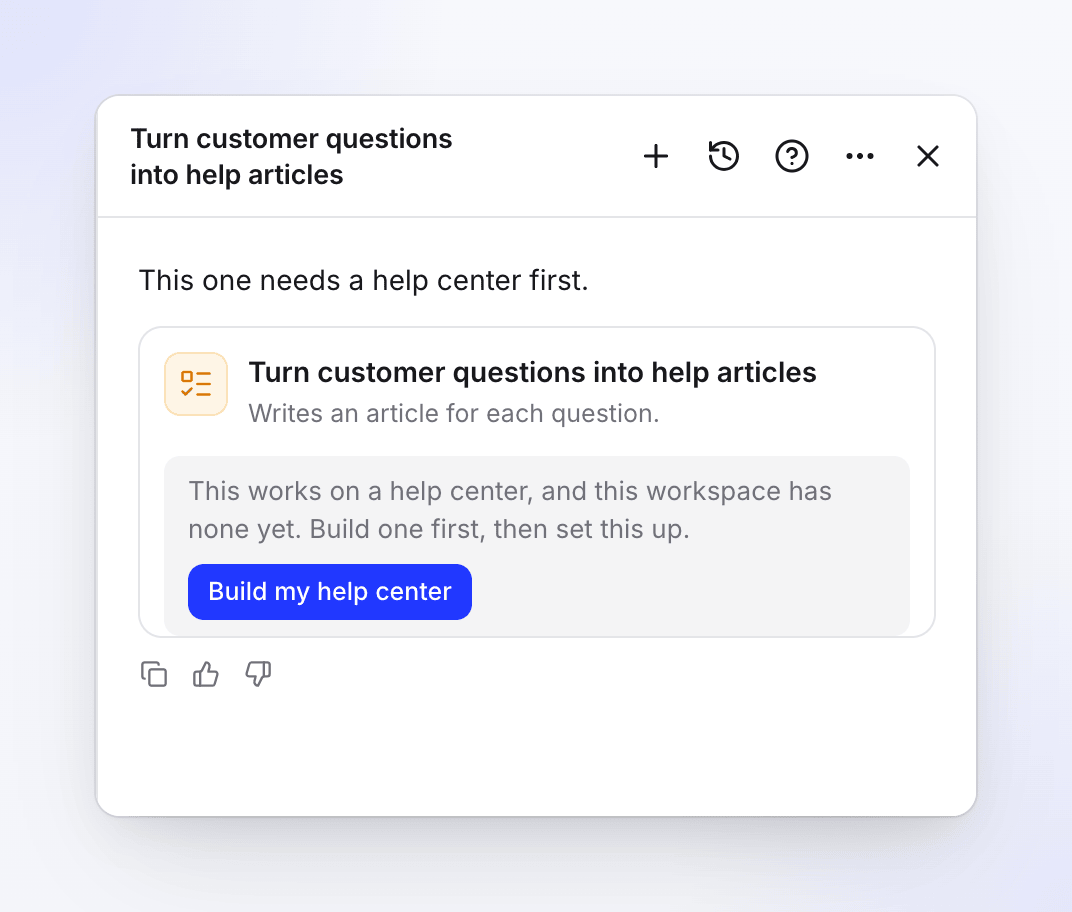
- A help center, and a role that can add articles to it (owner, admin or content creator). Without a help center, the agent says "This one needs a help center first." and the card offers Build my help center, which opens that recipe in the same chat.
- Reader searches come from your published help center. A new site has none yet, but the gaps recipe still finds videos not on the site and what your app does that the site doesn't cover.
- Your app's address and a sign-in (optional), so an article nothing shows yet can be recorded first. See Save an app sign-in.
Set it up
Open the recipe
In Autopilot, click Turn customer questions into help articles or Fill the gaps in my help center every week under Or start from a recipe. You can also paste your questions into What should Autopilot do?, for example "Write articles for these questions: …". The agent fills in what it understood and shows the setup card.
Fill in the details
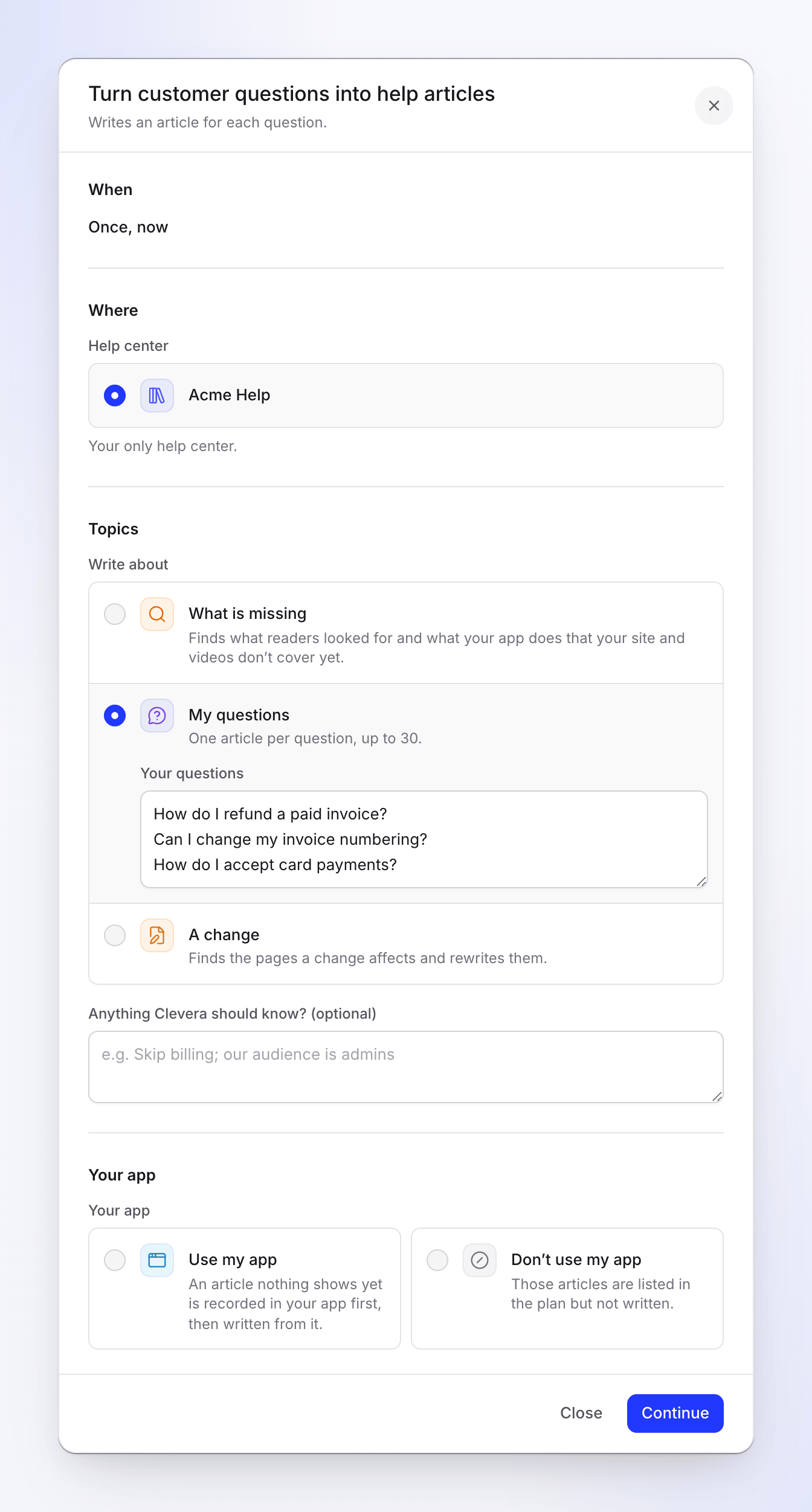
Click Fill in the details (or Edit details). Check the help center and the topics, decide whether Clevera may use your app and, for the gaps recipe, set the schedule and budget. See The setup form. Click Continue.
One question per line, up to 30. Check the review and create the task
The review shows When, Monthly budget and Approval (for a schedule), Typical run ("5–60 credits") and Language (by name, for example "English (US)"). For a schedule, Approval reads "Each run waits for your review" with Ask me first, or "Makes drafts; runs that write from reader searches wait for your review" with Make drafts, I publish. Click Create task.
Approve the plan
A one-off is planned right away (free, a few minutes) and the chat gets a message when it's ready. A schedule plans a run at each time it's due. The plan lists each article with its credits and where it comes from. Untick what you don't want and click Run.
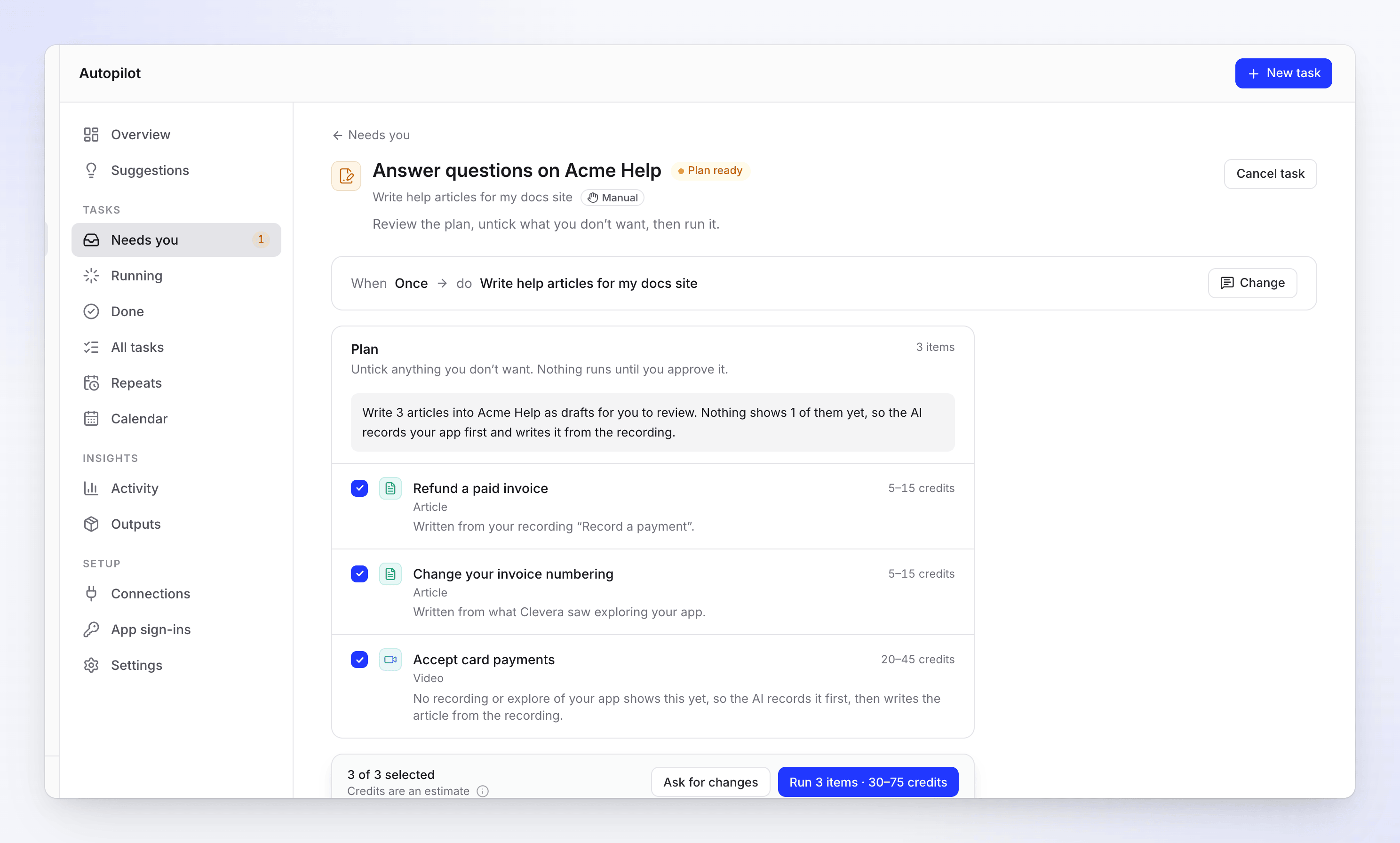
A line nothing shows yet records your app first, then writes the article.
The setup form
| Section | Field | Options and defaults |
|---|---|---|
| When | Runs | Questions: Once, now only. Gaps: On a schedule (default) or Once, now. |
| Where | Help center | Picked for you when you have only one ("Your only help center."). |
| Topics | Write about | What is missing: "Finds what readers looked for and what your app does that your site and videos don’t cover yet." My questions: "One article per question, up to 30." A change: "Finds the pages a change affects and rewrites them." The questions recipe opens on My questions, the gaps recipe on What is missing. |
| Your questions (My questions) | One question per line, for example "How do I export to CSV?". Up to 30. | |
| What changed (A change) | Up to 3,000 characters. | |
| Anything Clevera should know? (optional) | Up to 2,000 characters, for example "Skip billing; our audience is admins". | |
| Your app (What is missing and My questions) | Your app | Use my app: "An article nothing shows yet is recorded in your app first, then written from it." Don’t use my app: "Those articles are listed in the plan but not written." You must pick one. With Use my app: App address and Sign-in. |
| How it runs (What is missing only) | Runs | Once ("One plan now, for you to approve.") or Repeat ("Plans on a schedule, inside a monthly budget."). It moves with When. |
When you start from videos picked in your library, Write about also offers My videos: one article for each video you picked, up to 30.
Repeat settings (Fill the gaps)
| Field | Options | Default |
|---|---|---|
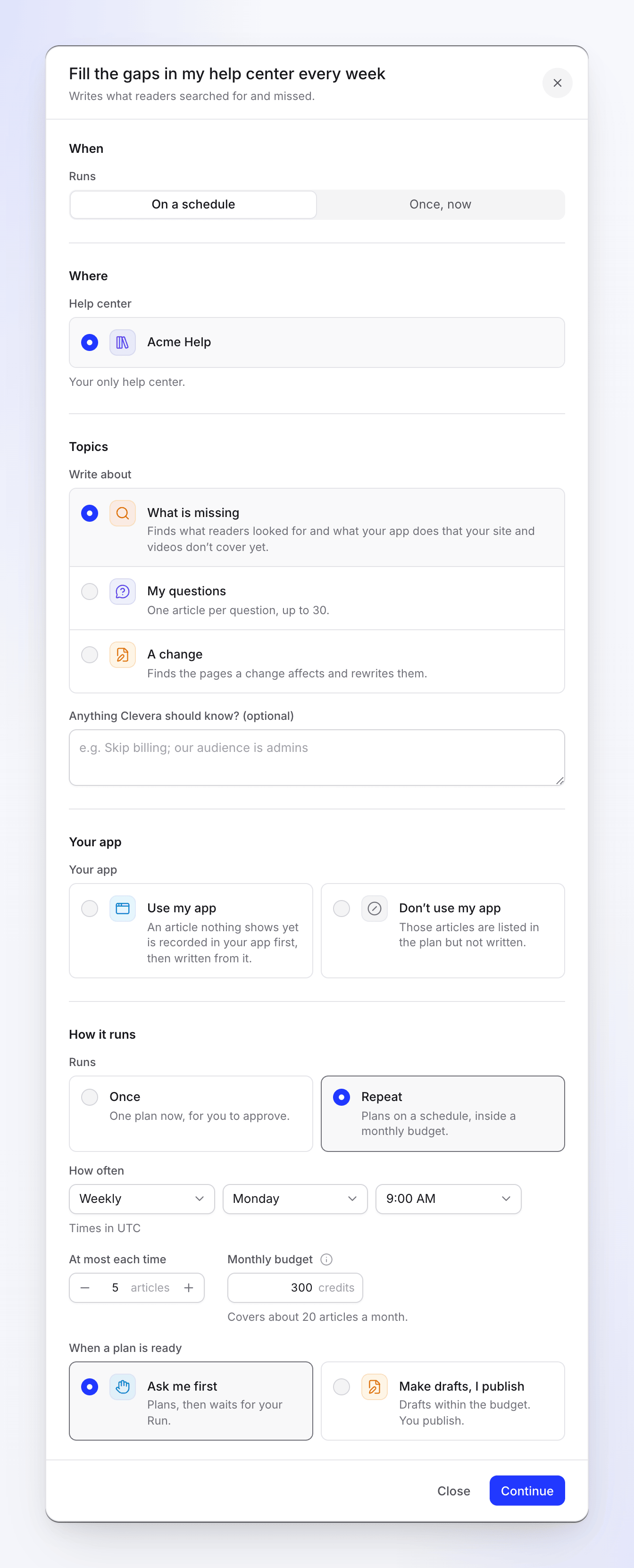
| How often | Daily, Weekly, Every 2 weeks, Monthly; a day (of the week, or Day 1–Day 28 of the month) and a time on the quarter hour, in your time zone | Weekly, Monday, 9:00 AM |
| At most each time | 1–12 articles per run | 5 |
| Monthly budget | 1–100,000 credits. "A Repeat never spends more than this in a month. At the budget it pauses and tells you." | The suggested budget: runs a month × articles each time × 15 credits, for example 300 for weekly × 5. Your workspace's default budget, if an owner or admin set one in Autopilot settings. |
| When a plan is ready | Ask me first ("Plans, then waits for your Run.") or Make drafts, I publish ("Drafts within the budget. You publish.") | Ask me first |
Under the budget, "Covers about 20 articles a month." tells you what it pays for; Use 300 puts back the suggested amount. Only the owner or an admin can set a budget above the suggested one. Articles are never published for you, whichever approval you pick.
For pausing, editing the schedule and what happens at the budget, see Set a Repeat schedule and monthly budget.
Where each article comes from
| Topic source | What Clevera reads |
|---|---|
| What is missing | Searches and assistant questions on your help center from the last 90 days that found nothing, finished videos not on the site yet, and what Clevera learned of your app that the site doesn't cover. Up to 12 articles a run (5 by default). |
| My questions | Your questions, one article each, up to 30 |
| A change | Your help center's pages a change affects, rewritten with before → after, up to 30 pages |
Every article is matched to something real: a workflow Clevera learned when it explored your app ("Written from what Clevera saw exploring your app."), a recording in your library ("Written from your recording “…”."), or, when nothing shows it yet, a new recording of your app made first. That line costs the recording plus the article. Without Use my app it stays in the plan with "No recording or explore of your app shows this yet. To write it, start again with your app’s address so the AI can record it first."
Cost
Setting up and planning are free. Each article shows its credits on its plan line, usually 5–15; a line that records your app first costs more. A typical run costs 5–60 credits and takes 5–15 minutes. You're charged for what each line really uses.
What you get
Draft articles in the help center you picked, marked Waiting for approval ("Written by Autopilot. Approve it to publish it."). No publish includes them until someone approves them; the owner or an admin approves and publishes. See Publish a doc site.
Troubleshooting
| What you see | What to do |
|---|---|
| "This one needs a help center first." | Click Build my help center. |
| "Pick a help center." | Choose the help center the articles go to. |
| "Fill this in to go on." / "Add at least one question." | Type at least one line under Your questions. |
| "Describe what should change on the site." | A change needs What changed. |
| "Choose whether Clevera may use your app." | Pick Use my app or Don’t use my app. |
| "Set a monthly budget between 1 and 100000 credits." | Enter a budget, or click Use with the suggested amount. |
| "Only the workspace owner or an admin can set a budget above 300 credits." (your suggestion) | Keep the suggested budget, or ask an owner or admin. |
| "Nothing new to write for Acme Help right now." | Clevera found nothing it could fill. Try My questions. |
| "Readers found what they looked for and every finished video is on the site: nothing to write right now." | Add your app's address, or run Explore my app once. |
| The Repeat shows Paused at budget | It used this month's budget. It starts again on the 1st, or raise the budget. |