

Choose how much Autopilot can do on its own
When does an Autopilot task wait for you? One-off plans wait for your Run, triggered tasks wait every time, and only a Fill the gaps Repeat offers Ask me first or Make drafts, I publish. Nothing is ever published for you.
Autopilot never spends credits or publishes without a person's say-so unless you choose otherwise, and today the only choice is for a Repeat. This article explains, recipe by recipe, when a task waits for you, when a run may start on its own, and what is never published for you.
The short answer
- A task you set up to run once always makes a plan first. Nothing runs until you click Run on the plan.
- A task that starts on a trigger (each release, a changelog page, each new video) makes a plan each time and every plan waits for your review.
- A Repeat (Fill the gaps on a schedule) is the only task with a choice: Ask me first or Make drafts, I publish. Even on drafts, a run that writes from reader searches waits for your review.
- Nothing is ever published for you. Articles wait for approval in your help center, videos land in your library, and help center sites are published by you.
The approval levels
| Level | On the setup card | What happens |
|---|---|---|
| Ask me first | "Plans, then waits for your Run." | Plans on schedule, then waits for your Run. Never spends on its own. |
| Make drafts, I publish | "Drafts within the budget. You publish." | Runs inside the budget without a click, except runs that write from reader searches (see below). You publish the drafts. |
With Make drafts, I publish picked, the form adds the note "A run that writes from reader searches still waits for your review."
A third level, Publish for me, exists in the product but no current recipe makes anything that allows it, so you won't be offered it.
Approval per recipe
| Recipe | When it runs | Approval |
|---|---|---|
| Fill the gaps in my help center every week | On a schedule | Your choice under When a plan is ready. The summary after Continue shows "Each run waits for your review" (Ask me first) or "Makes drafts; runs that write from reader searches wait for your review" (Make drafts, I publish). |
| Fill the gaps in my help center every week | Once, now | You review the plan and click Run. |
| Keep my help center up to date when we ship | Each release, A changelog page | "Each run waits for your review" |
| Update my videos when the product changes | Each release, A changelog page | "Each run waits for your review" |
| Record a video for every new feature | Each release | "Each run waits for your review" |
| Turn new videos into articles | Each new video | "Each run waits for your review" |
| Translate new videos into my languages | Each new video | "Each run waits for your review" |
| Your own task | Each release, Each new video | "Each run waits for your review" |
| Every recipe run Once, now (Build a help center, Explore my app, Document one area, Getting-started videos, Turn customer questions into help articles, Edit a batch of videos, Your own task…) | Once | You review the plan and click Run. Build my help center asks you to approve each step's cost. |
On a trigger, the setup card says: "Nothing runs now. Each time it fires, Clevera plans a run and waits for your review before anything is made."
When you ask the agent to let a Repeat run on its own, its confirm card reads Runs on its own: "Yes: it spends from the budget without asking, except runs that write from reader searches, which wait for your review".
What always waits for review
Even on Make drafts, I publish, a Repeat run waits for your Run when:
- Its plan read someone else's text. For Fill the gaps, that is what your readers searched for and didn't find, or questions they asked. Text written by people outside your team is never acted on without you. Most gap-filling runs read reader searches, so expect most of them to wait for you. A run that only adds finished videos missing from the site can go ahead on its own.
- The plan is empty (nothing to make), in which case it simply ends "Nothing needed this time."
- It was switched on through an AI-assistant connection that has since been removed.
- It doesn't fit the budget: Clevera leaves out lines to fit, or pauses the Repeat at its budget. See Paused at budget.
Runs that start from a release, a changelog page or pull-request text always wait for review anyway, for the same reason.
Where results go: nothing is published for you
| Output | Where it lands | Who publishes it |
|---|---|---|
| Help-center articles | In your help center, as pages marked Waiting for approval ("Written by Autopilot. Approve it to publish it.") | You, with Approve on the page or in bulk. No build of the site includes them until someone approves them. |
| Library articles | In the collection you picked, or the top of your library | Nothing to publish |
| Videos | Your library: the task's collection, else Autopilot's Default collection | Nothing to publish; share them as usual |
| Video edits | The video itself; Undo on the task puts it back | — |
| A help center site | Built by Build my help center | You, from Review and publish or the site's settings |
On a one-off plan you may see When ready: with Keep as drafts, or the quiet line "Kept as drafts. You publish them." Both mean the same: what the task makes stays a draft.
Change the level of a Repeat
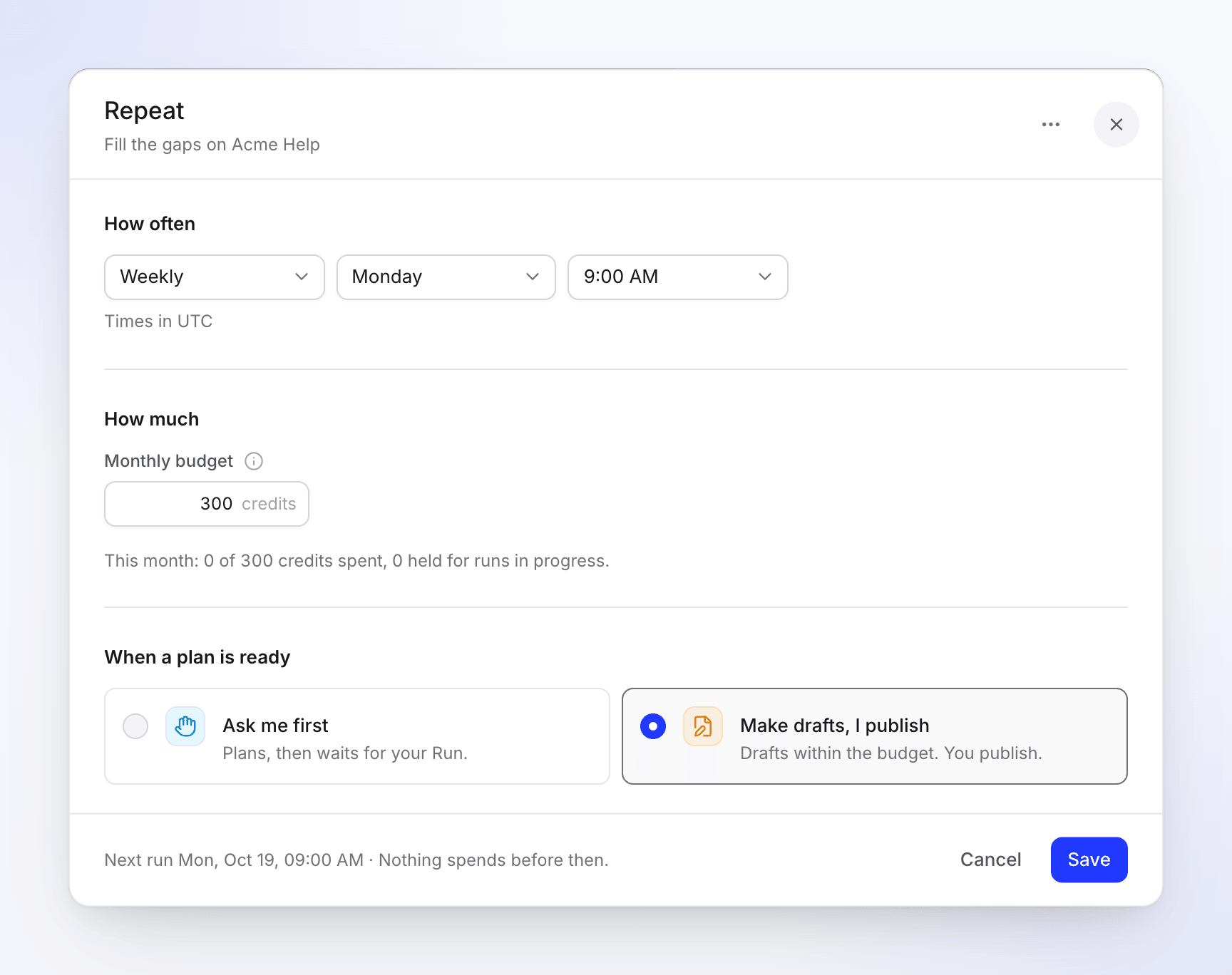
- When you set it up: under When a plan is ready on the setup card. It starts at Ask me first.
- Later: open the Repeat and click Edit on its Repeat card, or Edit in its ⋯ menu on the Repeats page. Pick a level and click Save.
- On a run's plan: the plan footer shows When ready: with a menu per kind of output (for example Articles). A change there saves at once and applies to every later run.
- With the agent: click Change on the task and say, for example, "let it run on its own within the budget". It shows a Change the task card; click Apply. The agent can switch a Repeat only between Ask me first and Make drafts, I publish.
You need a role that can change the task (owner, admin or Content Creator). A triggered task's approval can't be changed: "This task runs when its trigger fires, so it has no schedule. Its runs always wait for your review."