

Ta strona nie została jeszcze przetłumaczona, więc jest wyświetlana w języku angielskim.
Read video analytics
Read views, completion and watch time for your shared videos and articles, for the whole workspace or one item. Explains exactly how a view is counted, every filter, number and card, and why your own plays don't show.
Analytics shows how your shared videos and articles are watched: how many people watched, how far they got and where they came from. It also counts what your team made and exported. Every member of a workspace can open it.
Open analytics
| To see | Go to |
|---|---|
| The whole workspace | Analytics in the sidebar |
| One video, clip or article | In the editor, ⋯ → Analytics, or Share → Link → Views and engagement |
Views only come from Clevera's own share pages and embeds. Turn on a share link or embed the video to start collecting them. See Share a video with a link.
How a view is counted
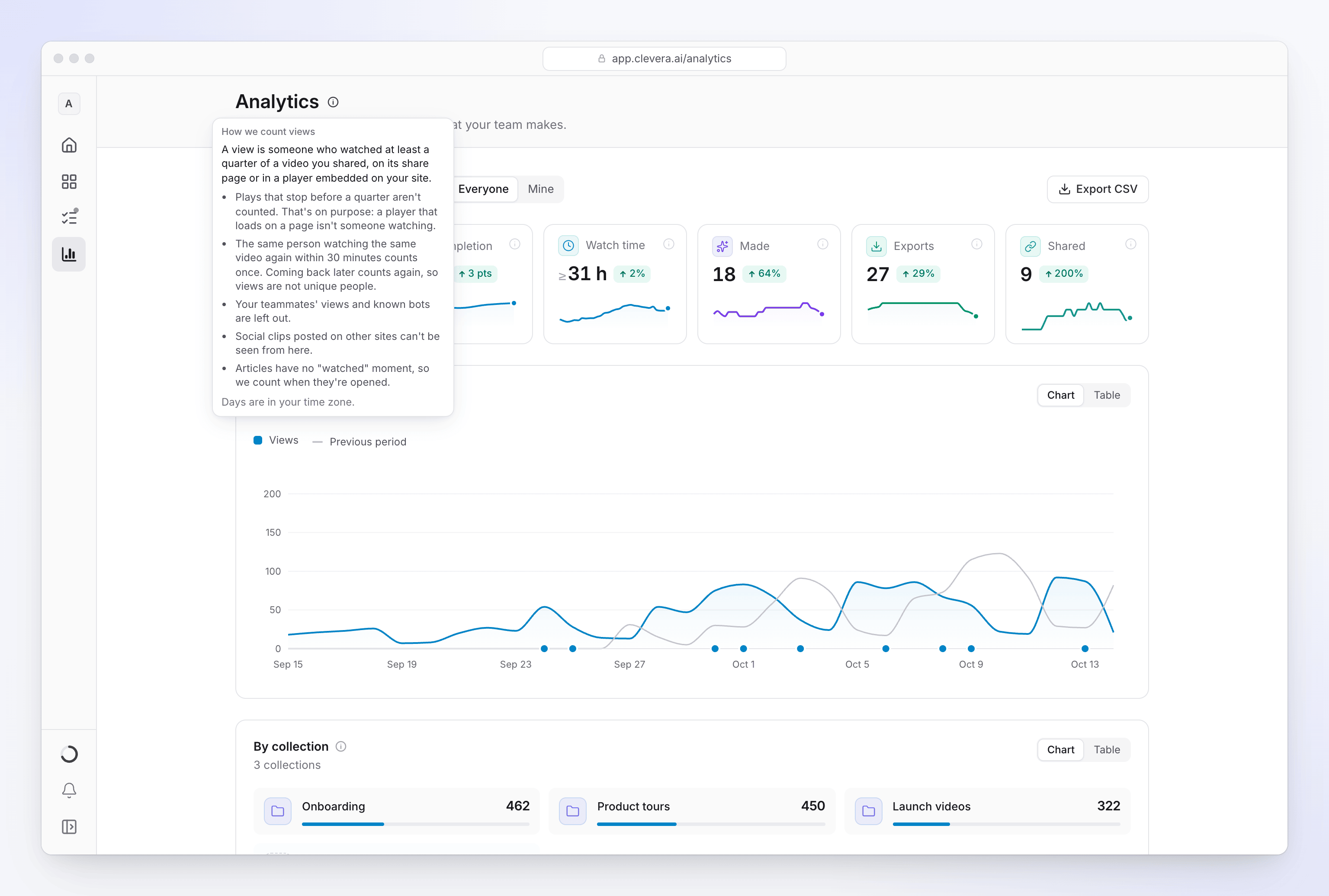
A view is someone who watched at least a quarter of a video, on its share page or in an embedded player.
| Rule | Why |
|---|---|
| At least 25% of the video must actually play. Skipping ahead with the seek bar or arrow keys doesn't add watched time. | A player that loads on a page isn't someone watching. |
| Repeat views of the same video from the same network (internet address) within 30 minutes count once. Coming back later counts again. Several people watching from one office or school network within 30 minutes count as one view. | Views are plays, not unique people, and repeat loads don't inflate the numbers. |
| From one network, at most 100 opens of the same video or article a day (UTC) can count. Opens beyond that add no views. | Stops a single address from flooding the numbers. A busy shared office stays well under it. |
| Your team's views aren't counted, and neither are known bots. Plays from a network a teammate signed in to Clevera from in the last 90 days count as your team's. | Your own checks don't inflate the numbers. |
| The live preview in the Embed tab never counts. | It's you, not a viewer. |
| Plays that couldn't be real, such as more video "watched" than time passed, are left out. | Keeps the numbers honest. |
| Social clips you download and post on other sites aren't counted. | Those sites don't report back to Clevera. Only views of the Clevera share page or embed count. |
| Articles count opens, not views. Repeat opens from the same network within 30 minutes count once. | Articles have no "watched" moment. |
| Days are in your time zone. | So "today" means your today. |
The How we count views tip next to the page title sums up the main rules.
Completion and watch time
| Measure | How it's worked out |
|---|---|
| Completion | "Finished views ÷ views. A view finishes when it plays 90% of the video, or at least half of it including the end." Skipping straight to the end doesn't count as finishing. |
| Watch time | Counted in quarters of each video, so it's a minimum: someone who stopped at 60% counts as 50%. Plays under a quarter add nothing. It's shown with a ≥ sign. |
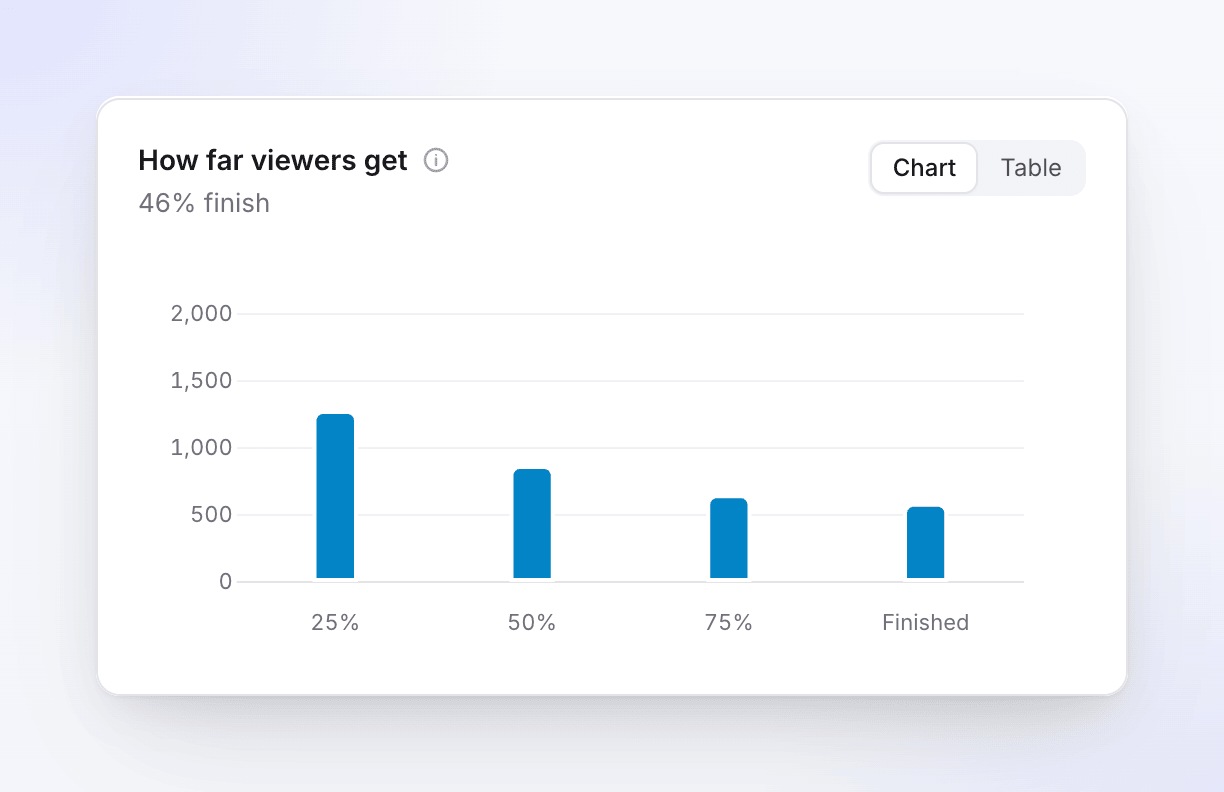
| How far viewers get | Of the views in the period, how many reached 25%, 50%, 75% and the end. The first bar is every view. |
The Analytics page
Filters
| Control | What it does |
|---|---|
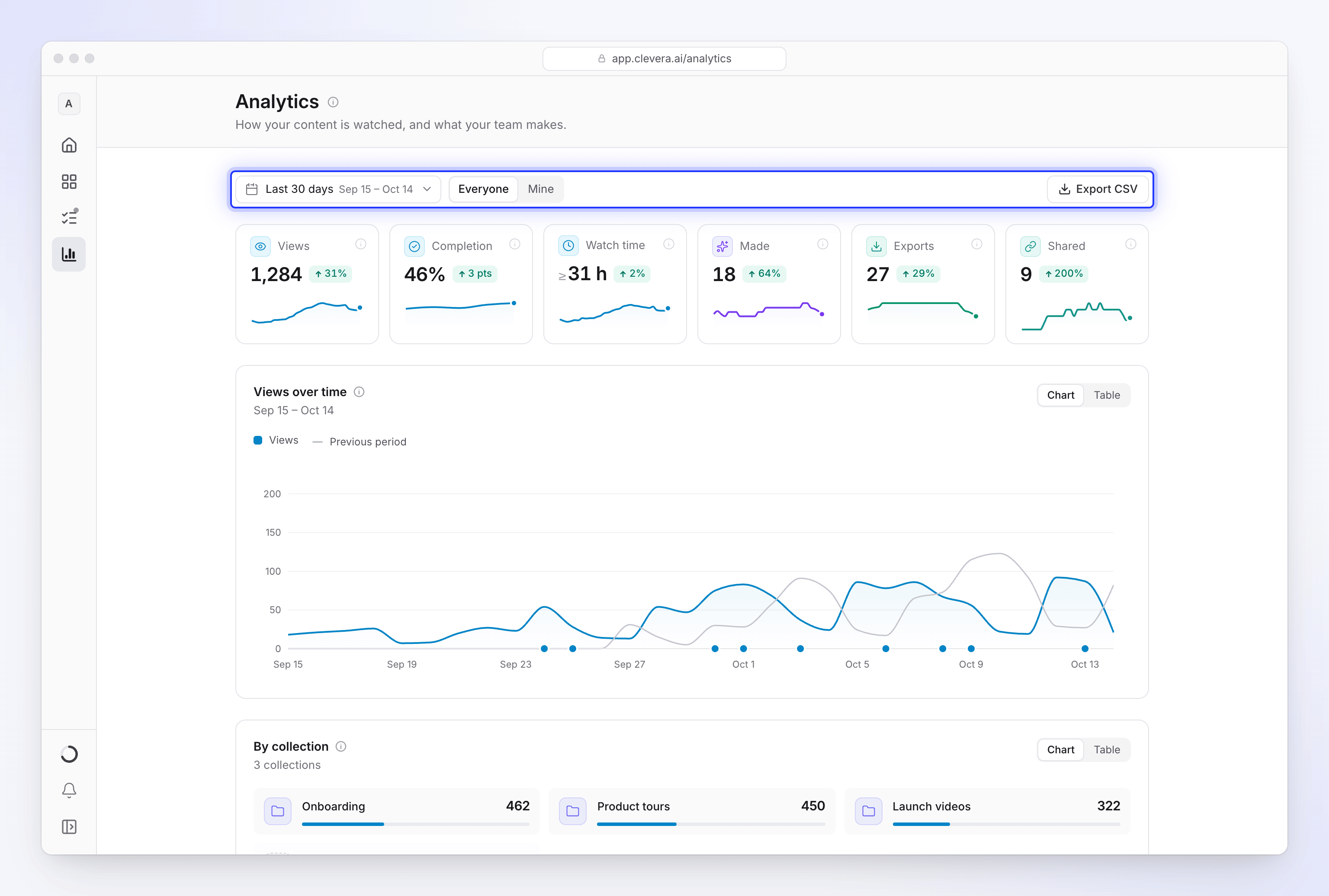
| Date range | Today, Yesterday, Last 7 days, Last 30 days (default), Last 90 days, This month, Last month, This year, Last 12 months or Custom range |
| Compare to previous period | Adds the period before as a grey line and shows the change on each number |
| Everyone / Mine | Owners and admins: the whole workspace, or what you made and exported. Members: everything you can open, or yours. |
| Export CSV | Downloads the numbers for the selected period and scope |
Members only see items they can open. Items in collections you're not part of aren't included.
The numbers at the top
| Number | What it counts |
|---|---|
| Views | "People who watched at least a quarter of your shared videos." |
| Completion | "How many views reached the end." |
| Watch time | "Time spent watching your videos, at least." |
| Made | Videos, social clips, articles and translations finished in the period. Drafts and failed generations aren't counted. |
| Exports | Videos exported, on your device or on our servers. Cancelled or failed exports aren't counted. Exports never use credits (MP4 downloads are on paid plans). |
| Shared | Items that got their first share link or embed in the period, for links that are still on |
The cards
| Card | What it shows |
|---|---|
| Views over time | Views per day (per week for ranges over 90 days). A dot on the axis marks a day something was shared for the first time. |
| By collection | Views and new pieces per collection. Collections you can't open are grouped as "Other collections". |
| Creators | What each person made and the views their content earned. Owners and admins see everyone's numbers. |
| Content types | Pieces finished by type, with the views each type earned |
| How far viewers get | The 25% / 50% / 75% / end funnel |
| Countries | Where views came from. Views without a country are left out. |
| When it's watched | Views by weekday and hour. It appears after 20 views. |
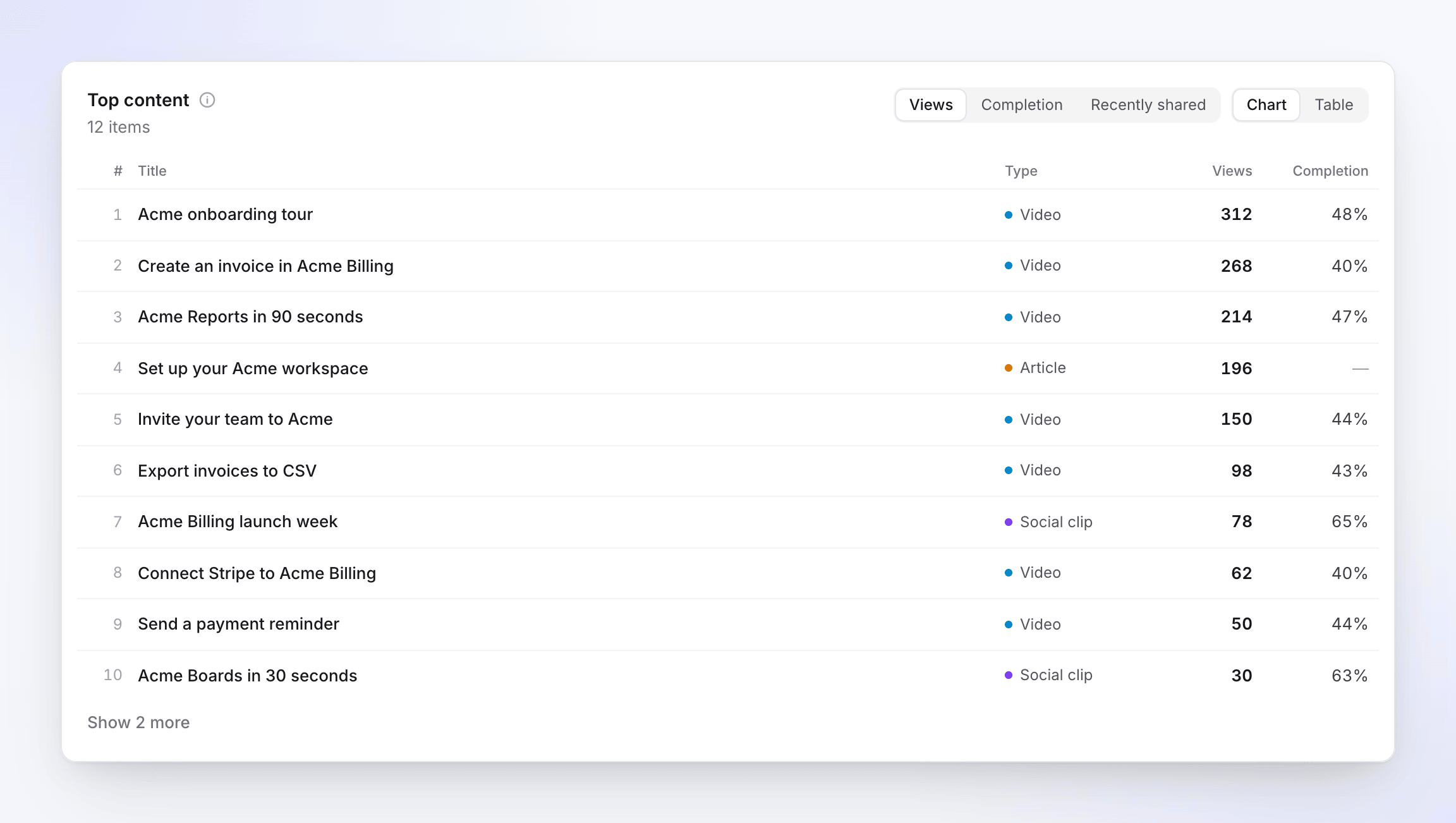
| Top content | Your items with views or opens, sortable by Views, Completion (items with at least 5 views) or Recently shared |
| Shared and exported | First shares and exports in the period |
Click a collection or a person to open their own breakdown.
One video's analytics
The analytics panel for a single item shows:
- whether it's Shared, Link turned off or Not shared yet
- Views (≥25% watched), Completion, Times opened (share page and embeds) and Watch time
- Views and opens per day
- How far viewers got, with a plain-language note on where viewers leave, for example "The biggest drop is between 50% and 75% (1:05–1:38)"
- Audience: views by Source (share page or embed), Device and Country
- Languages: opens of each language version
- Exports and Published to (connected tools)
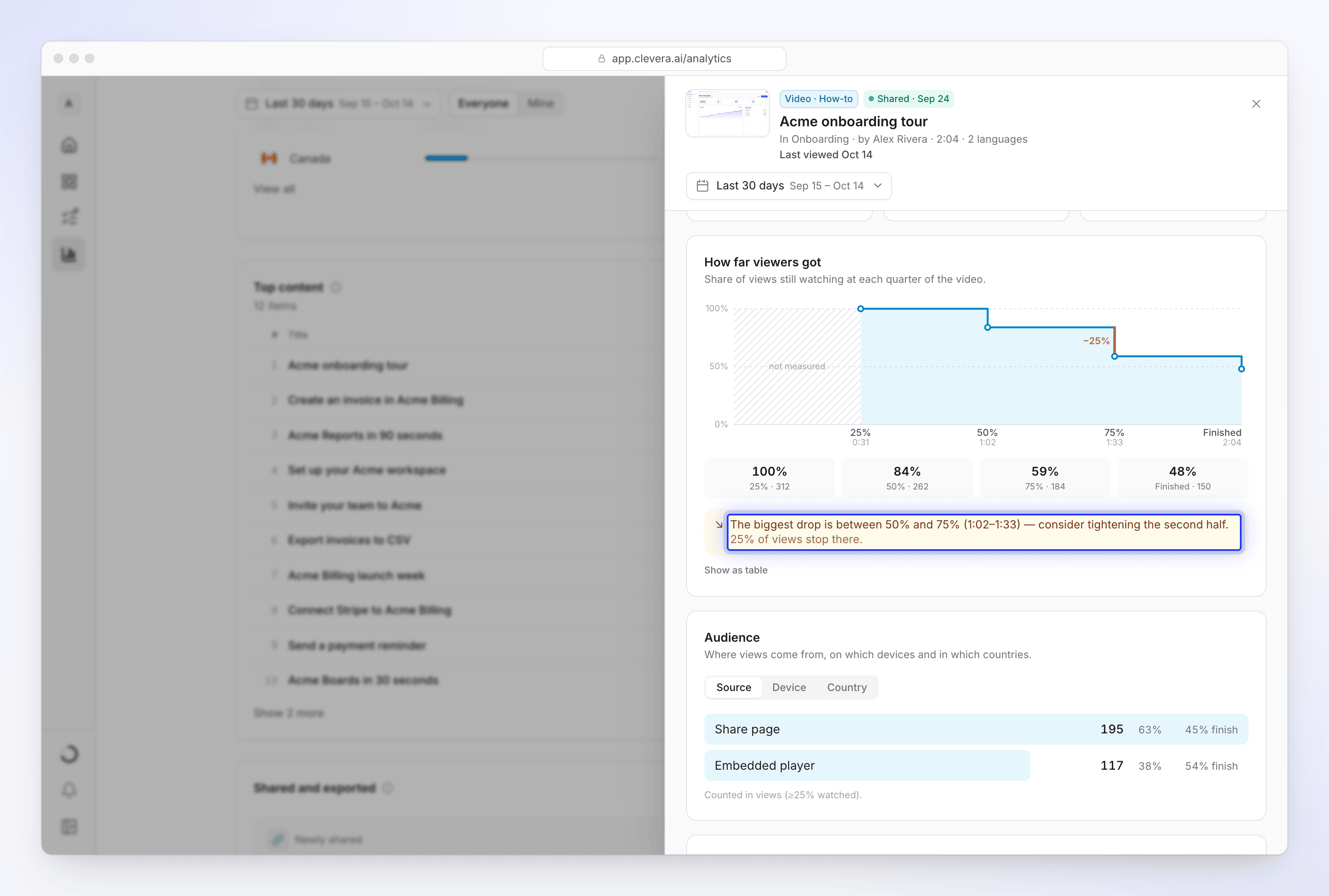
Times opened is not the same as views: it counts loads of the share page or embed, including people who never press play.
Troubleshooting
| What you see | Why |
|---|---|
| "No views yet. Share a video or embed it on your site, and views show up here once someone watches a quarter of it." | Nobody has watched 25% of a shared video yet. |
| Your own test plays don't appear | Plays from your team, or from a network your team signs in from, are left out on purpose. A private window on the same network still counts as your team. |
| Colleagues at a client's office don't show up | If someone on your team signed in to Clevera from that same network recently, its plays count as your team's. |
| A whole team watched but you see one view | They watched from the same network within 30 minutes, which counts once. |
| Views stop rising after a lot of plays from one place | Past 100 opens from one network in a day (UTC), further opens of that video don't count. |
| Views are lower than opens | Opens count page loads; views need 25% watched. |
| A social clip shows no views | It's watched on the platform you posted it to. Only its Clevera share page and embeds are tracked. |
| "We couldn't load your analytics." | Click Try again. |
Credit usage isn't on this page. See Check where your credits went.